Most classroom reward systems have exactly one layer. A student earns a point, the point goes on a chart, and that is the end of the story. That works for a week or two. Then the same three students keep winning, everyone else stops caring, and the reward that seemed motivating in week one is background noise by week five.
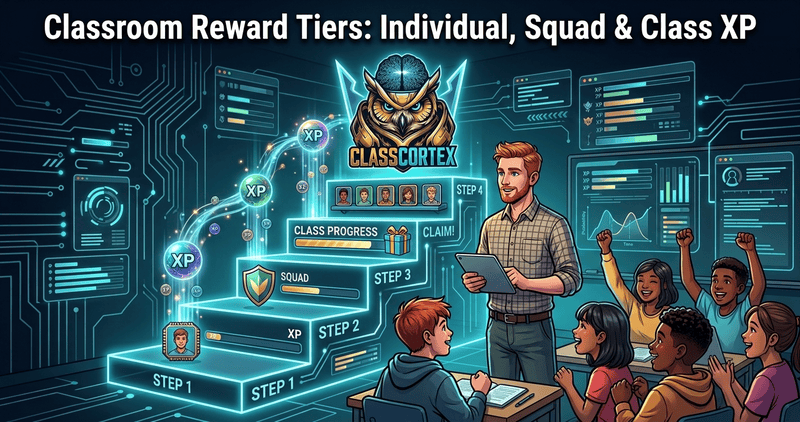
A better structure has tiers that connect: rewards for individuals, rewards for teams, and a shared reward for the whole class, with something personal for students to spend their own effort on. This guide explains how those tiers work in Class Cortex, a free classroom management dashboard with no student accounts, and how a single award flows through all of them.
Why One Layer of Rewards Is Never Enough
Behavioural research has looked at this for decades under the name group contingencies, where a reward depends on the behaviour of a group rather than only one student. A review of 50 school-based studies published between 1980 and 2010 concluded that all varieties of group contingency were effective across a wide range of behaviours with school-aged children. A later meta-analysis found that group contingencies are generally effective, particularly in general education classrooms.
The same literature carries a caution: group rewards can create peer pressure, especially when a whole class loses out because of one student's behaviour. That is a design problem, and it is why tiers matter. A system that only rewards the individual ignores teamwork, and a system that only rewards the whole class can feel unfair to the students trying hardest. Layering the two, and letting a shared target fill from everyone's contribution rather than an all-or-nothing rule, softens the trade-off.
Tier 1: Individual XP, an Individual Reward System for Students (Free)
The first tier is personal. In the Command Deck's Personnel list, every student has their own XP, and you award or deduct it with the plus and minus buttons, or use Commend All to give every student on the roster +10 at once. CC-Achieve badges (Teamwork, Focus, Math and others) grant an instant +50 XP bonus when you award them from the Achievements tab. XP never drops below zero, so a run of deductions cannot put a student in a hole.
The important detail is what happens next. Awarding individual XP does not stop at the student. The same amount is credited to that student's squad and to the class weekly total in one step, so a small personal recognition also moves the team and the class forward. For the full breakdown of how to award and what to reward, see our classroom XP system guide.
What it is best for
Recognising specific behaviour in the moment: a good answer, a kind act, a student who got started straight away. It is also the only tier that builds a student's own spendable balance, which matters for Tier 4.
Tier 2: Squad XP and the Squad Scoreboard
The second tier is the team. You choose how many squads each class has, from 2 to 6 (four by default), named in order from ALPHA through FOXTROT, and students are shuffled into them or dragged between them. Every squad has its own XP bar on the Command Deck, so the class can see the squad scoreboard change as students earn.
Squads collect XP two ways. Individual awards to a squad's members flow up automatically, and you can also award or deduct XP directly on a squad card, which credits the squad and the class total without crediting any individual student. That direct route is useful for team behaviour you want to recognise as a group, such as the squad that packed up fastest. Squad XP does not reset with the weekly counter, so the standings build across the term. Squad standings are not the same thing as the Tactical Scoreboard, which is a separate tool for head-to-head activities: two named teams, a match timer, round logs and an optional victory threshold. Use the Tactical Scoreboard for a one-off team game and the Command Deck squads for the term-long standings; the Scoreboard tutorial shows how it works. For strategy on assigning squads and keeping the same team from dominating, see our guide to using squad teams in the classroom, and for the points side, how to use team points that last all term.
Tier 3: Class XP, the Weekly Target and the Reward Gacha
The third tier is the whole class. Every class has three counters: Daily, Weekly and Total. Every XP award of any kind adds to them, and you set a Weekly XP Target for each class (1,000 by default, adjustable from 100 up to 50,000). A progress bar fills as the week goes on, and the moment the class reaches the target a toast and confetti mark it.
Reaching the target unlocks the Reward Gacha. Until then the DEPLOY REWARDS button is locked and shows how much XP is still needed. When it opens, clicking it cycles through a grid of 18 reward tiles and lands on one at random. You edit the tiles yourself (Popcorn Party, Extra Recess and Hat Day are among the defaults) or refill the grid from a built-in bank of ready-made rewards. These are real classroom prizes that you honour, not points. The app does not track redemption or limit how often the draw can be used while the target is met, so how often you spin it is a teacher decision.
Class-only XP sources
Some XP goes straight to the class and to no individual or squad. The noise monitor's Quiet Streak awards +10 XP for every 30 seconds the room stays quiet on the free tier, and on Pro, Noise Auto-Penalty deducts XP automatically when noise crosses the threshold. Most training games award +10 XP on completion, defeating a Boss Battle awards +100, and the Command Deck's +10, +50 and +100 buttons give the class a bonus directly. All of it counts toward the Weekly XP Target, so a quiet room, a good game and a boss victory all move the class closer to the prize draw. For more on the noise monitor, see our free classroom noise monitor guide.
The counters reset on a schedule: Daily at the start of each new day and Weekly at the start of each new calendar week, checked when the app loads and every minute while it stays open. That gives the target a natural weekly rhythm, and each counter also has a manual reset button if you want to start a fresh cycle. Because the target is one pooled total rather than an all-or-nothing rule, the class fills it together. For more reward ideas to put in those 18 tiles, see our classroom reward system ideas for secondary school.
Tier 4: The Personal Spend Layer, the Neural Core Economy
The fourth tier goes back to the individual, but as something to spend rather than just earn. Student avatars work as a real XP economy. The first row of the CORE category (10 avatars) is free for every student on every class, with no XP and no Pro required. Every other avatar costs XP: CORE's remaining three rows can be bought on any class, and the five Pro-only categories (Chassis, Retro, Profile, Orbital and Morale) need Pro to access at all, and every avatar inside them still costs XP on top of that.
Two details keep this honest. First, a student's spendable balance is their earned XP minus what they have already spent, and it is shown separately from their raw XP total. Second, only individual awards build that balance. Class-only XP, such as Quiet Streak, training games and boss victories, fills the Weekly Target but does not give any single student something to spend. Once bought, an avatar is owned permanently, even if the student's XP is later reset to zero. You set the prices yourself, per row and per class, so there is no fixed price list.
Supply Airdrop: Random Bonus XP at Any Level
The Supply Airdrop adds an element of surprise on top of the tiers. A crate icon in the navigation bar glows a few times a week, with the timing randomised per class so different periods do not all glow on the same day. Open it, let the class pick one of three sealed crates, and it flips to reveal the reward. An unclaimed drop stays live until you open it.
On the free tier the reward is flat bonus XP for the class, most often 10 and occasionally 50 or 100. Pro adds two more crates: an XP x2 window that lasts one hour and doubles every award made in that class, at every tier, and a Squad Airdrop that gives bonus XP to a random squad that is not currently leading, which keeps the squad race close.
Classroom Reward Tiers at a Glance
| Tier | Earned by | Credited to | What it does |
|---|---|---|---|
| Individual XP | Personnel +10 or -10, Commend All (+10 each), CC-Achieve badges (+50) | The student, their squad and the class weekly total | Builds the student's own spendable balance and personal standing |
| Squad XP | Squad +10 or -10, individual awards to squad members, Pro Squad Airdrop | The squad's XP bar (direct squad awards also count toward the class total) | Drives team competition on the Command Deck |
| Class XP | Any award, plus class-only sources: Quiet Streak, training games, Boss Battle victory, the class +10, +50 and +100 buttons | Class daily, weekly and total counters only | Fills the Weekly XP Target and unlocks the Reward Gacha prize draw |
| Personal spend | A student buys avatars with their earned XP | The student's spendable balance (earned minus spent) | Permanent avatar ownership; CORE's first row is free, everything else costs XP |
How One Award Travels Through the Tiers
Put the pieces together and a single tap does a lot of work. Say you award a student +10 for helping a classmate. That student gains 10, their squad's bar gains 10, and the class weekly total gains 10. If an XP x2 Airdrop is running, all three gain 20 instead. Use Commend All in a class of 28 and every student gains 10, each squad gains 10 for every member it holds, and the class weekly total gains 280 in one click.
Meanwhile the class-only sources are quietly filling the same weekly bar in the background: a stretch of quiet, a completed training game, a boss victory. By the end of the week the target is either met, unlocking the prize draw, or it is not, and the counter resets for a fresh start. The squads keep their standings, and students keep their balances to spend.
Setting the Tiers Up in Ten Minutes
- Pick the squad count: 2 to 6 squads per class. Four is the default and a good starting point for a class of around 28.
- Set the Weekly XP Target: run one normal week first, read the weekly total at the end, then set the target a little above it so the prize is achievable but not automatic.
- Write your 18 rewards: click any tile to edit it, or use the randomise button to refill from the built-in bank.
- Price the avatars: open the coin icon on the Achievements tab and set prices per row for the class.
For a full walkthrough of every screen, see the Command Deck tutorial. Everything runs in your browser with no student accounts, and the free tier covers one class of up to 30 students.
No student accounts. No credit card. No install.
Frequently Asked Questions
What are classroom reward tiers?
Classroom reward tiers are layers of rewards that connect: individual rewards for a single student, team rewards for a squad, and a shared reward for the whole class. In Class Cortex, individual XP, squad totals and the class Weekly XP Target feed each other, the Reward Gacha unlocks a class-wide prize draw when the target is reached, and the Neural Core Economy lets students spend their own earned XP on avatars.
Does individual XP also count toward squad and class totals?
Yes. When you award XP to a student, the same amount is credited to that student, to their squad's XP bar and to the class weekly total in one step. XP from class-level sources such as the Quiet Streak, training games and Boss Battle victories goes only to the class total, and awards made directly to a squad go to the squad and the class total but not to any individual student.
What happens when the class reaches the Weekly XP Target?
The DEPLOY REWARDS button on the Command Deck unlocks, and clicking it cycles through your 18 editable reward tiles and lands on one at random, with confetti. The rewards are real classroom prizes that you write yourself, such as Extra Recess or Hat Day, not XP. The app does not limit how many times it can be spun while weekly XP stays at or above the target, so you decide how often to use it.
Does weekly XP reset, and do squad totals reset with it?
The class Daily and Weekly XP counters reset automatically at the start of each new day and week, and each also has a manual reset button. Individual student XP and squad XP do not reset with them, so long-term standing and avatar balances carry on across weeks until you choose to reset them.
Is the Class Cortex reward tier system free, and do students need accounts?
The core system is free: individual XP, squads, the Weekly XP Target, the Reward Gacha and the first row of avatars cost nothing, and students never need accounts because all class data stays in your browser. Pro (AUD $49 per year) adds extras such as Noise Auto-Penalty, the XP x2 and Squad Airdrop rewards, and the five Pro avatar categories.
Further Reading