Command Deck is where every student's XP lives - Personnel management, Squad assignment, the Reward Gacha, the Airdrop crate, and the Neural Core avatar economy, all in one place.
If the Scoreboard is a one-activity tool, Command Deck is the opposite: it is where your class's persistent, term-long XP actually lives. It has four tabs - 01_GOALS, 02_SQUADRON, 03_PERSONNEL, and 04_ACHIEVEMENTS - and every student sits in the Personnel list with their own XP total, assigned to one of up to six Squadrons (you choose two to six per class). Everything else in this guide - the Reward Gacha, the Airdrop crate, CC-ACHIEVE badges, and the Neural Core Economy - draws from that same running total.
This guide covers Personnel management, Squad assignment, the Reward Gacha, the Airdrop crate, CC-ACHIEVE badges, and how the Neural Core avatar economy actually prices things.
What Command Deck Does
Load your roster from the Settings menu to deploy students onto Command Deck. Use the plus and minus buttons in the Personnel list to award or deduct individual XP - it syncs automatically to whichever Squadron that student belongs to. Drag a student's name tag between fuel cells in the Squadron tab to reassign them instantly, and use COMMEND FLEET to award +10 XP to every student on the roster in a single click.
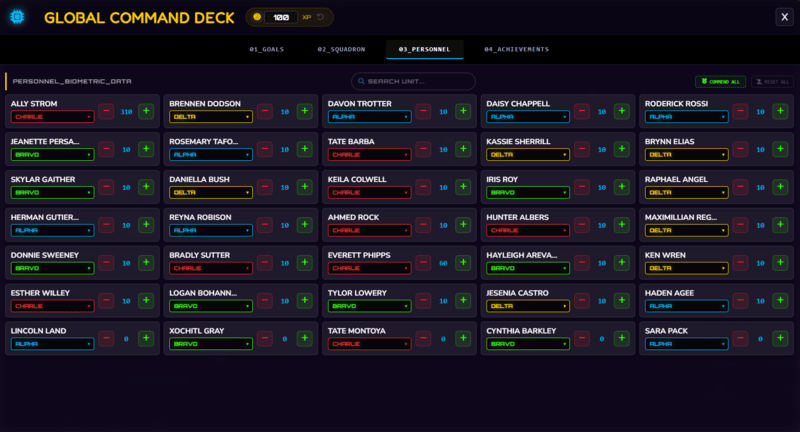
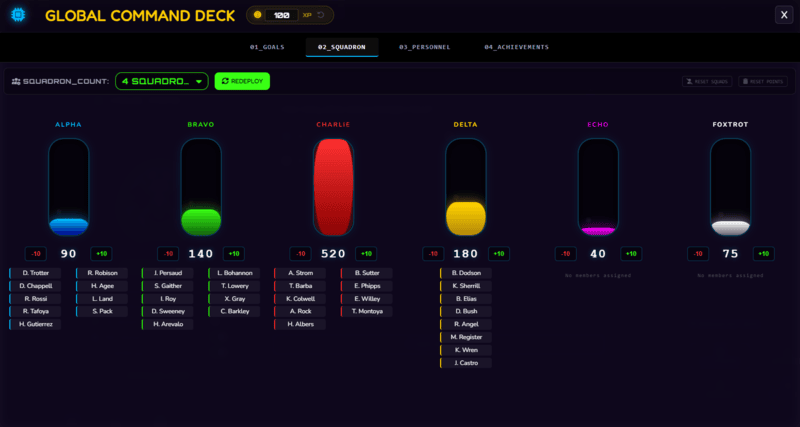
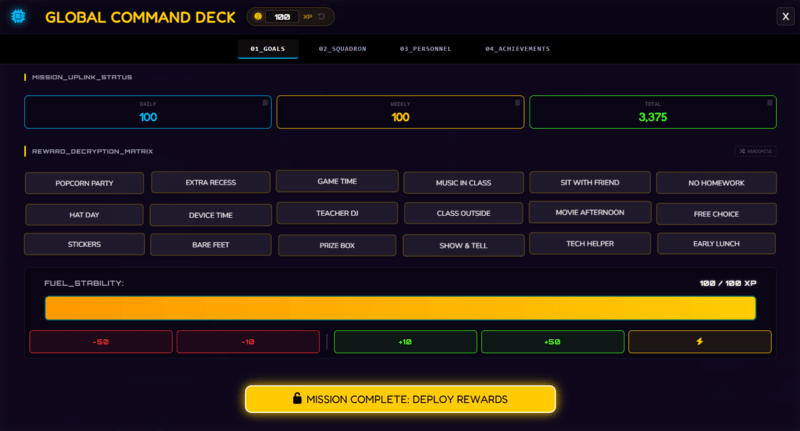
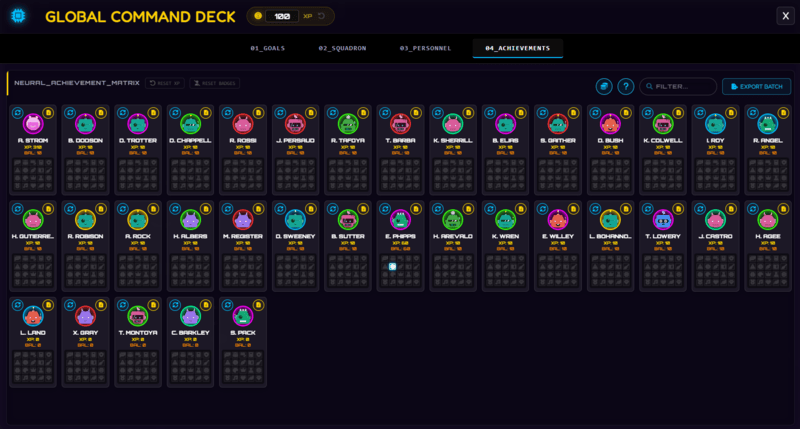
Set a Weekly XP Target, and once the class surpasses it, the Reward Gacha unlocks - click DEPLOY REWARDS to rapidly cycle through your custom reward grid and land on a randomly selected prize, with each grid box directly editable by clicking on it. The Airdrop crate icon next to the Command Deck pill glows a few times a week, at a randomised time per class, and clicking it while it glows lets the class pick one of three sealed crates for a reward. The 04_ACHIEVEMENTS tab is where CC-ACHIEVE badges live - a set of 20, with 10 free (Helper, Team, Spelling, Math, Bravery, Resilient, Focus, Writing, Reading, Clean) and 10 needing Pro (Logic, Art, Leader, Science, Tech, Athlete, Music, Kind, Nature, Elite). Every badge, regardless of tier, grants an instant +50 XP bonus the moment it is awarded.
How to Use Command Deck: Step by Step
Setting Command Deck up for a new class takes four steps.
- Load your roster
Go to Settings and load your student list to deploy them onto Command Deck's Personnel view.
- Assign students to Squadrons
Drag each student's name tag into a Squadron fuel cell in the Squadron tab - this is what powers squad-vs-squad competition on the main scoreboard.
- Set a Weekly XP Target and reward grid
Enter a target for the Reward Gacha to unlock at, and fill in your custom reward grid - click any box to edit its text directly.
- Set Neural Core Economy pricing
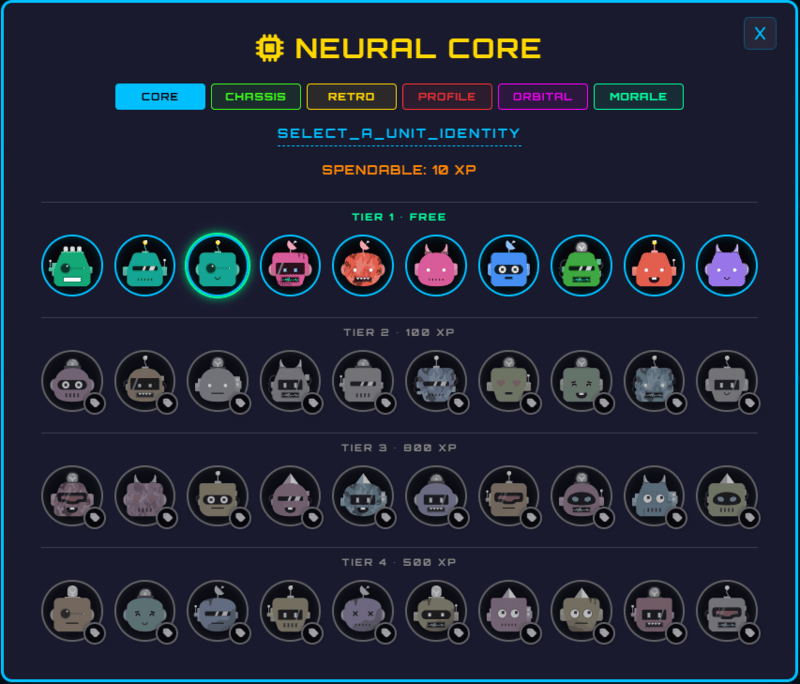
Click the coin icon next to the badge legend at the top of the Achievements tab to set avatar prices per row, per class. CORE and the five Pro categories share one price ladder by default, or you can customise a Pro category individually.
Classroom Use Cases
Command Deck is the hub most other features ultimately feed back into:
- Running ongoing squad competition all term, using the Weekly XP Target and Reward Gacha to give the class a recurring, visible goal to chase together.
- Rewarding individual effort quickly with COMMEND FLEET or the Personnel +/- buttons, without needing to run a separate activity first.
- Letting students spend XP on avatars through the Neural Core Economy, giving them a genuine reason to care about their XP total beyond just the number going up.
Badges Live Here, Not in Intel Archive
It is an easy mix-up to make since both deal with recognising students, but CC-ACHIEVE badges and Intel Archive are entirely separate parts of the app. Badges - and the +50 XP that comes with awarding one - live in Command Deck's own 04_ACHIEVEMENTS tab, covered above. Intel Archive (Settings > Intel) is a different system entirely: status tags and time-stamped notes, with no badges or XP involved at all. Separately, a student's spendable balance in the Neural Core avatar picker - what they can actually afford - is their total earned XP minus whatever they have already spent, shown in its own colour so it is never confused with the raw XP total. A full XP reset zeroes what a student can spend going forward, but never takes back an avatar or badge they already own.
How Command Deck Ties Into the XP Economy
Command Deck is the XP economy - Personnel XP, Squad totals, the Reward Gacha threshold, Airdrop rewards, CC-ACHIEVE badges, and Neural Core avatar purchases are all reading from and writing to the same underlying numbers. Every student's Rank is a direct readout of that number too - RECRUIT at 0 XP, SPECIALIST at 500, VANGUARD at 1500, SENTINEL at 3000, and COMMANDER at 5000. Click View Dossier on a student's Achievement card to see their Rank, XP, avatar, and badges laid out as a certificate - free to view, with a separate Pro-gated PDF export (single student, or EXPORT BATCH for the whole class) that is a different export entirely from Intel Archive's own UNIT/BATCH buttons. The free tier of the Neural Core Economy is genuinely free too: the first row of the CORE avatar category costs nothing for every student on every class, no XP or Pro required.
Everything beyond that first free row costs XP - CORE's remaining three rows, plus five Pro-only categories (Chassis, Retro, Profile, Orbital, Morale). Pro categories need Pro before their avatars can even be purchased with XP - there is no free row inside them, unlike CORE. The Airdrop crate adds a separate layer on top: flat bonus XP is Free-tier, while an XP x2 window and a Squad Airdrop (bonus XP to a random non-leading squad) are both Pro-only rewards.
Free vs Pro: What's the Difference?
Personnel management, Squad assignment, the Reward Gacha, flat-XP Airdrops, and CORE's free avatar row are all available on Free. Pro unlocks Copy Setup across classes, richer Airdrop rewards, and five entire avatar categories.
| Command Deck Capability | FREE | PRO |
|---|---|---|
| Personnel XP, Squadrons, Reward Gacha | Included | Included |
| CC-ACHIEVE badges (+50 XP each) | 10 of 20 badges | All 20 badges |
| Airdrop rewards & avatar categories | Flat XP Airdrop; CORE avatars only | Adds XP x2, Squad Airdrop & 5 Pro avatar categories |
No student accounts. No credit card. No install.
Frequently Asked Questions
Is Command Deck the same as the Scoreboard panel?
No. Command Deck is where persistent, term-long individual and Squad XP lives, while the Scoreboard is a separate, standalone two-team display used for a single activity like a PE match or quiz battle, with no connection to a student's ongoing XP total.
What is the difference between total XP and spendable balance?
Total XP is everything a student has ever earned. Spendable balance is that total minus whatever they have already spent on avatars in the Neural Core Economy, shown separately in its own colour so the two numbers are never confused.
Does resetting XP take back avatars a student already bought?
No. A full XP reset zeroes a student's spendable balance going forward, but any avatar they already purchased stays owned by them permanently, regardless of later resets.
Are CC-ACHIEVE badges and the Achievement Dossier the same thing as Intel Archive?
No - they are entirely separate systems that just happen to share some naming. CC-ACHIEVE badges and the Achievement Dossier (Rank, XP, avatar, badges, shown when you click View Dossier) both live in Command Deck's own 04_ACHIEVEMENTS tab; viewing a dossier is free, exporting it as a PDF needs Pro. Intel Archive is a different Settings tab entirely, built around status tags and logged notes, with its own separate UNIT/BATCH PDF export - see the Intel Archive guide for that one.
What does the Airdrop crate actually give, and is it different on Pro?
On Free, Airdrop rewards are flat bonus XP for the class. Pro adds two more possible rewards: an XP x2 multiplier window (1 hour, applies everywhere) and a Squad Airdrop, which gives bonus XP to a random squad that is not currently in the lead.
Further Reading