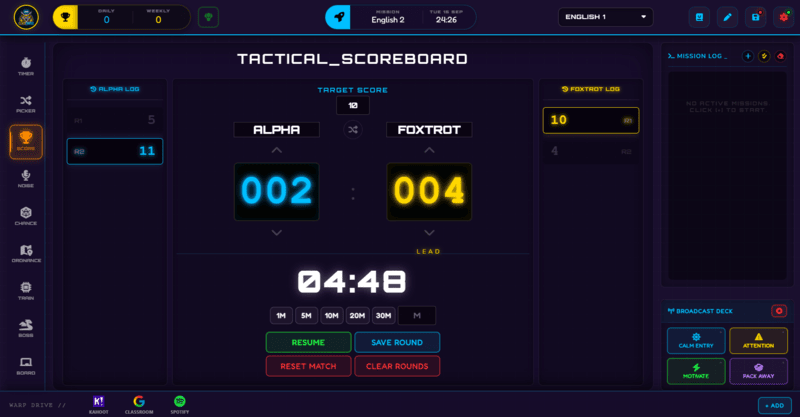
The Scoreboard is a dedicated two-team HOME vs AWAY display with its own match timer and win threshold, built for PE classes, quiz battles, and any head-to-head competition.
Not every activity fits neatly into individual XP - sometimes you just need a big, clear HOME vs AWAY scoreboard, the kind you would see courtside at a sports match, but running on your classroom screen. That is exactly what the Scoreboard panel is: two fully renameable teams, large 000-999 score displays, and its own built-in match timer, completely separate from the persistent XP and Squad system running elsewhere in Class Cortex.
This guide covers setting it up, running a match, and where it fits alongside the rest of the app.
What Scoreboard Does
Both teams default to HOME and AWAY but can be renamed to anything - class names, team names, subject groups, whatever suits the activity. Scores display in a large format with LEAD indicators showing which side is ahead, and can be adjusted with plus and minus buttons, a mouse wheel scroll, or a touch swipe gesture, whichever is fastest in the moment.
The built-in Match Timer has its own quick presets (1, 5, 10, 20, or 30 minutes) or a custom duration, started with a START button that becomes PAUSE while running and RESUME once paused - it runs independently of the main Timer panel, so you can have both going for different purposes if you need to.
How to Use Scoreboard: Step by Step
Getting a match running takes four steps.
- Rename the teams
Change HOME and AWAY to whatever fits your activity - team names, class groups, or subject labels.
- Set a victory threshold, if you want one
Enter a target score for automatic win detection, or leave it at infinity for a match with no automatic end point, just running score.
- Start the Match Timer
Pick a preset (1M, 5M, 10M, 20M, 30M) or a custom duration, then click START to begin the clock alongside the score tracking - the button becomes PAUSE while it runs, and RESUME once paused.
- Track and save the round
Adjust scores as the activity runs, then click SAVE ROUND to record the result to history - each team keeps its own log in the side panels, so you can look back on a series of rounds later.
Classroom Use Cases
The Scoreboard is built for head-to-head formats rather than ongoing individual tracking:
- PE lessons with a genuine team score to track - house competitions, small-sided games, or anything with a running tally that needs to be big and readable from across a gym or oval.
- Quiz battles where the whole class splits into two sides and competes on a running score, separate from any individual student's persistent XP.
- Any quick head-to-head activity where a fresh, on-theme name for each side and a match timer matter more than tracking who personally contributed what - the randomise-names button pulls two names from a themed pool (Phantom, Vortex, Nova, Titan, and others) in one click.
Scoreboard vs the Class XP System - Not the Same Thing
It is easy to assume the Scoreboard is where your class's persistent XP lives, since it is the most literal-looking scoreboard in the app - but it is not. Individual and squad XP is tracked through Command Deck instead, and carries across every lesson. The Scoreboard panel is a standalone, resettable two-team display for a single activity or match, with no connection to a student's ongoing XP total.
How Scoreboard Ties Into the XP Economy
The Scoreboard does not read from or write to the class XP economy at all - scores here are local to whatever match or activity you are running, and Save Round only stores them to this panel's own history, not to any student's record.
If you want a competitive activity to also affect persistent XP, that has to be done separately through Command Deck - for example, manually awarding the winning team's students a small XP bonus once the Scoreboard round is over. The two systems are intentionally kept apart so a single lost quiz round never dents a student's actual season-long XP total.
Free vs Pro: What's the Difference?
Every Scoreboard mechanic - both teams, the match timer, victory threshold, and round logs - is fully available on Free.
| Scoreboard Capability | FREE | PRO |
|---|---|---|
| Two-team scoring and Match Timer | Included | Included |
| Victory threshold and round logs | Included | Included |
| Number of class slots to run it in | 1 class | 12 classes |
No student accounts. No credit card. No install.
Frequently Asked Questions
Is the Scoreboard the same as the class XP total?
No. The Scoreboard is a standalone two-team display for a single activity or match, completely separate from the persistent individual and squad XP tracked through Command Deck. Scores here reset per activity rather than carrying across the term.
Can I rename the teams to something other than Home and Away?
Yes. Both team names are fully editable - use house names, class groups, subject teams, or anything else that fits the activity you are running.
Does the Match Timer replace the main Timer panel?
No, they are separate and run independently. The Scoreboard has its own built-in match timer with its own presets, so you can run a scored match with a clock without needing to also open the main Timer panel.
What happens when a team reaches the victory threshold?
If you have set a target score, reaching it triggers automatic win detection. If you would rather run continuous scoring with no automatic end point, leave the threshold at infinity.
Are round logs saved permanently?
Clicking Save Round records that match's result to the panel's own history, shown in each team's side log. This is separate from a student's individual XP history and is specific to the Scoreboard panel itself.
Further Reading