Training runs eight built-in mini-games directly inside Class Cortex, most of which award XP automatically the moment a student finishes.
Rather than sending students to a separate site or app for a quick game-based activity, Training keeps eight mini-games running natively inside Class Cortex itself - no extra tab, no separate login, no leaving the dashboard. Four are free, four are Pro, and most award XP automatically the instant a module is completed.
This guide covers all eight modules, how session tracking works, and the two Pro modules where XP has to be awarded manually rather than automatically.
What Training Does
The four free modules are DATA_BREACH, a typing challenge; SECTOR_MATH, number puzzles; MAINFRAME_HACK, pattern recognition; and CIPHER_PROTOCOL, code-breaking. The four Pro modules are SUB_LINK_ALPHA, letter sequences; MEMORY_UPLINK, memory recall; NEURAL_BINGO, pattern matching; and KINETIC_PULSE, reflex and reaction training.
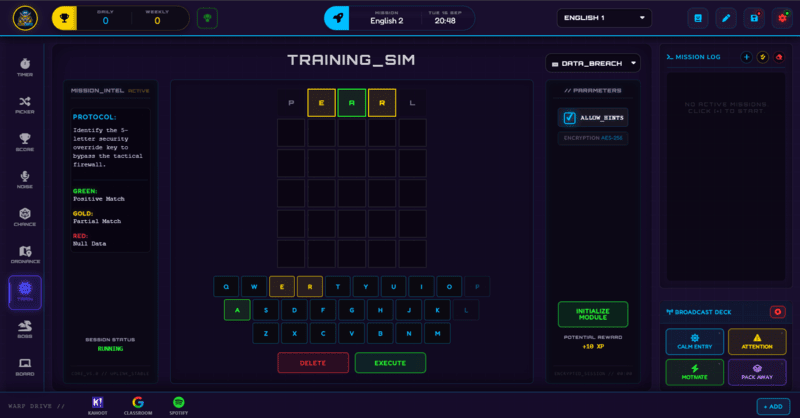
Each module opens in a central hologram viewport with its own keyboard dock for input, while the left panel shows mission intel and instructions and the right panel shows the module's parameters and an INITIALIZE MODULE button to start. Most modules award +10 XP automatically on completion - the two exceptions are Neural Bingo and Kinetic Pulse, where XP needs to be awarded manually since their completion state is not a simple pass or fail.
How to Use Training: Step by Step
Running a module takes four steps.
- Open the Training panel
The left panel shows the mission intel and instructions for whichever module is currently selected.
- Pick a module
Choose from the four free modules, or one of the four Pro modules if you have Pro - each one tests a different skill, from typing speed to pattern recognition to reflexes.
- Click Initialize Module
This starts the game in the central hologram viewport, with a keyboard dock appearing for whatever input the module needs.
- Check whether XP needs a manual award
Most modules award +10 XP automatically on completion. Neural Bingo and Kinetic Pulse are the two exceptions - award XP manually through Command Deck for those once a student finishes.
Classroom Use Cases
Training is well suited to short, self-contained bursts rather than a full-lesson activity:
- A fast-finisher activity for students who complete set work early, since each module is short and self-contained with no setup required from you.
- A brain-break between two longer activities, using something quick like Data Breach or Mainframe Hack to reset attention before moving on.
- A reward slot at the end of a lesson, where students who have earned enough XP get a few minutes on whichever module they prefer.
Two Modules Need a Manual XP Award
Neural Bingo and Kinetic Pulse are the only two Training modules where XP is not awarded automatically on completion - both are Pro modules, and both have a completion state that is not as clean a pass or fail as the other six, so the automatic award does not apply. If you are running either of these two specifically, remember to award XP manually through Command Deck once a student finishes.
How Training Ties Into the XP Economy
Six of the eight Training modules award +10 XP automatically the moment a student completes them, feeding straight into the same class-wide XP total tracked through Command Deck - no manual step required from you for those six.
The two exceptions, Neural Bingo and Kinetic Pulse, need that XP awarded manually instead, since their completion state is less clear-cut than a simple finish line. Either way, every module's XP lands in the same pool that Squads, Airdrops, and the Neural Core Economy all draw from.
Free vs Pro: What's the Difference?
Four modules - Data Breach, Sector Math, Mainframe Hack, and Cipher Protocol - are free. Pro adds four more: Sub Link Alpha, Memory Uplink, Neural Bingo, and Kinetic Pulse.
| Training Capability | FREE | PRO |
|---|---|---|
| Free modules | 4 (Data Breach, Sector Math, Mainframe Hack, Cipher Protocol) | Same 4 included |
| Pro modules | Not available | 4 more (Sub Link Alpha, Memory Uplink, Neural Bingo, Kinetic Pulse) |
| Automatic XP on completion | Included for free modules | Included, except Neural Bingo & Kinetic Pulse (manual) |
No student accounts. No credit card. No install.
Frequently Asked Questions
Do students need to leave Class Cortex to play these games?
No, all eight modules run natively inside the app in the central hologram viewport - there is no external site, login, or separate tab involved.
Which modules are free and which need Pro?
Data Breach, Sector Math, Mainframe Hack, and Cipher Protocol are free. Sub Link Alpha, Memory Uplink, Neural Bingo, and Kinetic Pulse are Pro-only.
Does completing a module always give XP automatically?
Most modules do - +10 XP is awarded the instant a student finishes. Neural Bingo and Kinetic Pulse are the two exceptions, where you need to award XP manually through Command Deck instead.
What skill does each module actually test?
Data Breach is a typing challenge, Sector Math covers number puzzles, Mainframe Hack is pattern recognition, and Cipher Protocol is code-breaking. On Pro, Sub Link Alpha covers letter sequences, Memory Uplink tests memory recall, Neural Bingo is pattern matching, and Kinetic Pulse tests reflexes and reaction time.
Can a whole class use Training at once, or is it one student at a time?
Training modules run on whichever device is displaying Class Cortex, so it works best as a rotation - one or a few students at a time on the main screen or a shared device, rather than every student in the class playing simultaneously on their own device the way a Boss Battle does.
Further Reading