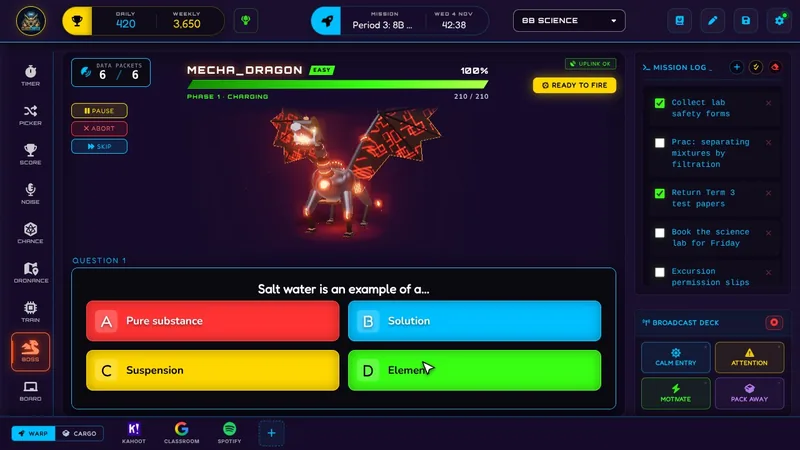
Boss Battle turns a multiple-choice quiz into a live, class-wide RPG fight - students join by QR code, answer on their own device, and correct answers deal real damage to the boss.
A normal multiple-choice quiz gets a class's attention for about five questions. Boss Battle keeps it for the whole set, because every correct answer is dealing visible damage to a boss on the main screen, and every wrong answer has a real cost. Students connect from their own device using a QR code or room code - no account, no app download, no email - and the whole thing runs peer-to-peer directly between your device and theirs.
This guide covers setup, connecting students, the three Pro roles, the 3D bosses, and what to do if students are not connecting on a school network.
What Boss Battle Does
Enter up to 5 questions on Free or 20 on Pro, each with 4 answer options. The system generates a room code and QR code automatically. Students go to classcortex.com/join, enter the code, and pick a cyber-name using the built-in randomiser before the battle starts.
Difficulty scales with how many questions you set: Easy for 3 or fewer, Medium for up to 7, Hard for up to 12, and Extreme for 13 or more. Boss HP scales with class size too, so the pacing feels consistent whether 15 or 30 students are connected. During combat you reveal each question on the main board, students tap an answer on their own device, and PAUSE freezes answers if you want to hold a discussion mid-question.
How to Use Boss Battle: Step by Step
Running a full Boss Battle takes four steps.
- Set up your questions
Enter up to 5 questions on Free or 20 on Pro, each with 4 options. The room code and QR code generate automatically once your questions are ready. Click VAULT to save the set for reuse later - see Payload Vault below.
- Get students connected
Students go to classcortex.com/join on their own device, enter the room code (or scan the QR), and pick a cyber-name using the randomiser.
- Assign roles, if you are running Pro
Enable Role Selection to auto-assign Attacker, Defender, or Support evenly as students join - they cannot pick their own role, which keeps the mix balanced without you managing it manually.
- Run combat and acquire target
Reveal each question on the main board, let students answer on their device, then click ACQUIRE TARGET. The system calculates class accuracy automatically - 100% triggers a Critical Hit, 0% triggers a miss. Once the boss is defeated, open Post-Battle Analytics (Pro) for a full breakdown of class accuracy, critical hits, and streaks from that battle.
Payload Vault: Save a Question Set Once, Reuse It Anywhere
Building the same 15-question review set from scratch for every class period gets old fast. Payload Vault fixes that: click VAULT next to Add Question on the setup screen, type a name, and save whatever is currently in your question list. Unlike everything else in Boss Battle, saved sets are not tied to one class - save it once in Period 1 and load it straight into Period 4 without re-entering a single question.
Loading a saved set replaces whatever is currently in your question list, so it always asks you to confirm first. Saving a name that already exists offers to overwrite it instead of creating a duplicate. Free accounts get 1 saved set; Pro gets 10. This is a separate limit from the 5-or-20 question cap on an individual battle - a Pro-saved 18-question set still loads in full on a Pro account, but trims down to the first 5 questions if loaded on a Free account, without changing what is actually saved.
3D Bosses: What the Class Sees on the Main Screen
On a device that can draw it smoothly, the boss is a live 3D model. It makes an entrance when the battle starts, taunts between questions, braces once every student has answered, recoils from each hit with the damage number on screen and flashes gold on a Critical Hit. A counter-attack gets its own signature strike, the boss cracks below 60% HP and enrages below 30%, and once defeated it plays its death and stays down. Older or slower hardware shows the original 2D artwork instead, and the battle itself plays exactly the same either way.
The two free bosses are 3D on every plan, and the four Pro bosses are 3D while Pro is active. The setting is in Settings > Themes > 3D BOSSES. AUTO, the default, checks the device once (and again every 14 days) and only uses 3D if it runs smoothly, stepping down to a lighter 3D and then to 2D if a battle still runs slow. ON uses 3D whenever the browser can draw it, and OFF always shows 2D. Performance Mode shows every boss in 2D, and with reduce motion turned on in the device or browser, the 3D boss stays but holds still.
The 3D bosses load from Class Cortex itself in the background and draw entirely on your device, so nothing extra goes online and no student data is involved. If you expected 3D and see the 2D boss, the line under 3D BOSSES says why, and the Cortex Codex (the in-app guide) lists each message with its fix.
Classroom Use Cases
Boss Battle works anywhere you would normally run a review quiz, but the format changes what it feels like:
- End-of-topic review, where the stakes of a boss fight keep engagement high through a full set of questions instead of trailing off after the first few.
- A hook activity at the start of a new topic or the first lesson of term, using a shorter Easy or Medium difficulty set to introduce the format without overwhelming students who have not played before.
- Exam or assessment revision with the full 20-question Pro set at Extreme difficulty, giving genuine coverage of a topic rather than a quick five-question check.
- Running the same review topic across multiple class periods in one day - save the question set to Payload Vault after building it once, then load it in each subsequent period instead of re-entering it.
Students Not Appearing in the Lobby? It Is Almost Always the Network
Boss Battle connects student devices directly to yours over Wi-Fi using peer-to-peer technology, with no external server required. If students are not showing up in the lobby, this is almost always a school network firewall blocking that direct connection, not a device or app problem. Ask your IT department to allow UDP ports 3478 and 5349 on the school Wi-Fi - this resolves it in most cases. If it works fine at home but not at school, that is the same cause. If some students connect and others do not, check whether the affected devices are on a different network segment or VLAN.
How Boss Battle Ties Into the XP Economy
Defeating the boss awards a large XP bonus to the class, on top of whatever the individual roles contribute along the way. On Pro, Role Selection adds a layer of strategy: Attacker deals bonus damage scaled to class size on a correct answer but heals the boss slightly on a wrong one, Defender contributes passive damage every round and reduces boss counter-attacks when accuracy drops below 50%, and Support protects the class's answer streak once per run.
Because HP scales with class size, a small class and a large one both get a battle that takes roughly the same number of rounds to resolve - so the XP payout for winning feels proportionate regardless of how many students are actually connected that lesson. On Pro, Post-Battle Analytics turns that single result into a reviewable record afterward, breaking down class accuracy, critical hits, and answer streaks so you can see which questions actually gave the class trouble.
Free vs Pro: What's the Difference?
A full Boss Battle - QR join, damage mechanics, difficulty scaling - runs on Free. Pro extends the question count and adds the three-role system.
| Boss Battle Capability | FREE | PRO |
|---|---|---|
| Question count | Up to 5 | Up to 20 |
| Saved question sets (Payload Vault) | 1 saved set | 10 saved sets |
| Attacker / Defender / Support roles | Not available | Included |
| Boss types & Post-Battle Analytics | 2 boss types, no analytics | 6 boss types + analytics |
No student accounts. No credit card. No install.
Frequently Asked Questions
What are the Attacker, Defender, and Support roles?
These are Pro-only roles auto-assigned evenly as students join. Attacker deals bonus damage on a correct answer but heals the boss slightly on a wrong one. Defender contributes steady passive damage every round and reduces boss counter-attacks when class accuracy drops below 50%. Support protects the class's answer streak once per streak run.
Why are my students not showing up in the lobby?
This is almost always a school network firewall blocking the direct peer-to-peer connection Boss Battle uses. Ask IT to allow UDP ports 3478 and 5349 on the school Wi-Fi - this fixes the issue in most cases, especially if it works fine at home but not at school.
How is difficulty determined?
Difficulty is based on how many questions you set: Easy for 3 or fewer, Medium for up to 7, Hard for up to 12, and Extreme for 13 or more. Boss HP also scales with class size so the pacing stays consistent regardless of how many students are connected.
How many questions can I set on Free versus Pro?
Up to 5 questions on Free, and up to 20 on Pro - each question has 4 answer options either way.
What is Post-Battle Analytics?
It is a Pro-only summary that opens once a boss is defeated (or a battle ends), showing class accuracy, critical hits, and answer streaks from that battle. On Free, opening it shows an upgrade prompt instead of the breakdown.
Can I save my questions and reuse them in another class?
Yes, with Payload Vault. Click VAULT next to Add Question, name the set, and save it - it is not tied to one class, so you can load it into any class period afterward instead of re-entering the questions. Free accounts get 1 saved set; Pro gets 10.
Further Reading