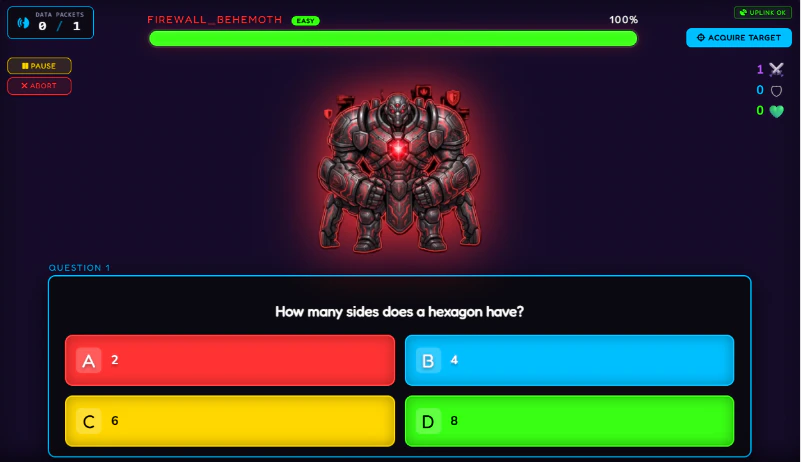
A classroom Boss Battle is a live multiplayer quiz where the whole class answers questions on their own devices to drain a boss's HP bar. Students join by QR code with no accounts or app. The class's combined accuracy decides each hit, and defeating the boss earns class XP. Run it weekly, earned by hitting the XP goal.
The first time a class runs a Boss Battle, something shifts. Students who were passively copying notes ten minutes earlier are now leaning forward, watching the boss HP bar, calculating whether their squad can land the killing blow before the timer runs out. The noise monitor is redundant because nobody is talking about anything except the question on the board.
That level of engagement does not happen by accident. It happens because the Boss Battle is structured correctly: it is earned rather than given, the stakes are real, every student has a role, and the questions connect directly to what the class has been learning. Get those four things right and you have an activity that students will reference for the rest of the year.
This guide covers everything you need to run it well. If you have not yet set up the XP system that makes the Boss Battle meaningful, read our guide on how to use XP in the classroom first - the two work together, and the Boss Battle without an XP economy behind it loses most of its motivational power.
What a Boss Battle Actually Is
A Boss Battle is a live multiplayer quiz activity where the whole class works together to defeat a boss character by answering questions correctly. Students join on their own devices by scanning a QR code displayed on the teacher's screen. No app, no account, no login. They enter their name, select their squad, and they are in.
The teacher reveals questions one at a time on the main display. Students submit answers on their own devices. Correct answers deal damage to the boss. The class's combined accuracy decides each hit: 100% is a Critical Hit, 0% is a miss. The session ends when the boss is defeated or the questions run out, and defeating the boss awards +100 XP to the class total. The boss has a visible HP bar on the main display that the whole class watches move in real time.
In Class Cortex, the Boss Battle runs via PeerJS WebRTC - a direct peer-to-peer connection between the teacher's device and every student device in the room. No server processes the answers, which means there is no latency, no login wall, and no data leaving the classroom. Students join at classcortex.com/join and the whole setup process for a full class takes under two minutes.
The five steps below summarise how to run a Boss Battle that students genuinely work all week to earn.
| Step | What to do | Key detail |
|---|---|---|
| 1. Tie it to the weekly XP goal | Run on Friday if goal hit | Earned, never given |
| 2. Design the questions | Short, unambiguous, recall-based | No trick questions |
| 3. Run the join process | Show QR code and squad list | Timer as hard cutoff |
| 4. Manage the session | Pace and narrate the HP bar | 60 to 90 seconds per question |
| 5. Close and connect to XP | Link the result to the week | Loss never feels like punishment |
Step 1 - Tie It to the Weekly XP Goal
The single most important structural decision about Boss Battles is this: they must be earned, not given. The correct cadence is once per week, on Friday, and only if the class hit the weekly XP goal.
This matters for two reasons. First, a Boss Battle that happens regardless of what the class does loses its reward status within two weeks. Students quickly learn that effort is not connected to the outcome, and the motivational pull disappears. Second, tying the Boss Battle to the weekly XP goal makes every other lesson in the week meaningful - Tuesday's questioning session, Wednesday's Training Sim game, and Thursday's timed task all feed into Friday's reward. That is a full week of sustained engagement driven by a single incentive structure.
Announce the weekly goal on Monday morning. Write it on the board. Make it visible in Class Cortex so the progress bar is on the main display throughout the week. When the class hits the goal - make a moment of it. The anticipation of Friday's Boss Battle is part of the mechanism, and students who have been watching the XP bar all week arrive at Friday's session already invested.
Before the session - checklist
- Questions prepared in advance - the free tier allows up to five questions per battle and Pro up to twenty. On Pro, aim for ten to fifteen: more than fifteen and energy drops in the final third, while fewer than ten feels over before momentum builds. On the free tier, five sharp questions make a tight starter or plenary.
- Boss type selected - Class Cortex has multiple boss types with different HP values and damage mechanics. Match the boss difficulty to where the class is in the term - easier bosses early, harder bosses as the system matures.
- QR code ready to display - open Class Cortex on the teacher device, navigate to Boss Battle, and have the join QR code ready before students enter the room.
- Roles assigned if using Pro - Attacker, Defender, and Support roles add strategic depth. Assign them before the session rather than during it to avoid losing time to argument.
- Timer mode decision made - Pro users can enable a per-question timer. Decide in advance whether you are using it and what the time limit is. Announce it to the class before the first question.
Step 2 - Design Questions That Work in This Format
Boss Battle question design is different from written assessment design. The format rewards speed and clarity. A question that works brilliantly on a test paper can completely stall a live multiplayer session if it requires more than thirty seconds to process.
The questions that work best are short, unambiguous, and answerable from recall or quick application. Multiple choice, true or false, single-word answers, and short numeric answers are all well-suited to the format. Open-ended questions requiring explanation do not work - not because they are bad questions, but because the live format cannot accommodate extended written responses without breaking the session's pace.
Question design principles
- Review content from the current week first - start with questions students should be able to answer confidently. Early wins build momentum and keep the boss HP bar moving. A session that stalls in the first three questions loses the room.
- Increase difficulty progressively - the final three to five questions should be genuinely challenging. The boss should still be alive at this point and students should feel the pressure of the HP race.
- Avoid trick questions entirely - Boss Battles are not the right context for gotcha questions. Students who feel deceived by a question turn against the activity faster than anything else. Keep questions fair and unambiguous.
- Mix topics if the class is doing consolidation - a mixed-topic Boss Battle works well at the end of a unit or before an assessment. Students experience it as revision but the engagement level is entirely different from a worksheet.
- Keep answer formats consistent within a session - do not mix free-text answers with multiple choice in the same session unless you have announced it. Switching format mid-session breaks the rhythm.
Step 3 - Run the Join Process Smoothly
The join process is the moment where Boss Battles can lose time if it is not managed deliberately. Thirty students all trying to connect at once, selecting the wrong squad, or typing their name incorrectly can eat five minutes of the session window.
Three things prevent this. First, display the QR code on the main screen before you say a word about the session - students who arrive and see the code will start joining immediately without being told. Second, have the squad list visible next to the QR code so students know which squad to select before they open the join screen. Third, set a hard cutoff: "Everyone needs to be joined by the time this timer hits zero." Use the Arc timer running alongside the join screen for this.
Once students are joined, you can see all connected devices on your teacher screen. Do a quick squad count to confirm everyone is in the right team before starting. The first question does not go up until the count is right. This takes thirty seconds and prevents the chaos of students trying to rejoin mid-session. For every click from creating the boss to connecting students on a school network, follow our step-by-step Boss Battle setup guide.
Step 4 - Manage the Session in Real Time
Once the session starts, your primary job is pacing. Reveal the question, give students time to read and answer, close the answer window, show the result, and move to the next question. The whole cycle for a standard question should take sixty to ninety seconds. Faster than sixty seconds and students who are thinking carefully get cut off. Slower than ninety seconds and the energy drops between questions.
Narrate the HP bar. When the boss takes a big hit from a wave of correct answers, call it out. "ALPHA and DELTA just took fifty HP off - boss is at forty percent." That commentary is not incidental - it is the mechanism that keeps the emotional stakes visible in the room. Students who are watching the HP bar and hearing live commentary are in the session in a way that a silent scoreboard cannot achieve.
When a round lands weakly because accuracy was low, treat it the same way. "Barely scratched it - boss still on sixty percent. Three questions left." The threat of losing should feel real without feeling punitive. The tone is sports commentary, not classroom discipline.
Using roles effectively (Pro)
If you are running with Pro roles enabled, the role assignment changes the social dynamic of the session significantly. A few notes on making roles work:
- Attacker - assign to a student who is highly engaged and competitive. Attackers deal bonus damage on correct answers, but a wrong answer heals the boss a small amount - so there are genuine stakes attached to their performance. It rewards speed and accuracy and gives your most competitive students a sanctioned outlet for that energy.
- Defender - assign to a student who is engaged but may not be the fastest answerer. Defenders contribute passive bonus damage every round regardless of individual accuracy, which makes it a good fit for students who disengage when they feel outpaced by peers. They always feel useful.
- Support - works best assigned to a student who is reliable and consistent. The Support role protects the answer streak through one imperfect round, once per streak, which makes them a positive force in the session regardless of individual performance on any given question.
- Rotate roles each week so no student is permanently cast in the same position. Fixed roles become social labels within three sessions.
Step 5 - Close the Session and Connect It Back to XP
How you close the Boss Battle matters as much as how you run it. A session that ends with "okay that was fun, pack up" misses the opportunity to reinforce the XP system that made the session possible.
Whether the class wins or loses, acknowledge what happened in terms of the XP economy. If they won: "You hit the weekly goal, earned the Battle, and defeated the boss. That XP carry-over goes into next week's starting total - you are already ahead." If they lost: "Boss survived but you earned the shot at it. Same deal next week - hit the goal and we run it again." The loss should never feel like punishment, and the win should always feel connected to the week of effort that earned it.
In Class Cortex, the XP system persists between sessions automatically via browser localStorage. The scoreboard is exactly where you left it on Monday morning. Students who were watching the weekly progress bar all week will open the app on Monday and immediately see where their squad stands. That continuity is what transforms a one-off activity into a classroom culture over a full term.
Cadence and Sustainability Across a Term
The Boss Battle system sustains itself when the cadence is right. Once a week, earned by hitting the XP goal, run on Friday with varying boss types and difficulty. That structure is the right one for most secondary classrooms for a full term.
Two things to vary to prevent it becoming predictable. First, rotate the boss type. Class Cortex includes multiple boss types with different HP values, damage mechanics, and visual presentation. Using the same boss every week removes the novelty faster than any other factor. Second, occasionally adjust the question format - a session that is entirely multiple choice followed by a session that is entirely true or false followed by a mixed session keeps the format feeling fresh even when the cadence is consistent.
For the broader gamification system that makes Boss Battles meaningful week over week, read our full guide on how to gamify your classroom without losing control. The Boss Battle is the most visible part of the system, but the XP economy, squad competition, and noise monitor are what give it stakes. All four pieces together is what makes the culture sustainable rather than a novelty that fades by week five.
No student accounts. No credit card. No install.
Frequently Asked Questions
What is a Boss Battle in the classroom?
A classroom Boss Battle is a live multiplayer quiz game where the whole class works together to defeat a boss character by answering questions correctly on their own devices. Students join via QR code at classcortex.com/join with no accounts required. Correct answers deal damage to the boss, the class's combined accuracy decides how hard each hit lands, and the session plays out in real time on the main display. It is best used as a weekly reward tied to the class XP goal.
How do students join a Boss Battle without accounts?
Students scan the QR code on the teacher's main display, which takes them to classcortex.com/join. They enter their name, select their squad, and are immediately connected to the live session. No app download, no account creation, and no login is required at any point. The entire join process for a full class takes under two minutes when managed with a visible timer and squad list on the main display.
What types of questions work best in a Boss Battle?
Short, unambiguous questions answerable in under thirty seconds work best. Multiple choice, true or false, single-word answers, and short numeric answers are all well-suited to the format. Start with questions students should answer confidently to build early momentum, then increase difficulty progressively so the boss is still alive in the final third of the session. Avoid trick questions and open-ended responses that require extended writing.
How often should you run a Boss Battle?
Once per week maximum, and only when the class earns it by hitting the weekly XP goal. Running Boss Battles more frequently removes their reward status within a fortnight. Tying access to the weekly XP goal means every lesson in the week feeds into Friday's reward, which sustains engagement across the full week rather than just during the Battle itself. If the class misses the goal, no Battle that week - the consequence is the mechanism.
What are boss roles in Class Cortex?
Boss roles are a Pro feature that assigns special abilities to individual students during the Battle. Attacker deals bonus damage on correct answers (a wrong answer heals the boss a small amount), Defender contributes passive bonus damage every round regardless of accuracy, and Support protects the answer streak through one imperfect round, once per streak. Roles add strategic depth and give students a personalised stake in the outcome. Roles are assigned automatically as students join, so a different join order each week naturally rotates who plays which role.
Further Reading