There is a common misconception among educators that "gamification" simply means playing games in class. It conjures images of students shouting over a Kahoot leaderboard while the teacher desperately tries to regain control of the room.
True gamified classroom management is something fundamentally different. It is a structural overlay - a set of persistent game mechanics that run in the background of every lesson, reinforcing the behaviours you actually want to see. When implemented correctly, particularly in Years 5 through 10, it creates a self-regulating classroom environment where students actively manage their own engagement, not because you told them to, but because the system makes it worth their while.
This guide gives you a practical, step-by-step framework for building that system - from establishing your first XP economy through to running Boss Battles that your students will talk about for the rest of the term.
What Is Gamified Classroom Management?
Gamified classroom management is the deliberate application of game mechanics - XP points, HP, squads, achievement badges, leaderboards, and challenge events - as a layer on top of your normal classroom routines. It is not about replacing teaching with games. It is about giving the invisible social dynamics of your classroom a visible, structured form that students can understand, respond to, and invest in.
The core insight is simple: students already operate within social hierarchies, peer pressure, and status games. Gamification makes those dynamics explicit and redirects them toward productive outcomes. The student who was showing off for their friends is now showing off by earning XP for their squad. The class that was getting noisy during independent work is now defending a silence streak because losing it would cost them 50 XP.
The mechanics do the management. You do the teaching.
Does Classroom Gamification Actually Work?
The research answer is: yes, when the mechanics are tied directly to real classroom behaviours rather than isolated quiz performance. Studies on game-based learning consistently show improvements in student motivation, on-task behaviour, and voluntary participation when gamification is implemented with consistency and clear rules.
The practitioner answer, from 14 years in K-12 classrooms, is more specific: it works when you automate the enforcement. The single most common reason gamification systems collapse in classrooms is teacher fatigue. If you have to manually award every XP point and personally intervene every time the class gets too loud, the system becomes more work than traditional management - and teachers abandon it within two weeks.
The solution is to build a system where the mechanics enforce themselves.
Step 1: Establish Your XP Economy
Before you introduce Boss Battles, avatars, or any visible game elements, you need a currency. Experience Points (XP) are the gold standard for gamified classroom management because students intuitively understand the concept from video games - XP accumulates, unlocks things, and represents progress.
The critical rule is consistency. If XP is handed out randomly or based on your mood, it loses its economic value within days. You need a published rate card that students can predict and plan around.
A simple starting framework:
- +10 XP - Entire class seated and on task at the bell
- +15 XP - Full class submission of an assigned task
- +20 XP - 10-minute Quiet Streak during independent work
- +25 XP - Squad wins a training mini-game
- -15 XP - Class noise exceeds threshold (automated)
- -10 XP - Task not submitted by deadline
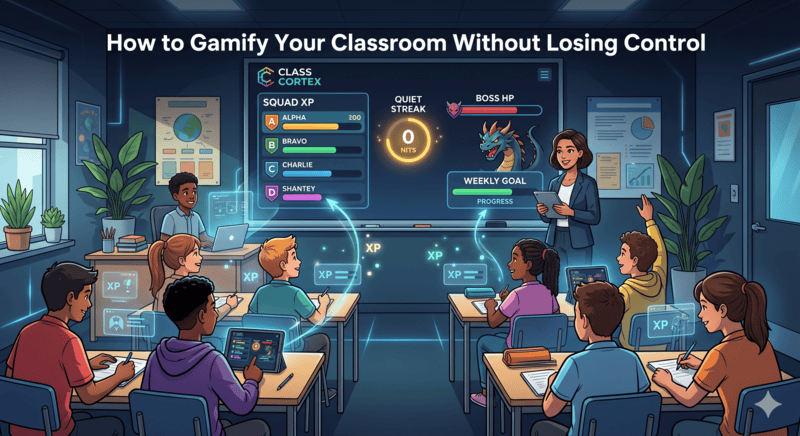
Set a Weekly XP Goal and display it on your board. In Class Cortex, the Tactical Scoreboard shows the live class total against the weekly target at all times. Tell your class on Monday: "If we hit 400 XP by Friday, we run a Boss Battle last period." Suddenly arriving on time, staying quiet during work time, and completing tasks all have collective, tangible value - and the students are tracking it themselves.
Pro-Tip: Leverage Squad Dynamics
Never track individual XP only. Group your students into Squads - in Class Cortex these are ALPHA through FOXTROT - and give each squad its own XP bar on the scoreboard. Peer accountability is the single most powerful behavioural force in a secondary classroom. When a student knows their off-task behaviour is costing their squad the weekly reward, they are dramatically more likely to self-correct - without you having to say a word. Their squadmates will say it for you.
Keep squads at 4-6 students and reshuffle them each term to prevent permanent social stratification.
Step 2: Automate Your Boundaries
Gamification fails when the teacher becomes a scorekeeper. If you have to stop teaching every five minutes to award or deduct points, you have added workload without adding value. The game needs to run itself while you run the lesson.
The most effective mechanism for automated classroom management is a noise monitor with automatic XP consequence. Rather than shushing the room, you set a decibel threshold calibrated to your room's baseline. When the class exceeds it, the system fires - a visual alert on your board, an audio cue, and on Pro, an immediate automatic XP deduction that every student can see.
The psychological shift this creates is significant. The consequence is no longer personal - it is not "the teacher is angry." It is systemic - "the class lost XP." You remain neutral. The game is the enforcer. This dramatically reduces the emotional charge of discipline incidents, particularly with students who have difficult relationships with authority.
Class Cortex's Sonic Defence Engine handles this automatically once calibrated. The Pro tier enables full Noise Auto-Penalty mode, which operates continuously in the background without any teacher interaction required. There is also a Quiet Streak tracker on the flip side - every 30 seconds below the threshold earns the class bonus XP. Students actively compete to keep the streak alive during independent work. A Year 9 class defending a 12-minute silence streak is one of the most remarkable things you will see in secondary education.
Step 3: Use Boss Battles as the Reward, Not the Routine
A Boss Battle is a high-energy, multiplayer classroom event. Students join from their own devices via QR code, you reveal a curriculum question on your board, and the class has to answer correctly to deal damage to the boss - and the class's combined accuracy decides how hard each hit lands. It is the most engaging fifteen minutes in any lesson.
The mistake most teachers make is running Boss Battles too frequently. If you do them every lesson, three things happen: the novelty evaporates, the energy levels exhaust both you and the class, and - crucially - they lose their function as a reward for the XP economy you have built all week.
The correct cadence for most classes is once per week, maximum twice. Reserve them for the final period on Friday, or as the payoff at the end of a difficult unit. Build the anticipation all week through the XP system. When you finally project the boss on the smartboard and students realise they have thirty minutes to defeat it using questions from the unit you just finished, you will see a level of focused, voluntary engagement that is almost impossible to achieve through any other method.
In Class Cortex, Boss Battles support up to 30 simultaneous students, run entirely through the browser with no student accounts, and include Pro features like role assignment (Attacker, Defender, Support), timer mode, and streak bonuses. If you are coming from ClassCraft and looking for a direct replacement, read our full ClassCraft alternatives guide.
Step 4: Gamify Quiet Work Time
One of the least obvious applications of gamification - and one of the most powerful - is applying it to the periods of a lesson that should be silent. Independent reading. Essay drafts. Exam practice. These are the moments where a secondary class is most likely to fragment.
The Quiet Streak mechanic flips the psychology entirely. Instead of silence being a punishment or an absence of stimulation, it becomes a cooperative challenge with a visible reward. Display the streak timer on your board. Award XP at each milestone - 5 minutes, 10 minutes, 15 minutes. Watch the class regulate itself. Students will glare at the one person who breaks the streak far more effectively than any teacher intervention.
Step 5: Assign Achievement Badges for Milestones
Long-term engagement in any gamification system depends on the sense of individual progress beyond the weekly reset. XP goals are great week-to-week, but students also need to feel that they are building toward something personal.
CC-Achieve badges in Class Cortex serve this function - milestone badges awarded automatically when individual students or squads reach cumulative XP thresholds. These are displayed on the scoreboard permanently. They provide a recognition layer that rewards consistent engagement over the long term, not just this week's performance. For students who struggle with academic achievement, being the first in the class to unlock a badge can be a meaningful moment of visible success.
The Neural Core Economy gives that "building toward something personal" idea an actual destination: students spend their own banked XP unlocking avatars in the Achievements tab, rather than just watching a badge count go up. A first tier is free for everyone, everything past it costs XP, and whatever a student buys stays theirs for good even through an XP reset - so the sense of individual ownership survives the weekly cycle in a way a pure number never quite does.
Step 6: Use Training Games to Replace External Quiz Tools
Once your XP economy is running, the natural next step is replacing isolated quiz tools - Kahoot, Blooket, external sites - with games that feed directly back into the gamification system you have already built. Every external tool you use breaks the continuity of your classroom economy and requires a separate tab.
Class Cortex includes 8 built-in training games that award class XP automatically on completion: DATA_BREACH (typing speed and accuracy), SECTOR_MATH (mental arithmetic under time pressure), MAINFRAME_HACK (logic and pattern puzzles), CIPHER_PROTOCOL (code-breaking), and four additional Pro modules. Because they live inside the same tab as your scoreboard, noise monitor, and seating map, a training game session flows seamlessly into a Boss Battle without any switching or setup. If you are currently using Classroomscreen for your utility tools, see how Class Cortex compares to Classroomscreen.
Common Mistakes to Avoid
- Inconsistent XP distribution. If students cannot predict when they will earn or lose XP, the currency loses value. Define your rate card on Day 1 and stick to it.
- Using gamification as punishment only. A system where XP only goes down is demoralising. The majority of interactions should be positive. Aim for a 3:1 ratio of gains to deductions.
- Running Boss Battles too often. Once a week maximum for most year levels. Scarcity preserves the event's power.
- Manually enforcing everything. If you are the one stopping lessons to award points, you will burn out. Automate wherever possible.
- Ignoring the seating map. Squad competition only works if squads have physical proximity. Arrange your seating map so squad members sit together and can see each other's faces during competitive moments.
Getting Started in Under 10 Minutes
The fastest path from zero to a running gamification system is this:
- Open classcortex.com/app in Chrome on your board computer.
- Go to Settings and add your class roster - first names only is fine.
- The app auto-assigns students to squads. Adjust if needed using the seating map.
- Set your Weekly XP Goal on the scoreboard.
- Calibrate the noise monitor to your room's ambient level.
- Tell your class the XP rate card and what the weekly goal unlocks.
- Award your first XP for the class arriving on time.
That is your gamification system live. Everything else - Boss Battles, training games, achievement badges - can be introduced progressively over the following weeks as the class internalises the economy.
No student accounts. No credit card. No install. Ready before the bell.
Frequently Asked Questions
What is gamified classroom management?
Gamified classroom management is the use of game mechanics - XP points, HP, squads, achievement badges, and challenge events like Boss Battles - as a structural overlay on top of normal classroom routines. It runs in the background to reinforce the behaviours you want: quiet focus, task completion, respectful participation, and on-time arrival. When implemented correctly, it creates a self-regulating environment where students manage their own engagement.
Does classroom gamification actually work?
Yes - when the mechanics are tied to real classroom behaviours and enforced consistently and automatically. The most effective systems use automated tools so the teacher does not have to pause teaching to administer consequences. Research consistently shows that structured gamification increases on-task behaviour, reduces disruptive incidents, and improves voluntary participation, particularly in upper primary and lower secondary settings.
What year levels does classroom gamification work best for?
Gamified classroom management works best for Years 5 through 10 (ages 10-16). Students in this range are old enough to understand persistent progression systems and squad competition, but young enough that the game mechanics still genuinely resonate. For Foundation to Year 4, simpler reward systems tend to work better. For Years 11-12, the tone may need to shift toward achievement recognition rather than overt game mechanics. For Years 7 and 8 specifically, see our guide to classroom gamification for middle school.
How do I start gamifying my classroom without it becoming chaotic?
Start with one mechanic only: XP. Introduce a Weekly XP Goal and tie it to something the class wants - like a Boss Battle on Friday. Publish your XP rate card so students can predict the system. Once they understand the economy, introduce squad competition. Then add automated tools like the noise monitor (alarm and Quiet Streak XP free, automatic XP penalty on Pro). Never hand out XP randomly - consistency is what gives the currency its value and prevents the system from breaking down.
What is the best free tool for gamified classroom management?
Class Cortex is the best free tool for gamified classroom management in 2026. It includes persistent XP and HP tracking, live multiplayer Boss Battles, squad team competition, an automated noise monitor (alarm and Quiet Streak XP free, automatic XP penalty on Pro), 8 built-in training games, drag-and-drop seating map, tactical whiteboard, countdown timer, and random student picker - all in a single browser tab with no student accounts, no software install, and a permanent free tier.
Further Reading