Class Cortex is the top gamified classroom tool that needs no student accounts for any feature. Other no-login options worth knowing include Classroomscreen for utility widgets, Kahoot for live quizzes students join with a PIN, and Blooket for game-based review where only the teacher needs an account.
There is a specific kind of frustration that every teacher who has tried to roll out a new classroom tool knows well. You have done the research, you have set up the system, you have prepared the lesson - and then the first ten minutes of class disappear into a login loop. Passwords forgotten. Accounts not activated. The IT helpdesk is not available until Thursday. Half the class is on the system and half is not, and the engagement window you needed has closed.
This friction is not a minor inconvenience. For gamification specifically, it is a fatal problem. Gamification works when the entire class is inside the system simultaneously. The moment you have students sitting out because of login issues, the squad competition breaks down, the Boss Battle cannot run, and the whole point of the system collapses in the first session.
The solution is to use a tool that does not require student accounts at all. This guide covers what that looks like in practice, which tools actually deliver on the promise, and what to watch for when something claims to be account-free but is not.
Why Student Accounts Kill Classroom Gamification
It is worth being specific about the ways student account requirements cause damage - because different schools experience different versions of the problem.
- IT approval bottlenecks: Most schools require formal approval before any third-party service can collect student data. This process can take weeks, and in some schools never completes at all. The tool you discovered on Sunday cannot be running by Monday morning.
- COPPA and GDPR obligations: In Australia, the UK, and the US, collecting personal data from students - including email addresses and usernames - triggers legal obligations. Schools need to verify parental consent, maintain data processing agreements, and ensure the vendor's privacy policy meets the relevant standard. Many schools simply refuse to engage with services that collect student data rather than risk compliance failures.
- Password management at scale: A class of thirty students generates thirty passwords that need to be created, distributed, remembered, and periodically reset. In a secondary school where students have accounts across multiple platforms, password fatigue is real. The first time something does not work because a student has forgotten their login is the last time many teachers try the tool again.
- BYOD device inconsistency: In BYOD environments, students are on a mix of personal phones, tablets, and laptops with different browsers, different stored passwords, and different levels of technical competence. Account-based systems that work smoothly on managed school devices become unreliable nightmares on personal ones.
- The first-lesson failure: Gamification tools need to create a strong first impression to build the buy-in that sustains engagement across a term. A first lesson spent troubleshooting logins does the opposite - it signals to students that this is yet another piece of educational software that does not actually work.
What "No Student Login" Actually Means
Not every tool that claims to be account-free actually is. There are three distinct models, and they are not equivalent:
- Genuinely account-free: Students interact with the tool with no registration of any kind - not even a name entry that gets stored on an external server. All class data lives in the teacher's device. Boss Battles and live sessions are joined via a room code or QR code with nothing persisted on the student's end. This is the cleanest model from a privacy and friction standpoint.
- Token-based login: Some platforms replace email/password accounts with tokens or QR codes that students scan to "log in." This can feel account-free but still involves student identity data being stored on the vendor's servers. The privacy implications are similar to traditional accounts even if the friction is lower.
- Optional accounts: Some tools run core features without accounts but lock their best features - often the gamification mechanics - behind account creation. The free tier is account-free, but the features you actually need require students to register. This is the most common version of the bait-and-switch in the edtech space.
When evaluating any tool, the test is simple: can students participate in every part of the gamification system - including live multiplayer sessions - without registering anything, on a device they have never used with this tool before?
How Class Cortex Delivers Full Gamification With Zero Student Accounts
Class Cortex was built with a specific constraint from day one: no student data would ever leave the teacher's device. This was not a concession to privacy regulations - it was a deliberate design decision made by a teacher who had watched account-based tools fail in the first lesson too many times. For the full guide on building the gamification system, read How to Gamify Your Classroom Without Losing Control.
The full gamification stack - zero student accounts required:
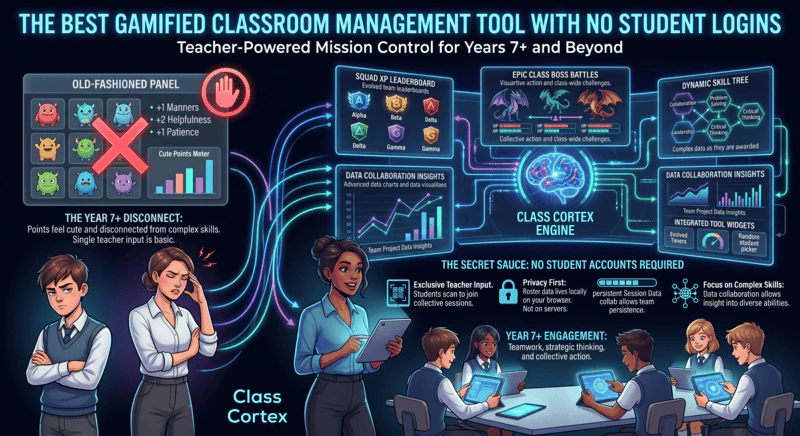
- Persistent XP and HP per student: Every student in your class roster has individual XP and HP that carries across every session. The roster lives in your browser's local storage. Students never see it, never log into it, and never interact with it directly - it is entirely teacher-side.
- Six-squad competition: Students are assigned to squads - ALPHA through FOXTROT - with their own XP bars on the live scoreboard. The competition runs automatically. Students can see the scoreboard on your smartboard without having any account or device involvement at all.
- Live Multiplayer Boss Battles - join by QR code: When you launch a Boss Battle, a QR code appears on your screen. Students scan it on any device - their phone, a school tablet, anything with a browser. They land at classcortex.com/join, enter the room code, and they are in. No email. No password. No name registration. When they close the tab, there is no trace of them on any server anywhere.
- Sonic Defence Noise Monitor: The noise monitor runs entirely on the teacher's device using the microphone. When noise exceeds your calibrated threshold, a visual alarm fires and an audio cue plays. The Quiet Streak tracker awards bonus XP for every 30 seconds the room stays quiet - free. Pro users get Noise Auto-Penalty mode: XP deducts from the class scoreboard automatically with no teacher intervention. No student device involvement whatsoever.
- 8 built-in training games: All eight training games run natively inside Class Cortex on the teacher's screen. Students participate by responding verbally, on whiteboards, or on their own devices depending on how you run the game - none of which requires accounts.
- All data stays local: Class rosters, XP scores, session history, seating maps - every piece of data lives in your browser's localStorage. It never touches a Class Cortex server. You can back it up, export it, and restore it. But it never leaves your device without your explicit action.
Price: Permanently free core tier. Pro is AUD $49 / year.
COPPA / GDPR status: Built with COPPA and GDPR principles in mind. No student data collected. No IT approval required.
How Other Tools Compare
Most gamification platforms require student accounts for their core features. Here is the honest picture of how the main options sit on the account requirement spectrum.
Classroomscreen - Account-Free, But No Gamification
Classroomscreen runs with no student accounts and covers a solid range of utility tools - timer, noise meter, random name picker, QR codes, whiteboard. It is genuinely useful and genuinely private. What it does not offer is any gamification depth. There is no XP, no squad competition, no Boss Battles, and no persistent progression. It solves the login problem but not the engagement problem. For a detailed comparison, see our Class Cortex vs Classroomscreen breakdown.
ClassMana - Student Accounts Required for Gamification
ClassMana's free instant tools - Monster Battle, Silence Challenge, Timer - can be used without student accounts. But the full gamification layer - avatars, XP, powers, health, team collaboration - requires students to create accounts. This is the optional-accounts model described above: the features you actually want to replace ClassCraft are behind registration. For teachers in schools with flexible IT policies who want deep avatar progression, ClassMana is a strong option. For teachers who need zero account friction, the core gamification features are not accessible without student registration.
ClassDojo - Accounts Required, Primary Focus
ClassDojo requires student account creation for its gamification features and is primarily designed for primary and elementary classrooms. It solves neither the account problem nor the secondary-relevance problem simultaneously. For more on why ClassDojo specifically fails for secondary teachers, read our ClassDojo alternative guide.
Gimkit, Kahoot, Nearpod - Accounts Optional, Progress Resets
All three let students join a live game or lesson with a code and no account. Accounts, or paid features such as Kahoot's Player ID, are what track a student's results over time. They are excellent quiz and lesson delivery platforms but are not classroom management dashboards - there is no persistent XP, no squad system, and no background gamification layer running while you teach. When the game ends, the gamification ends.
Account Requirements at a Glance
| Tool | Student Accounts | Full Gamification | No IT Approval Needed | COPPA / GDPR Safe |
|---|---|---|---|---|
| Class Cortex | ✓ None required | ✓ | ✓ | ✓ By design |
| Classroomscreen | ✓ None required | ✗ No gamification | ✓ | ✓ |
| ClassMana | Partial (tools free, gamification requires accounts) | Partial | ✗ | Partial |
| ClassDojo | ✗ Required | ✗ Primary only | ✗ | Partial |
| Gimkit | Optional | ✗ Quiz only | ✗ | ✗ |
| Kahoot / Nearpod | Optional | ✗ Lesson delivery | ✗ | ✗ |
Other No-Login Classroom Tools Worth Knowing About
Several well-known tools also let students take part without an account. Classroomscreen runs timers, pickers and a sound level meter with no student logins at all. Kahoot lets students join a live game with a PIN and a nickname. Blooket only needs the teacher to have an account, with students joining by Game ID, QR code or link.
The difference is what carries over. In Kahoot and Blooket, tracking a student's progress over time needs accounts, and Classroomscreen has no gamification layer. Class Cortex keeps XP, squads and Boss Battle results across every lesson with no student accounts at any point.
The Verdict
If you want gamification and you want zero student account friction, Class Cortex is the only tool in this space that delivers both simultaneously. Every other platform either requires accounts for the gamification features to work, or offers account-free access only to utility tools without any engagement depth.
The practical implication is significant. You can open Class Cortex on your smartboard this afternoon, set up a class roster in two minutes, and have a Boss Battle running before the end of the lesson - with every student in the room participating via QR code, no passwords, no IT requests, and no compliance paperwork. The gamification system is live from minute one.
That is not a marginal advantage. For schools with strict IT policies, for teachers in BYOD environments, and for anyone who has watched a classroom tool collapse in its first week because of login failures, it is the entire ballgame.
No student accounts. No credit card. No install.
Frequently Asked Questions
Can you do gamified classroom management without student accounts?
Yes. Class Cortex delivers a full gamification system - persistent XP, HP, squad competition, live multiplayer Boss Battles, noise monitor (visual alarm and Quiet Streak XP free; automatic XP deduction on Pro), and 8 training games - with zero student accounts required. All class data lives in the teacher's browser local storage. Students join Boss Battles via QR code with no login, no email, and no app download.
Why do student logins cause problems in the classroom?
Student account creation requires IT department approval, managed email addresses, and parental consent in some jurisdictions - and produces the inevitable first-lesson situation where students cannot log in due to forgotten passwords or unactivated accounts. Every minute spent on login troubleshooting is engagement lost. Tools that require student accounts also create data privacy obligations under COPPA and GDPR that many schools are not equipped to manage.
How does Class Cortex handle COPPA and GDPR?
Class Cortex is built with COPPA and GDPR principles in mind. No student data is ever transmitted to Class Cortex servers. All class rosters, XP scores, and session history stay entirely in the teacher's browser local storage. Because no student personal information is collected or stored externally, there is nothing to consent to and no IT approval required.
How do students join Boss Battles without an account?
Students go to classcortex.com/join on any device and enter the room code displayed on the teacher's screen - or scan the QR code. No email, no password, no app download, no registration of any kind. When they close the tab, they are gone. The teacher's dashboard is the only persistent record.
Which gamified classroom tools require student accounts?
ClassDojo and ClassMana (for full gamification) require student account creation for full functionality, while quiz tools such as Gimkit, Kahoot and Nearpod let students join a live session with a code but need accounts to track progress over time. Class Cortex and Classroomscreen are the two major tools that operate with zero student accounts. Class Cortex is the only one of these that also provides a full gamification layer with persistent XP, Boss Battles, and squad competition.
What are other classroom tools that work without student accounts besides Class Cortex?
Besides Class Cortex, other tools students can use without an account include Classroomscreen for utility widgets, Kahoot for live quizzes joined with a PIN and nickname, and Blooket for game-based review where only the teacher needs an account. Class Cortex is the only one of these that keeps gamified progress like XP and squad standings across lessons without any student accounts.
Further Reading