Class Cortex is the top ClassDojo alternative for secondary teachers who need something built for Year 7 and above. Other options worth considering include ClassMana for RPG-style progression and Classroomscreen if you only need a neutral utility display board.
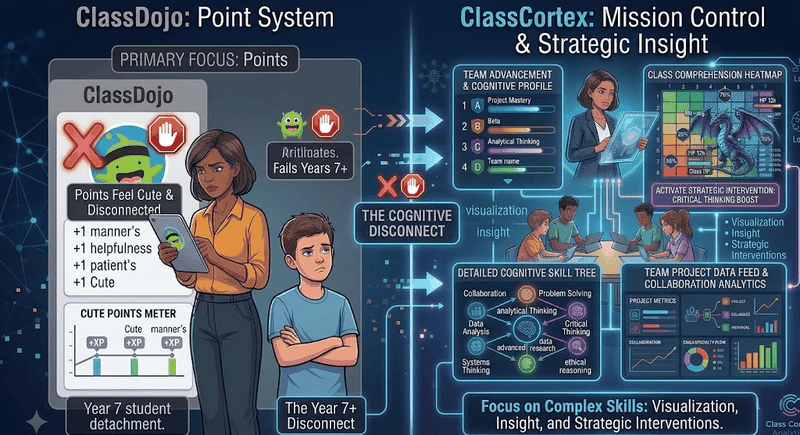
Every secondary teacher has had the same experience. You transfer from a primary school where ClassDojo was running beautifully - the points, the monsters, the parent updates - and you try to set it up for your Year 8s. By the end of the first lesson, you can see it on their faces. The cartoon avatars. The cheerful sound effects. The "+1 Helpfulness" notifications. They are not engaged. They are embarrassed.
ClassDojo was built by and for primary school classrooms. Its design language, its gamification depth, and its core engagement model are all calibrated for students aged five to eleven. That is not a criticism - for Foundation to Year 6, it works exceptionally well. But somewhere around Year 7, students cross a threshold where primary-school tools stop working, and the gap between what they need and what ClassDojo offers becomes impossible to ignore.
This guide is for teachers who teach that gap - Years 5 through 10 - and need a replacement that takes secondary students seriously. Here is how the main alternatives compare, and what to actually look for.
Why ClassDojo Fails in Secondary Classrooms
Before looking at alternatives, it is worth being specific about what actually breaks down - because the answer shapes what you need to look for in a replacement.
- The aesthetic problem: ClassDojo's visual design is deliberately friendly, round, and childlike. Cartoon monsters with googly eyes. Pastel colour schemes. Sound effects that belong in a kids' app. Secondary students are acutely aware of how things look to their peers, and projecting ClassDojo on a smartboard in front of a Year 9 class is social death for the tool within the first week.
- The depth problem: ClassDojo's gamification is shallow by design. Points go up, points go down, parents see updates. There is no persistent progression, no squad competition, no skill system, no meaningful consequence structure tied to the mechanics. For students who spend hours in sophisticated games at home, a point meter labelled "+2 Perseverance" registers as patronising rather than motivating.
- The parent-focus problem: A significant portion of ClassDojo's value proposition is parent communication - class stories, portfolio updates, direct messaging. Secondary teachers generally do not need or want this level of parent involvement embedded in their classroom management tool. It adds noise without adding value.
- The student account problem: At the secondary level, ClassDojo requires student account creation. That means IT approval, managed emails, parental consent forms, and the inevitable situation where half your class cannot log in during the first lesson because passwords have been forgotten or accounts have not been activated. Secondary IT environments are far more bureaucratic than primary ones.
Any tool that replaces ClassDojo for secondary use needs to solve all four of these problems simultaneously - not just one or two of them.
What Secondary Teachers Actually Need
The requirements shift significantly once you move into upper primary and secondary. Students need a system that respects their intelligence while still providing the structural engagement that makes gamification work. Specifically:
- An aesthetic that does not embarrass them. Mission control, tactical, sci-fi, dark mode - anything that signals this is a serious tool, not a primary school reward chart.
- Depth of mechanics. Persistent XP that carries across weeks, not just today. Squad competition with real peer accountability. A noise management system that enforces itself without the teacher having to stop and adjudicate.
- Zero friction for students. No accounts. No passwords. No app downloads. If students need to do anything before they can participate, secondary engagement drops immediately.
- Utility tools that replace the tab jungle. Timer, seating map, student picker, whiteboard - the tools primary teachers have simple access to should not require five separate browser tabs for a secondary teacher.
1. Class Cortex
Class Cortex was built by a secondary teacher specifically for the year levels ClassDojo abandons. The aesthetic is deliberate - dark, tactical, mission-control - and it was designed by someone who has stood in front of a Year 9 class on a Friday afternoon and needed something that would actually work. For a full breakdown of how to build the gamification system from scratch, read How to Gamify Your Classroom Without Losing Control.
Why it works where ClassDojo fails:
- Tactical aesthetic: No cartoon monsters. No pastel colours. Class Cortex projects like a mission control dashboard - 27 themes ranging from Cyber Cortex to The Matrix to Vaporwave. It looks like something students actually respect.
- Persistent XP and Squad Wars: Every student has individual XP and HP that carries across every session. Up to six squads - ALPHA through FOXTROT - compete with their own XP bars on the main scoreboard. Peer accountability kicks in automatically. Squadmates start managing each other's behaviour so you do not have to.
- Live Multiplayer Boss Battles: Students join at classcortex.com/join via QR code on their own devices. No app. No account. You reveal a question, they answer, right answers deal damage to the boss, and the class's combined accuracy decides how hard each hit lands. The class wins or falls together. Secondary students who roll their eyes at ClassDojo will actively ask when the next Boss Battle is.
- Sonic Defence Noise Monitor: When classroom noise exceeds your calibrated threshold, a visual alarm fires and the Quiet Streak resets - free. On Pro, XP deducts automatically from the class scoreboard. You do not have to say a word. The board enforces it - and students regulate each other far more effectively than any teacher intervention could. See how it compares in our free classroom noise monitor guide.
- Zero student accounts: Students never create an account, download an app, or remember a password. For Boss Battles they scan a QR code. Everything else runs from the teacher's screen. No IT approval required.
- Everything in one tab: Timer, student picker, seating map, whiteboard, scoreboard, training games - all simultaneously, without switching tools.
Price: Permanently free core tier. Pro is AUD $49 / year.
Best for: Years 5-10. Any teacher who needs secondary students to take the gamification system seriously.
2. ClassMana
ClassMana is the most direct ClassCraft spiritual successor, built with animated 3D avatars, a full RPG progression system, powers, health points, and boss battles. If your students need deep avatar customisation and long-term character progression, ClassMana is worth a look.
The friction points at secondary level are meaningful. ClassMana requires student account creation, which reintroduces the IT approval and password management problems that make ClassDojo difficult in secondary settings. It also lacks the utility tool layer - there is no built-in seating map, whiteboard, or robust noise monitor - meaning you are still juggling browser tabs. And the RPG aesthetic, while more sophisticated than ClassDojo, still skews toward a gaming fantasy theme that may not land with every secondary cohort. For a comparison with ClassMana specifically as a ClassCraft replacement, read our full ClassCraft alternatives guide.
Price: Free tools available. Premium for full Class Adventure (coming soon). Best for: Teachers whose students want deep avatar RPG progression and whose schools have flexible IT policies.
3. Classroomscreen
Classroomscreen is a well-designed widget board that works across all year levels - timers, noise meters, random name pickers, QR codes, and backgrounds. It is genuinely useful for secondary teachers who just need utility tools on screen without the gamification layer. For timers specifically, our free classroom timer comparison covers the options.
What it does not offer is any engagement depth. There is no XP, no HP, no squad competition, no Boss Battles, and no persistent progression. If you are specifically looking to replace ClassDojo's behaviour management function with something more sophisticated, Classroomscreen will not fill that role. For a detailed head-to-head on utility tools, see our Class Cortex vs Classroomscreen comparison.
Price: Free Basic plan with every widget. Pro is USD $36 / year. Best for: Teachers who only need utility widgets and already have a separate behaviour management approach.
4. LiveSchool
LiveSchool is a school-wide behaviour management platform popular in the United States, particularly in middle and high schools. It has a point system, positive reinforcement tools, and analytics dashboards that give administrators visibility into behaviour trends across the whole school. If your school is adopting a behaviour framework at the institutional level, LiveSchool makes sense.
For an individual teacher trying to manage engagement and behaviour within a single classroom, LiveSchool is significantly overbuilt. It requires district or school-level adoption, student and parent accounts, and administrative setup that is well beyond what one teacher can implement independently. It is a school system, not a classroom tool.
Price: School-level pricing on request. Best for: School-wide implementation, not individual classroom use.
ClassDojo Competitors and Apps Like ClassDojo
ClassDojo bundles several jobs into one app, so the right competitor depends on which job you are actually replacing:
- Points and behaviour tracking: LiveSchool covers this at a whole-school level. Class Cortex covers it inside one classroom, with persistent XP and HP, squads and an automated noise monitor, and no student accounts. In UK schools, Class Charts often fills the same role; see our Class Charts alternative guide.
- Games like ClassDojo: ClassDojo's Toolkit is light on games. Class Cortex's live Boss Battle and built-in training games feed straight into the class XP total, while quiz games such as Blooket and Gimkit are great for review but reset when the round ends. See our Gimkit alternatives and Blooket alternatives guides for that side.
- Random picker, timer and noise meter: ClassDojo's Toolkit has all three. Classroomscreen and Class Cortex both offer them in the browser without the app, and our random student picker comparison covers the picker side in detail.
- Parent messaging and portfolios: this is the one job Class Cortex does not do. Remind is built for messaging and Seesaw for student portfolios with family access.
- An RPG layer: Classcraft used to fill this gap until HMH retired the original platform in June 2024. Our ClassCraft alternatives guide covers what replaced it.
If you want the direct head-to-head on behaviour tools, read ClassDojo vs Class Cortex.
Side-by-Side Comparison
| Feature | Class Cortex | ClassDojo | ClassMana | Classroomscreen |
|---|---|---|---|---|
| Works for Year 7+ | ✓ Built for it | ✗ Primary focus | Partial | ✓ |
| No Student Accounts | ✓ | ✗ Required | ✗ Required | ✓ |
| Persistent XP & HP | ✓ | ✗ | ✓ | ✗ |
| Squad Competition | ✓ | ✗ | ✓ | ✗ |
| Live Multiplayer Boss Battles | ✓ | ✗ | ✓ | ✗ |
| Automated Noise Monitor | ✓ + XP penalty (Pro) | Meter only | Basic | Display + bell |
| Drag-and-Drop Seating Map | ✓ | ✗ | ✗ | ✗ |
| Secondary-Appropriate Aesthetic | ✓ Tactical/sci-fi | ✗ Cartoon/primary | RPG fantasy | ✓ Neutral |
| Annual Cost (AUD approx.) | Free / $49 | Free / ~$100+ | Free tools / TBC | Free / ~$55 |
Other ClassDojo Alternatives Worth Knowing About
Class Cortex is not the only secondary-appropriate option, and the right pick depends on what your classroom needs most. If you want a deep RPG-style character progression system and your school's IT policy allows student account creation, ClassMana is worth evaluating - it shares some of the persistent XP mechanics that make ClassDojo feel thin at secondary level. If your students just need a clean, neutral utility board with a timer, noise meter, and QR codes with no gamification attached, Classroomscreen covers that well and avoids ClassDojo's primary-school aesthetic entirely.
Neither combines persistent XP and HP, live multiplayer Boss Battles, squad-based competition, and an automated noise consequence the way Class Cortex does, all with zero student accounts. But if your classroom does not need that full system, both are worth considering on their own merits.
The Verdict
If you are in primary school - Foundation to Year 6 - ClassDojo remains one of the best tools available. The parent communication features, the simple points system, and the friendly aesthetic are genuinely well-matched to that age range.
But if you teach above that level, you need something that meets your students where they actually are. Class Cortex is the tool that fills this gap directly - built by a secondary teacher, designed for the year levels where ClassDojo stops working, with zero student accounts, a mission-control aesthetic that teenagers respect, and a gamification depth that keeps them engaged across the whole term rather than just the first week.
You can have it running on your smartboard today. No setup beyond adding your class roster. No student accounts. No IT request. Open classcortex.com/app in Chrome and you are ready before the bell rings.
No student accounts. No credit card. No install.
Frequently Asked Questions
Why doesn't ClassDojo work for secondary teachers?
ClassDojo was designed for primary and elementary classrooms. Its cartoon monster avatars, simple points system, and parent communication focus make it feel patronising to Year 7+ students. Secondary students need deeper mechanics - persistent XP systems, squad competition, consequence automation, and tools that feel like the games they already play at home, not a kindergarten reward chart.
What is the best ClassDojo alternative for high school teachers?
Class Cortex is the best ClassDojo alternative for secondary and high school teachers. It includes persistent XP and HP tracking, live multiplayer Boss Battles, squad team competition, a Sonic Defence noise monitor (visual alarm and Quiet Streak XP free; automatic XP deduction on Pro), 8 training games, drag-and-drop seating map, tactical whiteboard, and student picker - all in one browser tab. No student accounts required. Free to use.
Does Class Cortex require student accounts like ClassDojo?
No. Class Cortex requires zero student accounts or app downloads. Students join Boss Battles at classcortex.com/join using a QR code - no email, no password, no registration. All class data lives in the teacher's browser local storage. Built with COPPA and GDPR principles in mind. No IT approval required.
Is Class Cortex free?
Yes. Class Cortex has a permanent free tier that includes 1 class slot, full XP and HP tracking, Boss Battles with 2 boss types, 4 training games, noise monitor, seating map, whiteboard, and student picker. The Pro plan is AUD $49 per year and adds 12 class slots, 27 themes, Noise Auto-Penalty, 4 Pro boss types, 4 additional training games, Picture-in-Picture mode, and PDF export.
What year levels does Class Cortex work best for?
Class Cortex is designed for Years 5 through 10 - the exact range where ClassDojo starts to fall apart. The tactical, mission-control aesthetic resonates with older students who find ClassDojo's cartoon approach childish. For Foundation to Year 4, ClassDojo's simpler design may still be appropriate. For Years 11-12, the tone may need to shift toward achievement recognition, though the utility tools remain valuable at any level.
What are other alternatives to ClassDojo besides Class Cortex?
Besides Class Cortex, other ClassDojo alternatives for older students include ClassMana for RPG-style character progression where student accounts are permitted, and Classroomscreen for a neutral utility display board with no gamification layer at all. Class Cortex remains the only option that combines persistent XP and HP, live Boss Battles, squad competition, and an automated noise consequence with zero student accounts required.
Further Reading