Most teachers who try XP in the classroom give up within three weeks. Not because the idea is wrong, but because the implementation was never built to last. The XP was handed out inconsistently, the rewards were vague, and by week four students had stopped caring because nothing was at stake.
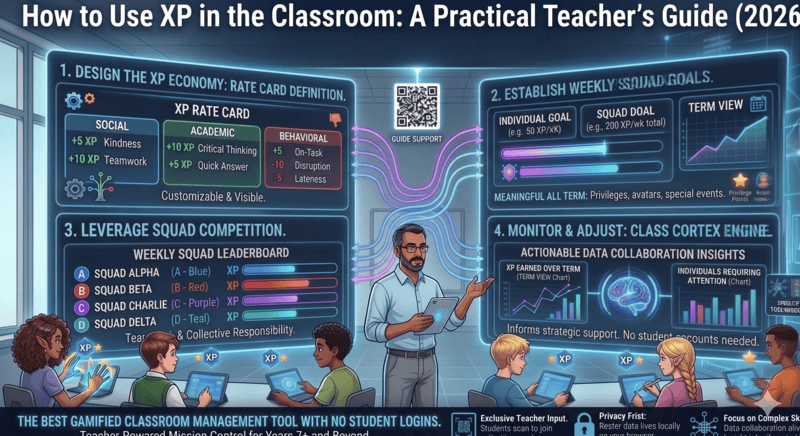
A well-designed classroom XP system is different. It runs on a clear rate card, visible squad competition, a weekly goal with a real reward attached, and just enough noise penalty to make quiet feel earned. When all of those pieces are in place, XP stops being a novelty and starts being the engine that drives classroom culture.
This guide walks through every step of building that system from scratch. If you want to understand the broader gamification context before diving in, read our guide on how to gamify your classroom without losing control first.
Why XP Works When Other Reward Systems Do Not
Sticker charts, marble jars, and paper point systems all share the same structural weakness: the reward is disconnected from the progression. Students collect tokens until someone decides they have enough, and the decision feels arbitrary because there is no visible scoreboard, no squad tension, and no clear finish line.
XP works because it is persistent, visible, and cumulative. Every point earned in Monday's lesson still counts on Friday. The scoreboard is on the main display where the whole class can see it. And the weekly goal creates a shared finish line that makes every individual contribution feel meaningful to the group. The social pressure of squad competition does more behaviour management work than any token system because students enforce the norms on each other rather than waiting for the teacher to intervene.
What you need before you start
- A class roster entered into your system - every student needs to be in the Command Deck before day one.
- Squads assigned - Class Cortex supports 2 to 6 squads, ALPHA through FOXTROT. Assign squads deliberately, balancing ability levels and mixing friendship groups to prevent dominant squads forming immediately.
- A rate card decided in advance - covered in Step 1 below. Do not make XP values up on the fly; inconsistency kills the system faster than anything else.
- A weekly XP goal set - covered in Step 3. Students need to know the target before the week starts.
- The noise monitor calibrated - covered in Step 5. This takes thirty seconds at the start of the first lesson.
Step 1 - Set Your XP Rate Card
A rate card is the fixed list of what earns XP and how much. It lives on the wall or on the board at the start of term, and it never changes without a class discussion. Consistency is the entire foundation of the system. If you just want the basics of awarding points, start with our classroom XP points guide.
Keep the rate card simple. Five to seven entries maximum. Every additional entry is a cognitive load cost for students trying to remember the rules. The following is a starting point you can adapt:
Sample XP rate card
- Correct answer during class questioning: +10 XP - awarded via the Student Picker when the selected student answers correctly. Keeps questioning stakes meaningful without pressure.
- Task completed on time: +15 XP - awarded at the end of a timed activity when the squad finishes within the Arc or Detonator timer window.
- Training Sim game win: +20 XP - awarded automatically by the system on game completion. No teacher action needed.
- Outstanding contribution or effort: +25 XP - teacher discretion, used sparingly. Reserve this for genuine moments rather than routine participation.
- Noise threshold breach: -10 XP (Pro) - automatic deduction from the class scoreboard when the Sonic Defence Engine detects the room exceeding the calibrated threshold. On the free tier, the visual alarm and audio cue fire instead.
- Quiet Streak bonus: +10 XP per 30 seconds of sustained quiet - automatic award from the noise monitor. Rewards sustained quiet, not just avoiding penalty.
Notice that the deduction is automatic and class-level, not individual. This is deliberate. Individual XP deductions feel punitive and personal. A class-level automatic deduction tied to the noise monitor feels systemic, which means students are less likely to argue with it and more likely to self-regulate. This automatic deduction is a Pro feature - on the free tier the visual alarm and Quiet Streak pressure still create the same peer dynamic without the hands-free deduction.
Step 2 - Assign Squads Deliberately
The squad structure is what makes XP social. Without squads, XP is just points. With squads, XP becomes a competition with visible standings, collective pride, and genuine peer pressure to participate.
Assign squads at the start of term rather than letting students self-select. Mixed-ability squads where no single group is dominant create the most sustainable competition. If one squad pulls far ahead early, the trailing squads disengage - exactly what you are trying to avoid.
In Class Cortex, each squad (ALPHA through FOXTROT) has its own XP bar displayed on the Command Deck. The bars are visible to the whole class on the main display. That visibility is not incidental - it is the mechanism. Students watch the bars move in real time and feel the collective consequence of individual choices.
At the halfway point of term, consider a partial reset. Not a full wipe - that feels unfair and destroys accumulated goodwill - but a scaling adjustment that brings trailing squads back within striking distance. This is the single most effective technique for maintaining engagement through the back half of term when the leading squad's gap would otherwise become demoralising for everyone else.
Step 3 - Set a Weekly XP Goal With a Real Reward
The weekly XP goal is the most important structural element in the whole system. Everything else - the rate card, the squads, the noise monitor - feeds into it. The goal is announced at the start of Monday's first lesson and tracked publicly throughout the week.
The reward for hitting the weekly goal should be a Boss Battle session, typically on Friday afternoon. This is the correct cadence: Boss Battles are the highest-engagement activity in the system, and limiting them to a weekly earned reward keeps them feeling special rather than routine. If you run Boss Battles whenever you feel like it, they lose their motivational pull within a fortnight.
For how to run the Boss Battle itself once the class earns it, read our complete guide on how to run a Boss Battle in your classroom.
Set the weekly goal at a level where it is achievable with genuine effort but not guaranteed without it. Too easy and students stop caring. Too hard and they give up early in the week. A useful calibration: if the class hits the goal every week for three weeks straight, raise it by 10 percent. If they miss it two weeks in a row, lower it slightly and have an explicit conversation about what changed.
Weekly XP goal checklist
- Announce the goal at the start of Monday - write it on the board and set it in Class Cortex so the progress bar is visible all week.
- Give a midweek update on Wednesday - "You are at 340 XP, goal is 500. Three lessons left." This keeps the target front of mind without making it feel like nagging.
- Do not reveal the reward until the goal is hit - the anticipation is part of the mechanism. Students who know the reward is coming regardless will not push for the goal.
- If the class misses the goal, acknowledge it briefly and reset on Monday. Do not dwell. Prolonged disappointment curdles into resentment.
Step 4 - Use the Student Picker to Keep XP Stakes Visible
The Student Picker is the most frequent XP-earning touchpoint in a typical lesson. Every time you select a student for questioning, there is an XP moment attached. Right answer means squad earns XP. The class sees it happen immediately on the scoreboard.
The no-repeat guarantee matters here. Because Class Cortex's picker cycles through the entire roster before selecting anyone twice, every student knows their turn is coming. This removes the psychological safety of being the student who never gets picked, which is one of the hidden mechanisms that allows disengagement to persist in classrooms for years.
Use the picker consistently for at least the first four weeks. Once students understand the pattern - everyone gets selected, XP is always on the line - the engagement effect becomes self-sustaining. You can then use it more selectively without losing the underlying culture it has built.
Step 5 - Calibrate the Noise Monitor Before Every Lesson
The Sonic Defence Engine's calibration takes thirty seconds and should happen at the start of every lesson. Open Class Cortex, navigate to the noise monitor, and run the calibration. The system samples the ambient noise level of your specific room - not a fixed decibel number, but a baseline relative to that moment - and sets the threshold accordingly.
This matters because classrooms are not acoustically identical. A demountable in the afternoon with traffic noise outside has a different baseline than a carpeted library room at 9am. Fixed-threshold noise monitors are wrong half the time. A calibrated baseline is accurate every time.
Once calibrated, the noise monitor runs in the background. When the room crosses the threshold, a visual alarm fires, an audio cue plays, and the Quiet Streak tracker resets. On Pro, XP also deducts automatically from the class scoreboard - students see the consequence immediately without you saying a word. Pro users can run the entire cycle completely hands-free in Noise Auto-Penalty mode, without even having the noise monitor tab visible.
For a full breakdown of how the noise monitor compares to other tools and why automatic consequence matters, read our free classroom noise monitor comparison.
Step 6 - Use Milestone Badges to Recognise Long-Term Progress
The weekly goal handles short-term motivation. Milestone badges handle the longer arc. Class Cortex's CC-Achieve system awards milestone badges when squads or individual students reach XP thresholds. These badges are permanent - they do not reset with the weekly cycle - and they serve as a record of accumulated achievement across the whole term.
Announce milestones publicly when they happen. A brief acknowledgment on the main display when a squad crosses a major XP threshold costs thirty seconds and pays back significantly in sustained engagement. Students who feel recognised for long-term effort are significantly less likely to disengage in the back half of term when novelty has worn off.
Milestone badges are not the only individual pull that keeps XP meaningful week to week. Class Cortex's Neural Core Economy lets each student spend their own banked XP on their avatar in the Achievements tab - a first tier of CORE avatars is free for everyone, but every avatar beyond that costs XP, and a purchased avatar is kept forever even if that student's XP is later reset. It gives a student who is not personally chasing the squad's weekly goal a reason to keep earning anyway.
Step 7 - Keep the System Honest
The fastest way to destroy an XP system is inconsistency. If XP is awarded generously on good days and forgotten on busy ones, students quickly learn that the system is not real - it is just the teacher's mood with a scoreboard attached.
Three rules that keep the system honest over a full term:
- Award XP within thirty seconds of the qualifying event - if you wait until the end of the lesson to add points, students lose the connection between action and reward. The immediacy is part of the mechanism.
- Never award XP retroactively for things that happened before the system started - it signals that the rate card is negotiable, which it should not be.
- When you make a mistake, correct it publicly - if you accidentally deduct from the wrong squad, fix it immediately and say so out loud. Students notice, and visible correction builds more trust than pretending the error did not happen.
The Command Deck in Class Cortex
Class Cortex's Command Deck is built to implement exactly this system with no spreadsheets, no paper, and no separate apps. It handles:
- XP and HP tracking per student across every squad simultaneously
- Individual squad XP bars visible on the main display in real time
- Weekly XP goal progress bar that updates automatically as XP is awarded
- CC-Achieve milestone badges that fire automatically at XP thresholds
- Neural Core Economy - students spend their own banked XP unlocking avatars, tracked separately from their total XP
- Persistent data between sessions via browser localStorage - the scoreboard is exactly where you left it when you open the app for your next lesson
- Pro: Class Dossier batch export for reporting and parent communication
How Long Does It Take to Work?
Expect three to five lessons before the system feels natural. The first lesson is explanation. The second is correction - students testing what happens when they push the noise threshold, or questioning whether XP is actually tracked. By the third lesson, the class usually starts self-regulating because the social dynamics of the squad competition have kicked in.
The hardest week is week three. The novelty has worn off but the habits are not yet fully formed. This is the week most XP systems collapse because the teacher relaxes consistency. Hold the line on the rate card through week three and the system will establish itself. By week four it runs mostly on its own.
By the end of the term you will have a class that knows exactly what earns XP, expects to be called on, monitors its own noise level, and genuinely cares about the weekly goal. That is not just engagement - it is a classroom culture. And culture is what sustains behaviour management when novelty and authority alone cannot.
No student accounts. No credit card. No install.
Frequently Asked Questions
What is an XP system in the classroom?
A classroom XP system is a gamification framework where students earn experience points for positive behaviours, academic participation, and meeting class expectations. XP accumulates on a visible scoreboard, creating a persistent progression system that motivates students across lessons, weeks, and a full school term. Unlike sticker charts or token systems, XP builds momentum over time and connects individual actions to a shared squad or class goal.
What should students earn XP for?
Students should earn XP for behaviours you want to reinforce consistently: arriving ready to work, contributing correct answers during questioning, completing tasks within the timer, demonstrating genuine effort, winning Training Sim mini-games, and maintaining quiet during noise monitor tracking. Keep the rate card to five to seven entries so students can remember it without asking. Consistency in applying the rate card is more important than the specific values you choose.
What is a weekly XP goal and how does it work?
A weekly XP goal is a class-wide target announced at the start of Monday and tracked publicly throughout the week. If the class reaches the threshold by Friday, they unlock a reward - typically a Boss Battle session. The goal creates a shared incentive that makes individual XP contributions feel meaningful to the group. Set it at a level where it requires genuine effort but is achievable with consistent participation.
Should you deduct XP for negative behaviour?
Yes, but sparingly and at the class level rather than individual level. The most effective deduction is tied to the noise monitor - on Pro, when the room exceeds the threshold, the scoreboard loses XP automatically without the teacher making a judgment call. On the free tier, the visual alarm fires instead. Individual deductions should be reserved for clear, agreed-upon breaches. Avoid using individual XP deductions as a general behaviour tool - the social cost of feeling publicly penalised can undermine the positive culture the system is building.
How do you keep the XP system from losing momentum across a term?
The most common cause of mid-term collapse is predictability and inconsistency. To sustain engagement: do a partial squad reset at the halfway point to bring trailing squads back into contention, introduce milestone badges at XP thresholds to recognise long-term achievement, vary the Boss Battle boss type and difficulty each week, and run an occasional surprise double-XP lesson. Consistency in the daily system combined with variation in rewards is what keeps the XP economy alive for a full term.
Further Reading