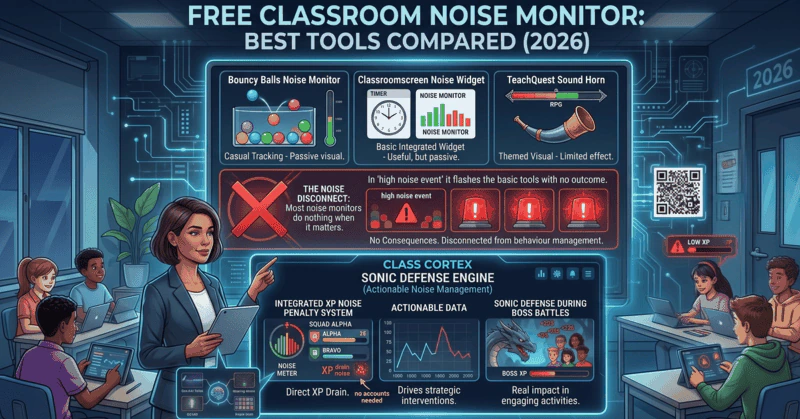
Class Cortex's Sonic Defence monitor is the top free classroom noise monitor for teachers who want the alarm tied to a real outcome. Other options worth knowing include Bouncy Balls for a quick visual with a beep or shush alert, Classroomscreen's sound level widget with its bell, and Too Noisy for star rewards on a paid plan.
Most teachers try a noise meter the same way: put it on the board, watch the class stare at it for a minute, and then watch them stop caring. The meter was never the problem. The problem is that nothing happens when it turns red, so students learn to ignore it.
This guide does two things. First, you can run a free classroom noise monitor with an alarm right here on the page, using the same engine as the Class Cortex app. Second, it compares 9 tools teachers actually use in 2026, checked against each tool's own site, so you can pick the one that fits your room.
Try a Free Classroom Noise Monitor With Alarm
Press Initialize Shield, allow the microphone, then press Calibrate while the room is at its normal working noise. If the room reaches 90%, the ring turns red and the alarm sounds.
Runs entirely in your browser. Nothing is recorded, saved or sent anywhere, and the microphone is released when you press Terminate Shield or leave the page.
This is the basic Sonic Defence monitor. In the full app, the Quiet Streak awards the class +10 XP for every 30 seconds below the threshold (free), and on Pro, Noise Auto-Penalty takes 50 XP off the class total on a breach.
Open the Full Noise Monitor FreeWhat a Classroom Noise Monitor Should Actually Do
A display that shows the room is loud is the lowest bar. A classroom noise monitor that genuinely helps you manage a room should do three things:
- Calibrate to your room. A quiet library and a portable classroom next to the oval have very different baselines. The monitor should measure your room's normal level and respond to spikes above it, not to a fixed number.
- Raise the alarm without you. When the room crosses the line, the screen and the speakers should deliver the cue, so you do not have to stop teaching to say it.
- Reward the quiet, not just punish the noise. The systems that last all term give students something to protect, which is why a quiet streak works better than an alarm on its own.
With that standard set, the setup matters as much as the tool. For how the reward side fits into a wider system, read our guide on how to gamify your classroom without losing control.
How to Set Up a Classroom Noise Monitor in 5 Steps
These steps work for the live monitor above and for the full Class Cortex app. The same ideas apply to any tool with a sensitivity setting.
- Use the right microphone. A laptop or interactive panel microphone at the front of the room works, but it hears the front rows loudest. A cheap USB microphone placed centrally gives a fairer reading for the whole class.
- Allow microphone access. Your browser will ask the first time. If you blocked it by mistake, click the padlock or microphone icon in the address bar and allow it for the site. On a school Chromebook, IT policy may need to allow the microphone for the site.
- Calibrate at normal working noise. Press Calibrate while the class is working at the volume you are happy with, not in total silence. The monitor listens for 5 seconds, sets that as the noise floor and resets Sensor Gain to 50.
- Fine-tune with Sensor Gain. If the ring sits too high during normal work, lower the gain. If a genuinely loud moment does not reach the red zone, raise it. The breach point stays at 90%; the gain changes how quickly the room gets there.
- Demonstrate it once. On day one, let the class watch it breach on purpose so everyone hears the alarm and sees the ring turn red. Then explain what quiet earns. A single controlled demonstration does more than ten warnings in week three.
Re-calibrate when you change rooms or switch from silent work to group work. For a step-by-step walkthrough of every control in the app, see the Noise Monitor tutorial.
Classroom Noise Monitor With Alarm: How Each Tool Alerts the Room
"With alarm" means very different things depending on the tool, and the difference decides whether the class keeps responding to it after the first week.
- Optional sound cue: Bouncy Balls lets you choose no sound, a beep or a shush when the room gets loud.
- Delayed bell: Classroomscreen's sound level widget rings a bell once the noise has stayed over your limit for 10 seconds, so a single cough or dropped book does not set it off.
- Alarm plus voice alerts: Too Noisy has an adjustable alarm and lets you record your own voice alert.
- Alarm tied to points: Class Cortex fires a visual alarm and the alarm sound at 90%, and the Quiet Streak pays the class +10 XP for every 30 seconds below the threshold. On Pro, Noise Auto-Penalty also takes 50 XP off the class total, with a 30 second cooldown between penalties.
- Hardware buzzer: wall-mounted traffic-light meters flash and buzz when the room crosses a set level.
An alarm on its own fades fast. An alarm that interrupts a streak the class has been building keeps working, because now the students are protecting something.
The 9 Best Free Classroom Noise Monitors (2026)
Every tool below was checked against its own website or help documentation in October 2026. Features change, so check the tool before you commit.
1. Class Cortex Sonic Defence
The Sonic Defence monitor inside Class Cortex is built around the question most meters skip: what happens when the room gets too loud? It reads the room as a percentage, shows the noise floor, peak signal and record quiet streak, and calibrates to your room with a one-button, 5-second Calibrate step. A Sensor Gain slider handles fine adjustment.
Free vs Pro
- Free: calibration, Sensor Gain, a visual alarm and the alarm sound when the room reaches 90%, and the Quiet Streak, which awards the class +10 XP for every 30 seconds below the threshold and tracks a record streak per class.
- Pro: Noise Auto-Penalty, which takes 50 XP off the class total automatically on a breach with a 30 second cooldown, plus a pop-out window so the monitor stays visible while you use other tools.
The difference from every other tool here is that the XP goes into the same Command Deck that runs your squads, weekly goals and Boss Battles, so quiet is worth something students already track. If you are deciding whether the automatic penalty is worth paying for, our free vs Pro noise monitor comparison covers that decision. For how the XP side works, read how to use XP in the classroom.
Best for: upper primary and secondary classes that have stopped responding to a plain visual.
2. Bouncy Balls
Bouncy Balls is the best-known free classroom noise meter and it is genuinely fun. Balls, emoji, bubbles, numbers or eyeballs bounce higher as the room gets louder, there is a sensitivity setting, and you can choose an optional noise alert of a beep or a shush. It is free with no registration.
The ceiling is that nothing is attached to the reading. There is no score, reward or consequence, so the teacher still supplies every follow-up, and older classes tend to tune it out once the novelty wears off.
Best for: younger classes and short bursts where a playful visual is enough.
3. Classroomscreen Sound Level
Classroomscreen's sound level widget sits inside its wider widget board alongside timers and name pickers. It shows a live bar, has a max noise slider to set the limit and a smoothing option to ignore coughs and dropped items, and can ring a bell when the noise stays over the limit for 10 seconds. You can try it free without logging in.
There is no XP, points or automatic consequence, so it works as a cue rather than a system. For a fuller look at what Classroomscreen does and does not do, see our Classroomscreen alternatives comparison.
Best for: teachers who already run their lessons from Classroomscreen.
4. Too Noisy
Too Noisy is the most feature-rich dedicated noise app on the list: animated backgrounds, a sensitivity slider, baseline calibration, sudden-sound suppression, an adjustable alarm, recorded voice alerts and a star reward system. It runs on iOS, Android and the web.
The catch is cost. The full web app is a paid subscription after a 30-day free trial, and the stars live inside Too Noisy rather than in a points system you use for anything else.
Best for: teachers who want a polished standalone noise app and are happy to pay for it.
5. ClassDojo Noise Meter
ClassDojo includes a free Noise Meter in its Toolkit, with adjustable microphone sensitivity and animations, and you can show it on the board from your phone. It needs a ClassDojo teacher account and runs from the ClassDojo app.
ClassDojo's own pages do not describe an alarm sound or any link between the meter and Dojo points, so treat it as a visual cue. If you already use ClassDojo daily it is the easiest option to reach for.
Best for: primary teachers already running their class through ClassDojo.
6. Calm Counter
Calm Counter is a simple free web meter with a colour gauge and a microphone sensitivity slider. Its site states that no sound data leaves your machine. There is no documented alarm or reward.
Best for: a no-frills visual on an older device.
7. Zero Noise Classroom
Zero Noise Classroom is a free Chrome extension with a live display and a stopwatch that tracks how much of the lesson the noise spent above the optimal level. That percentage is useful for a reflection conversation with the class. Its Chrome Web Store listing has not been updated since 2016, so test it on your device first.
Best for: teachers who want data on how much of a lesson was too loud.
8. TeachQuest Noise Tracker
TeachQuest is a deep classroom RPG platform with raids, dungeons, spells and a classroom shop, and its tool list includes a Noise Tracker alongside a timer, randomiser and dice roller. Because the tracker sits inside a persistent RPG that students are already invested in, it is closer in spirit to Class Cortex than to a plain meter. TeachQuest's public pages do not detail how the tracker alerts the room, so test it before you rely on it.
The trade-off is setup: students sign in with teacher-managed login codes, and their gameplay data is stored on TeachQuest's servers, which some schools will want to review first. Our TeachQuest alternative comparison covers the full picture.
Best for: teachers already running their class through TeachQuest.
9. Traffic-Light Wall Meters
Physical sound meters, such as the traffic-light style Yacker Tracker and wall-mounted decibel displays, sit on the wall and flash or buzz when the room crosses a set level. They need no screen and no browser, which suits rooms where the board is always busy.
They are paid hardware, they cannot reward quiet, and adjusting them means walking to the wall.
Best for: rooms where screen space is always taken.
Classroom Noise Monitor Comparison
| Tool | Alert when too loud | Rewards quiet | Automatic consequence | Cost |
|---|---|---|---|---|
| Class Cortex (free) | Visual alarm + alarm sound at 90% | +10 XP per 30s of quiet | No | Free |
| Class Cortex (Pro) | Same as free | +10 XP per 30s of quiet | -50 class XP on breach | AUD $49/yr |
| Bouncy Balls | Optional beep or shush | None | No | Free |
| Classroomscreen | Bell after 10s over limit | None built in | No | Free to try |
| Too Noisy | Adjustable alarm, voice alerts | Stars | No | Subscription, 30-day trial |
| ClassDojo Noise Meter | Not documented | None | No | Free in ClassDojo app |
| Calm Counter | Not documented | None | No | Free |
| Zero Noise Classroom | Not documented | None | No | Free |
| TeachQuest Noise Tracker | Not documented | Part of the RPG | Not documented | Check site |
| Traffic-light wall meter | Light + buzzer | None | No | Paid hardware |
Other Free Classroom Noise Monitor Alternatives Worth Knowing About
If none of the tools above fit, there are a few more routes. Phone decibel meter apps give a quick reading for your own reference, though most are not designed to be projected for a class. Community-made noise meters on Scratch can be remixed by students as a coding project, which doubles as a lesson. And printable noise-o-meter charts with a movable pointer still work in rooms with no spare screen at all.
None of these calibrate to your room or reward quiet automatically. But for a one-off activity or a room without a projector, each is worth considering on its own merits.
Noise Monitor vs Sound Meter: Which Do You Need?
Teachers search for the same tool under several names: classroom noise meter, sound meter for classroom use and classroom noise monitor. In practice they describe two levels of one tool. A sound meter shows the level. A noise monitor also responds when the level crosses a line, with an alarm, a reward for quiet or an automatic consequence.
If your class responds to a visual cue, a free sound meter is enough. If they have learned to ignore it, you need the response. Our classroom sound meter guide breaks that decision down rung by rung, including why browser meters show relative levels rather than true decibels.
The Verdict
Bouncy Balls and Classroomscreen are the right tools when a visual nudge is all you need. Too Noisy is the most complete standalone app if you are happy to pay. ClassDojo's meter is the convenient choice inside ClassDojo.
If your class has tuned out the visual, the tool that keeps working is the one connected to something students care about. Class Cortex is the only free option here that calibrates to your room, sounds the alarm at a consistent breach point and pays the class XP for every 30 seconds of quiet, with Noise Auto-Penalty on Pro for teachers who want the consequence fully hands-free. Students do not respond to a bouncing ball for long. They do respond to protecting a streak. For the wider picture of gamified classroom tools, read our ClassCraft alternatives comparison.
No student accounts. No credit card. No install.
Frequently Asked Questions
What is the best free classroom noise monitor for teachers?
Class Cortex's Sonic Defence monitor is the strongest free option if you want the alarm tied to a real outcome. It calibrates to your room, fires a visual alarm and the alarm sound when the room reaches 90%, and awards the class +10 XP for every 30 seconds of quiet on the free tier. On Pro, Noise Auto-Penalty also takes 50 XP off the class total on a breach. If you only need a quick visual, Bouncy Balls and Classroomscreen's sound level widget are both free and need no sign-up.
Is there a free classroom noise monitor with an alarm?
Yes. You can run one at the top of this page with no sign-up: it sounds an alarm when the room reaches 90% after calibration. Bouncy Balls offers an optional beep or shush alert, Classroomscreen's sound level widget rings a bell when noise stays over your limit for 10 seconds, and the full Class Cortex app adds a visual alarm, the alarm sound and Quiet Streak XP for free.
How do I calibrate a classroom noise monitor?
Calibrate while the class is at its normal working noise, not in silence. In Class Cortex, press Calibrate and the monitor listens for 5 seconds, sets that level as the noise floor and resets Sensor Gain to 50. From there, normal talk sits well below the line and only a genuine spike reaches the 90% breach point. Re-calibrate whenever you change rooms or activity types.
Does Classroomscreen have a noise monitor?
Yes. Classroomscreen's sound level widget shows a live bar with a max noise slider and a smoothing option, and it can ring a bell when the noise stays over your limit for 10 seconds. It is free to try without logging in. It has no XP, points or automatic consequence, so any follow-up is up to the teacher.
What does Bouncy Balls do as a noise monitor?
Bouncy Balls shows balls, emoji, bubbles or eyeballs that bounce higher as the room gets louder, with a sensitivity setting and an optional noise alert of a beep or a shush. It is free and needs no registration. There is no scoring, reward or consequence attached, so it works best as a quick visual cue.
Is a classroom noise meter the same as a noise monitor?
Teachers use the terms interchangeably, but they describe two levels of the same tool. A classroom noise meter or sound meter shows how loud the room is. A noise monitor also responds when the room crosses a limit, with an alarm, a reward for quiet or an automatic consequence. Our classroom sound meter guide covers that difference in detail.
What is Noise Auto-Penalty in Class Cortex?
Noise Auto-Penalty is a Pro feature. When it is switched on and the room reaches the breach point, 50 XP comes off the class total automatically, with a 30 second cooldown so one noisy moment cannot trigger repeated penalties. On the free tier, a breach fires the visual alarm and the alarm sound but does not deduct XP.
What are other alternatives to a free classroom noise monitor besides Class Cortex?
Besides Class Cortex, other options include Bouncy Balls for a free visual with an optional beep or shush, Classroomscreen's sound level widget with its bell alert, Too Noisy for star rewards and voice alerts on a paid subscription, ClassDojo's free Noise Meter inside the ClassDojo app, Calm Counter for a simple colour gauge, TeachQuest's Noise Tracker inside its RPG platform, and wall-mounted traffic-light meters with a buzzer. Class Cortex is the only free option here that pays the class XP for staying quiet.
Further Reading