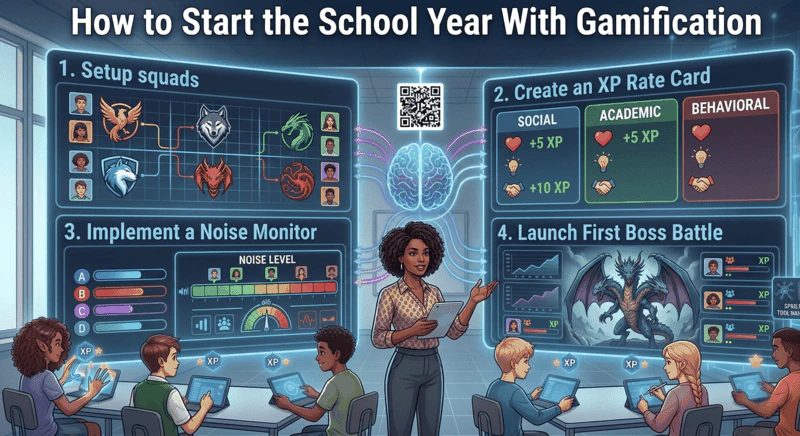
Start gamification in the first week, before routines set. Before day one, build your roster and assign balanced squads yourself. In lesson one, show the scoreboard, publish an XP rate card, introduce the noise monitor and award XP visibly. Run a low-stakes Boss Battle in lesson two or three, then add milestone badges in week two.
The first week of a new school year is the best window you will have all year for building classroom culture. Students arrive with no established patterns, no entrenched expectations about how your class runs, and - briefly - a genuine openness to how things might work. That window closes fast. By week three, routines are set, peer dynamics have calcified, and whatever culture your classroom has will be the culture it has for the rest of the term.
Starting the school year with gamification is not about decorating your classroom with leaderboards or announcing a points system. It is about building structural systems in that first week that will run automatically for the rest of the year - so that engagement and behaviour management do not depend entirely on your energy level every single lesson.
This guide covers the exact setup sequence for the first two weeks, the decisions that matter most, and the failure patterns to avoid. The implementation tool is Class Cortex - free, browser-based, no student accounts, operational in under ten minutes.
Why the First Week of the School Year Is the Only Window That Matters
Secondary students are not passive recipients of classroom culture. They are actively constructing a mental model of how your class works in the first few lessons - what earns respect, what gets ignored, what the real rules are versus the stated ones. By the time you hit week four, that model is largely fixed.
This is why introducing gamification mid-term is so much harder than starting with it from day one. Mid-term, you are asking students to abandon an existing mental model and adopt a new one. That requires overcoming inertia, skepticism, and the social dynamics of a cohort that has already sorted itself into roles. Starting at the beginning of the school year means you are writing on a blank page. The cost of that advantage is that you only get it once.
The setup sequence below is designed to use that window fully. Each step is sequenced deliberately - what to introduce on day one, what to hold back until week two, and what the most common first-week mistakes look like.
Before Day One: The Prep That Takes Ten Minutes
Open Class Cortex before your first lesson with a new class. The only prep required is building the student roster in the Command Deck - enter your student names, assign them to squads, and set your XP rate card. This takes about ten minutes for a class of thirty.
Squad Assignment: The Decision That Shapes the Whole Term
Class Cortex uses up to six squads - ALPHA, BRAVO, CHARLIE, DELTA, ECHO, and FOXTROT - each with their own XP bar on the live scoreboard. How you assign students to squads in the first week will determine whether the competition stays live all term or whether one squad pulls away in week two and kills the dynamic.
Do not let students self-select. Self-selection produces friendship groups, which produces uneven squads. The dominant social group in a class will cluster together and almost certainly produce the dominant squad, which means everyone else is competing for second place by lesson three.
Do distribute performance levels evenly. If you know your class from a previous year, use that knowledge. If it is a new cohort, use whatever data you have - prior achievement, teacher reports, gut instinct. Aim for each squad to have a similar spread of high, middle, and emerging performers. Review the assignments after week two and adjust if the competition has become unbalanced.
Do keep squads at five to six students in a class of thirty. Too small and a single absence collapses a squad's capacity. Too large and individual contribution feels invisible.
Day One: Announce the System, Set the XP Rate Card
The first lesson is where the culture gets established. You have roughly fifteen minutes of genuine student attention before the initial novelty starts fading - use it on the two things that matter most: announcing the squad structure and publishing the XP rate card.
Display the Class Cortex Command Deck scoreboard on your smartboard. Show students their squad assignments. Name the squads out loud. Let the social reaction happen - you want students to start developing squad identity from the first minute, because that identity is what will sustain the competition past the novelty drop.
Then announce the XP rate card - the exact rules for what earns XP in your class. Write it on the board. Be specific. A typical secondary rate card looks like this:
- Correct answer during class activity: 10 XP
- Volunteering an answer (right or wrong): 10 XP
- Submitting work on time: 20 XP
- Presenting or explaining to the class: 20 XP
- Outstanding contribution (teacher discretion): 30-50 XP
- Quiet Streak bonus: automatic +10 class XP for every 30 seconds of sustained quiet
The transparency is important. Students invest in systems they understand. A point system where the teacher awards XP at their own discretion without explicit rules is perceived as arbitrary and loses credibility fast. A published rate card that is applied consistently is perceived as fair - and secondary students will notice if you deviate from it.
Award XP visibly in the first lesson. Find reasons to give it out. The scoreboard needs to be moving from day one, not sitting empty for a week while you decide whether the system is working.
Day One: Introduce the Noise Monitor
The Sonic Defence noise monitor is the behaviour management layer of the gamification system and it needs to go in on day one - not week two, not after students have established a pattern of talking over you.
Calibrate the microphone to your room's baseline noise level in the first lesson. Show students the threshold indicator on the smartboard. Explain the mechanic clearly: when the room exceeds the threshold, the alarm fires and an audio cue plays. On Pro, XP is automatically deducted from the class scoreboard with no teacher intervention required. On the free tier, the visual alarm and Quiet Streak bonus XP run automatically. Then let them watch it fire once. A controlled demonstration in the first lesson is worth more than ten teacher warnings in week three.
The Quiet Streak tracker awards bonus XP for every 30 seconds the room stays below the threshold. Announce this at the same time as the penalty. Students who understand that quiet earns XP respond differently to the noise monitor than students who only know it as a penalty system. The combination of automatic consequence and automatic reward creates a self-regulating dynamic that transfers the behaviour management burden from you to the peer group within a week.
For a detailed breakdown of how the noise monitor works across different tools and configurations, see the free classroom noise monitor comparison.
Day Two or Three: First Boss Battle
Run the first Boss Battle in the second or third lesson - not the first. The first lesson is for establishing the system. The second or third lesson is when students have just enough squad identity to make the multiplayer format feel meaningful rather than random.
Students join at classcortex.com/join via QR code on any device. No accounts, no app, no friction. The teacher reveals questions, students answer on their devices, correct answers deal damage to the boss on the smartboard, and the class's combined accuracy decides how hard each hit lands. The first Boss Battle does not need to be high-stakes content - use it to teach the format. The content can be a review of something students already know. The goal is for every student to experience the mechanic and understand how it connects to the XP system that was announced on day one.
After the Boss Battle, update the squad scoreboard with the XP earned and show it on the board. The link between the live multiplayer event and the persistent scoreboard needs to be visible from the first time students play. That connection is what separates Boss Battle from a standalone quiz game. For a full guide on running Boss Battles effectively, see how to run a Boss Battle in your classroom.
Week Two: The Novelty Drop and What to Do About It
Between weeks two and three, engagement with a new classroom system almost always drops. This is not a sign that the system is failing - it is a predictable consequence of the novelty effect wearing off. The question is whether your system has structural depth that keeps students invested once the initial excitement is gone.
Systems that die at this point share a common feature: the only reason to stay engaged was novelty. When novelty fades, there is nothing underneath it. Systems that survive the novelty drop have progressive accumulation - XP that has been growing for two weeks and represents a real investment students do not want to abandon.
In week two, do two specific things. First, reference the accumulated XP totals directly. Show students how far each squad has come in two weeks. Point out which students have the most individual XP. Make the accumulation visible and meaningful. Second, introduce the CC-Achieve milestone badges - the long-term XP thresholds that unlock across the term and the year. Give students a visible goal to aim for beyond the weekly squad competition. This is also a good moment to point students toward the Neural Core Economy - the ability to spend their own banked XP on avatars in the Achievements tab, kept forever once bought - since it gives the long loop a tangible thing to save up for, not just a number climbing. The combination of a short loop (daily XP), a medium loop (weekly squad rankings), and a long loop (term-length badges and avatars) is what keeps the system alive past week three.
Week-by-Week Setup Sequence
- Before day one: Build class roster in Command Deck, assign squads (distribute performance levels evenly, no self-selection), set XP rate card.
- Lesson one: Display scoreboard on smartboard, announce squad assignments, publish XP rate card on board, calibrate and introduce noise monitor, award XP visibly for the first time.
- Lesson two or three: Run first Boss Battle on low-stakes review content, update scoreboard publicly after the battle, reinforce the connection between the live event and the persistent XP system.
- Week two: Reference accumulated XP totals, introduce CC-Achieve milestone badges and long-term thresholds, review squad balance and adjust if one squad has pulled significantly ahead.
- Ongoing: Award XP consistently using the published rate card, let the noise monitor run without intervening manually, run Boss Battles at a cadence that keeps them feeling like events rather than routine. Every four to six lessons is a sustainable frequency for most secondary classes.
The Most Common First-Week Gamification Mistakes
Introducing too much at once. The scoreboard, the noise monitor, Boss Battle, the seating map, the whiteboard, and the timer all in lesson one is overwhelming. Students need to understand the XP economy and the squad competition before anything else. Add tools progressively across the first two weeks.
Not awarding XP in the first lesson. A scoreboard that sits at zero for the first week sends the signal that the system is not real. Award XP for something in lesson one, even if it is just for listening to the instructions. Make the numbers move from the first day.
Letting the noise monitor slide. If the noise monitor fires and nothing happens - because you are mid-explanation and cannot deal with it - students learn that the system has exceptions. On Pro, the whole point of the automatic XP deduction is that it fires regardless of what you are doing. Trust it. Do not override it in the first week when the norms are being established.
Choosing squads based on friendship groups. This is the single most common first-week mistake. Self-selected squads produce uneven competition and destroy the emotional engagement layer of the system within a fortnight. For more on how squad design shapes long-term engagement, see the full guide to gamifying your classroom without losing control.
Abandoning the system before the structural benefits kick in. The week-two novelty drop feels like failure but is actually normal. The structural benefits of the gamification system - peer self-regulation, reduced need for teacher intervention on noise, sustained investment in the XP economy - take three to four weeks to become fully visible. If the system is set up correctly, hold the course through the novelty drop. The classroom culture shift that follows is worth it.
The five most common first-week mistakes, why they hurt, and what to do instead.
| Mistake | Why it hurts | Do this instead |
|---|---|---|
| Introducing too much at once | Overwhelms students | Add tools across two weeks |
| No XP in the first lesson | System does not feel real | Award XP visibly on day one |
| Letting the noise monitor slide | System seems to have exceptions | Let it run, no overrides |
| Friendship-group squads | Uneven competition | Teacher-assign balanced squads |
| Quitting at the novelty drop | Benefits take three to four weeks | Hold the course |
No student accounts. No credit card. No install.
Frequently Asked Questions
When is the best time to introduce gamification in the classroom?
The first week of a new school year or term is the ideal time to introduce classroom gamification. Students arrive with no established routines and no entrenched expectations about how your class runs - which means you can define the culture before default patterns take hold. Introducing gamification mid-term requires breaking existing habits, which is significantly harder than setting norms from day one.
How do you set up squads for classroom gamification?
Assign students to squads yourself rather than letting them self-select. Distribute high, middle, and lower-performing students evenly across all squads so no single squad becomes dominant in the first week. In Class Cortex, up to six squads run automatically - ALPHA through FOXTROT - each with their own XP bar displayed on the class scoreboard. Aim for five to six students per squad in a class of thirty. Announce squads publicly and display them on the board so the competition is visible from lesson one.
Why do gamification systems fail after the first few weeks?
Most gamification systems fail because they rely entirely on novelty. When the initial excitement of a new system wears off - typically around weeks two to four - there is no structural reason for students to stay invested. Systems that last share three design features: persistent accumulation (XP that grows across every lesson gives students a stake in tomorrow), social stakes (squad competition means individual disengagement has a team cost), and periodic high-stakes events (Boss Battles and milestone rewards create memorable peaks that reset engagement).
How do I introduce the noise monitor to students on day one?
Make the Sonic Defence noise monitor visible and explain the mechanic explicitly in the first lesson. Show students the threshold indicator on the smartboard, tell them what happens when it fires - a visual alarm, an audio cue, and on Pro, automatic XP deduction from the class scoreboard - and let them watch it trigger once. Students self-regulate far more effectively when they understand the mechanic clearly. The Quiet Streak tracker, which awards bonus XP for every 30 seconds of sustained quiet, should be announced at the same time so students see both the consequence and the reward.
How quickly can I set up Class Cortex for a new class?
A full Class Cortex setup for a new class - adding students to the roster, assigning squads, and configuring the noise monitor threshold - takes under ten minutes. The app runs in any browser with no installation required. Students require no accounts for any feature including Boss Battles, which they join by scanning a QR code at classcortex.com/join. There is no IT approval process and no school administrator setup required. You can have the full system running before the end of your first lesson with a new class.
Further Reading