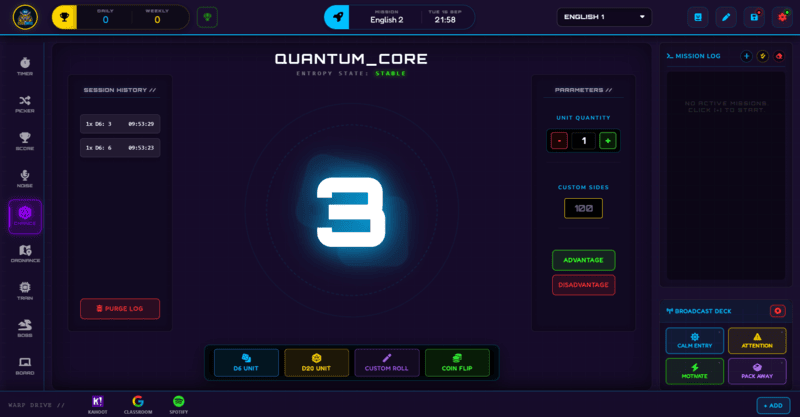
Chance is the Class Cortex dice and coin engine - D6, D20, and custom-sided rolls, coin flips, and D20 advantage/disadvantage, all logged with a timestamped history.
Some classroom moments call for genuine, visible randomness - deciding who goes first, resolving a tie, running a probability lesson, or adding a bit of chance to an activity. Chance covers all of it with a dedicated dice-and-coin engine: standard six and twenty-sided dice, a custom-sided option for anything else, and a coin flip, all with an animated roll so the result feels earned rather than just appearing on screen.
This guide covers the roll types, rolling multiple dice at once, and the advantage and disadvantage modifiers borrowed from tabletop RPG mechanics.
What Chance Does
Four roll types are available: D6 UNIT for a standard six-sided die, D20 UNIT for a twenty-sided die, CUSTOM ROLL for any number of sides you need, and COIN FLIP for a straightforward heads-or-tails call. Roll 1 to 10 dice at once, with the total calculated automatically so you never have to add them up yourself.
On D20 rolls specifically, you can toggle ADVANTAGE (roll twice, keep the higher result) or DISADVANTAGE (roll twice, keep the lower result) - a familiar mechanic if you or your students have played tabletop games, and a useful way to weight an outcome without making it feel rigged. Every roll is logged with a timestamp in Session History, which you can clear at any time with PURGE LOG.
How to Use Chance: Step by Step
Running a roll takes four steps.
- Pick a roll type
Choose D6 UNIT, D20 UNIT, CUSTOM ROLL, or COIN FLIP depending on what the activity needs.
- Set how many dice to roll
Roll 1 to 10 dice at once - the total is calculated automatically, so multi-dice checks do not require any mental maths mid-lesson.
- Apply Advantage or Disadvantage if it is a D20 roll
Toggle ADVANTAGE to roll twice and keep the higher result, or DISADVANTAGE to roll twice and keep the lower - useful for weighting an outcome in a game-based activity.
- Check Session History if you need the record
Every roll is logged with a timestamp automatically. Use PURGE LOG to clear the history once you are done with it, ready for the next class.
Classroom Use Cases
Chance is small but genuinely versatile across a few different classroom situations:
- Probability and statistics lessons, where multiple real dice rolls with a visible, logged history give students actual data to work with rather than a hypothetical example.
- Deciding order, teams, or a tie-break with a coin flip or die roll the whole class can see happen, rather than a decision that could look like it came from you.
- Game-based activities using the D20 mechanics, including Advantage and Disadvantage, for anything modelled loosely on tabletop RPG rules.
No Spinning Wheel - It Is a Dice and Coin Engine
If you are looking for a spinning probability wheel specifically, that is not what Chance is - it is built around dice (D6, D20, and custom-sided) plus a coin flip, not a wheel with weighted segments. For most classroom randomness needs - picking outcomes, running probability lessons, deciding order - the dice and coin mechanics cover the same ground with a visible, logged roll history built in.
How Chance Ties Into the XP Economy
Chance does not award or deduct XP on its own - like the Timer and Scoreboard, it is a pure utility panel that sits outside the XP economy.
Where it connects to XP is through however you choose to use a roll's outcome - for example, awarding a manual XP bonus through Command Deck to whichever squad wins a coin flip tie-break, or using a D20 roll to determine a reward multiplier for an activity you have set up separately.
Free vs Pro: What's the Difference?
Every roll type, the multi-dice total, Advantage and Disadvantage, and Session History are all available on Free - Chance has no Pro-gated mechanics of its own.
| Chance Capability | FREE | PRO |
|---|---|---|
| D6, D20, custom, and coin flip rolls | Included | Included |
| Advantage / Disadvantage and Session History | Included | Included |
| Number of class slots to run it in | 1 class | 12 classes |
No student accounts. No credit card. No install.
Frequently Asked Questions
Is there a spinning probability wheel in Class Cortex?
Chance is built around dice and a coin flip - D6, D20, a custom number of sides, and heads-or-tails - rather than a spinning wheel with weighted segments. It covers the same classroom randomness needs through rolls instead.
How many dice can I roll at once?
Between 1 and 10 dice in a single roll, with the total calculated automatically so you do not need to add up multiple results yourself.
What do Advantage and Disadvantage do?
Both apply to D20 rolls specifically. Advantage rolls the die twice and keeps the higher result; Disadvantage rolls twice and keeps the lower result. It is a way to weight an outcome slightly without removing the randomness entirely.
Is Session History saved permanently?
Every roll is logged with a timestamp for the current session, and you can clear it at any time using PURGE LOG. It is a running log rather than a long-term permanent archive.
Does Chance require Pro for any of its features?
No. Every roll type and modifier in Chance is available on the Free tier - Pro's relevance here is only the general class-slot limit, not any Chance-specific mechanic.
Further Reading