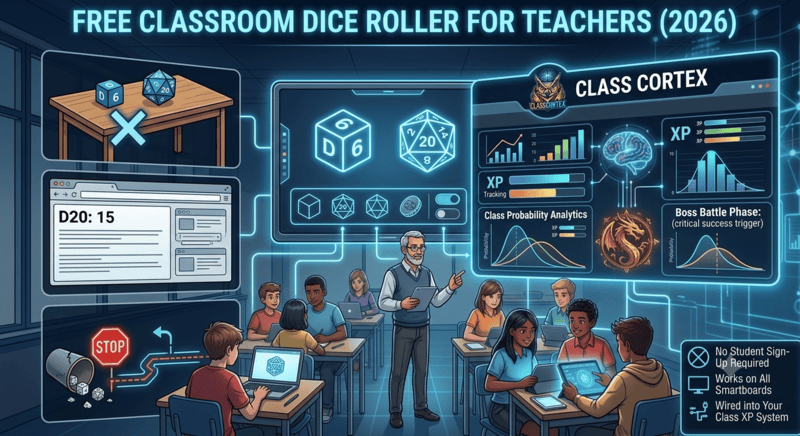
A physical die has one problem in a classroom: nobody past the third row can see the result. Rolling on a desk, calling out the number, writing it on the board - it works, but it is slow, it is error-prone, and it does not create a moment. A classroom dice roller on the smartboard is a different experience entirely. The whole class watches the same display, the result lands simultaneously for everyone, and the theatrical elements - a critical hit on a natural 20, confetti firing, the entropy HUD flickering to UNSTABLE_FLUX before settling - turn a simple random number into a classroom event.
Teachers use dice in the classroom for more activities than they often realise: probability lessons, random student selection, gamified review, bonus XP events, activity sequencing, and tiebreakers in competitive activities. A digital classroom dice roller handles all of these formats with more flexibility than physical dice, no risk of dice rolling off desks, and results that are always visible from every seat in the room.
The Probability Engine in Class Cortex is the classroom dice roller built specifically for this context. It sits inside the same browser tab as your class scoreboard, noise monitor, and student picker - which means you can award XP directly from a dice result without switching tabs or breaking lesson flow. If you want a broader look at the random selection tools available alongside the dice roller, see our guide on the free random student picker, which covers the student selection mechanic that pairs naturally with dice-based activities.
What the Class Cortex Probability Engine Includes
The Probability Engine is not just a D6 roller with a digital skin. It is a full suite of randomisation tools designed for the variety of situations teachers actually encounter in the classroom, from quick coin flips to multi-dice probability experiments.
Standard six-sided die. Fastest format for simple random events and everyday classroom randomisation.
Twenty-sided die with critical hit detection. Natural 20 fires confetti and a level-up sound. Natural 1 triggers alarm and critical failure toast.
Any number of sides from 2 to 10,000. Build a D7, D13, or D100 for probability experiments beyond standard polyhedra.
Instant heads or tails. Clean tiebreaker format for competitive activities or binary classroom decisions.
Roll up to 10 dice simultaneously with auto-total. Essential for probability distribution activities and multi-dice bonus XP events.
Roll twice, keep highest (advantage) or lowest (disadvantage). Borrowed from tabletop RPG mechanics - works as a reward or handicap layer.
Beyond the dice types, two features set the Probability Engine apart from generic online dice rollers. The entropy HUD displays the current randomisation state - cycling through UNSTABLE_FLUX before each roll and settling to STABLE after the result lands. It is a visual detail that adds genuine suspense to the roll for a watching class. The timestamped roll history logs the last 10 results with timestamps, which is useful for probability lessons where students are recording outcomes over multiple trials without needing a separate data entry step.
How to Use a D20 Classroom Dice Roller
The D20 is the most versatile format for classroom use because its range - 1 to 20 - is wide enough to create genuine uncertainty and allow for meaningful variation in outcomes, without being so large that most results feel arbitrary. Here are the formats that work consistently well across subject areas.
D20 classroom activity formats
- Bonus XP roll: When a student gives an excellent answer, let them roll the D20 and add the result to their XP total. Turns individual recognition into a class moment - the whole room watches to see if they land a natural 20 and trigger the critical hit effect.
- Random topic selector: Assign numbers 1-20 to revision topics, question sets, or activity types. Roll to determine what the class works on next. Removes the perception of teacher favouritism in topic sequencing and adds an element of controlled randomness students enjoy.
- Squad challenge decider: When two squads are tied on XP, a D20 roll-off determines which squad wins a bonus or gets to go first in a competitive activity. Clean, indisputable, theatrical.
- Consequence roll: In gamified lessons, a D20 roll can determine whether a Boss Battle boss gets a special attack, whether a Neural Training bonus round unlocks, or what the multiplier on XP for the next question is. Keeps the lesson unpredictable without requiring teacher preparation.
- Student selection: Assign row or table numbers and roll a D20 to select which group answers next. Pairs well with the random student picker for individual selection within a group.
Advantage and Disadvantage in the Classroom
Advantage and disadvantage mechanics come from tabletop roleplaying games - specifically the mechanic where rolling with advantage means rolling two dice and keeping the higher result, while rolling with disadvantage means rolling two dice and keeping the lower. Class Cortex implements both directly in the Probability Engine.
In classroom terms, advantage is a reward modifier. A squad that has maintained the highest XP for the week might earn advantage on the next bonus XP roll - giving them statistically better odds without guaranteeing an outcome. Disadvantage works as a consequence or balance mechanism - a squad that fell well behind might face disadvantage on a roll-off, or a student who has lost significant HP might roll with disadvantage on the next selection event.
The advantage and disadvantage system also works as a natural maths discussion point. Secondary students studying probability can observe the statistical effect of keeping the higher or lower of two rolls across multiple trials - the Probability Engine's roll history logs make this practical without additional record-keeping.
Using Custom Dice for Maths and Probability Lessons
The custom dice feature - which supports any number of sides from 2 to 10,000 - opens up a range of probability activities that are impossible with standard physical dice sets. A D7 lets students explore non-standard uniform distributions. A D100 works for percentage-based probability events. A D3 (three-sided die) is useful for ternary choice activities. Rolling a custom D37 and asking students to predict the probability of landing on any given number before the roll is a quick mental probability warm-up that requires no materials and takes under two minutes.
Multi-roll mode compounds this further. Rolling 10 D6 dice simultaneously and recording the total gives students an empirical data point for exploring the central limit theorem at senior secondary level - the distribution of totals across many multi-rolls will converge toward a bell curve, which is visually demonstrable using the roll history log across a class period. No spreadsheet required, no physical dice to collect and count. For a dedicated look at the full range of probability and randomisation tools available for classroom use, see our guide on the free probability wheel and dice roller for teachers, which covers the broader landscape including spinner-based tools.
The Dice Roller Within the Classroom System
The practical advantage of the Class Cortex Probability Engine over standalone dice roller websites is that it lives inside your classroom management system. You are not switching between a dice roller tab and your scoreboard tab and your seating map tab. The Probability Engine, the Command Deck, the noise monitor, the student picker, and the whiteboard all run simultaneously in the same interface.
This matters for lesson flow. When a student rolls a natural 20 on a bonus XP event, you can award the XP directly on the Command Deck without navigating away from the dice result. When a D20 roll selects a topic and you want to note which squad answered correctly, the scoreboard is immediately accessible. The Sonic Defence Noise Monitor runs in the background throughout - on the free tier, the Quiet Streak tracker rewards 30 seconds of silence with bonus XP, and the visual alarm fires if the class gets too loud during the excitement of a dice roll. Pro users get Noise Auto-Penalty mode, which deducts XP automatically if noise breaches the threshold without any teacher action needed.
Everything in one tab is a small thing that compounds significantly over the course of a term. The fewer tools you are managing, the more attention is available for the students.
No sign-up. No install. Works on any smartboard.
Frequently Asked Questions
What is the best free classroom dice roller for teachers?
The Class Cortex Probability Engine is the best free classroom dice roller for teachers. It includes D6, D20, custom-sided dice from 2 to 10,000 sides, coin flip, multi-roll up to 10 dice with auto-total, advantage and disadvantage modifiers, critical hit detection on D20, and a timestamped roll history log of the last 10 results. No sign-up required, works on any smartboard, and sits inside the same tab as your class scoreboard and other tools.
How do you use a D20 dice roller in the classroom?
A D20 classroom dice roller works well for bonus XP events, randomised student selection, activity topic sequencing, squad tiebreakers, and gamified consequence rolls. Roll to determine who answers a question, how many bonus XP points a correct answer awards, or which topic the class revises next. In Class Cortex, a natural 20 triggers confetti and a critical hit sound effect - a theatrical moment that secondary students respond to immediately.
What is advantage and disadvantage in a classroom dice roll?
Advantage means rolling two dice and taking the higher result - used to reward a student or squad with a better-than-average outcome. Disadvantage means rolling two dice and taking the lower result - used as a consequence or to balance a competitive activity. Both modifiers are built into the Class Cortex Probability Engine. They add a strategic layer to dice-based classroom activities without requiring any teacher calculation - the tool auto-selects and displays the relevant result.
Can a classroom dice roller work for maths lessons?
Yes. A classroom dice roller is a natural fit for probability and statistics lessons. Rolling D6 dice repeatedly and recording outcomes covers experimental probability. Multi-roll mode with auto-total works for expected value and distribution activities. Custom dice with non-standard side counts let students explore theoretical probability beyond standard 6-sided dice. The timestamped roll history in Class Cortex lets students record a sequence of rolls without separate data entry.
Does the Class Cortex dice roller work on a smartboard?
Yes. The Class Cortex Probability Engine is a browser-based tool designed to display on any smartboard or projector connected to the teacher's device. No install, no sign-up, no app required. Open classcortex.com/app in Chrome, navigate to the Probability Engine, and it is ready immediately. Results display at a size clearly visible from the back of a standard classroom.
Further Reading