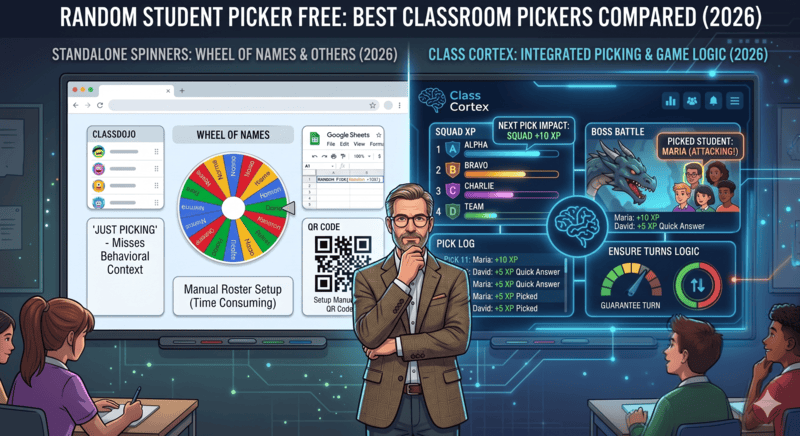
Every teacher knows the problem. You ask the class a question, you want to pick someone at random, and whatever tool you reach for either calls on the same kid twice in a row or requires you to stop, open a new tab, type in names, and spin a wheel that has no idea which students have already had a turn today.
A random student picker sounds simple. In practice, most free options fall short of what classroom use actually demands - a persistent roster, fair rotation, and ideally some connection to the gamification system that makes participation feel meaningful.
This guide covers the most commonly used free student pickers in 2026, explains exactly what each one does and does not do, and identifies which one is genuinely built for the classroom rather than repurposed from a generic list-spinner.
What a Classroom Student Picker Should Actually Do
Before comparing tools, it helps to define the standard. A spinner that picks a random name is the lowest bar. A classroom student picker that genuinely serves teachers needs to do more:
- Pull from a saved class roster - not require name entry every session.
- Guarantee no repeats until every student has been picked - true fairness, not statistical probability.
- Run alongside the rest of your classroom tools - not require a separate tab or app switch mid-lesson.
- Connect to consequences - ideally, a correct answer should trigger an XP award without the teacher leaving the picker.
With that standard set, here is how the main free options stack up. For context on how the XP side of this works in practice, our guide on how to use XP in the classroom covers the full system.
1. Wheel of Names (wheelofnames.com)
Wheel of Names is the dominant search result for "random name picker" and it does exactly what it says. You enter a list of names, spin the wheel, and it picks one at random with a satisfying animation. It is free, requires no account, and works instantly in any browser.
The limitations become apparent the moment you try to use it as a genuine classroom tool. There is no saved roster - you re-enter names every session. There is no no-repeat guarantee - the spinner can and does land on the same name consecutively because it picks truly at random from the full list each time. And there is zero connection to any classroom management system; it is a standalone spinner with no awareness of XP, squads, or participation history.
For a one-off decision - picking which group presents first, choosing a random prize winner - Wheel of Names is perfectly adequate. For daily classroom questioning, it is the wrong tool. For dice, coin flips and weighted spins, see our free probability wheel and dice roller guide.
Verdict: Great for one-off decisions. Not a classroom questioning tool.
2. Google's Built-in Random Picker
Searching "random name picker" in Google returns a built-in spinner directly in the search results. It works similarly to Wheel of Names - enter names, spin, get a result. It requires no account and no install.
The Google picker has the same fundamental limitations: no saved roster, no no-repeat logic, no classroom integration. It is marginally more convenient than navigating to a separate site, but the feature set is identical to a basic spinner. It also disappears the moment you close the search tab, leaving no persistent state whatsoever.
Verdict: Convenient for a quick one-off. No classroom utility beyond that.
3. ClassDojo's Student Picker
ClassDojo includes a random student selector as part of its broader platform. Because ClassDojo has a class roster built in, the picker does pull from actual student names rather than requiring manual entry each session - which is a genuine step up from standalone spinners. For the full head-to-head, read ClassDojo vs Class Cortex.
The friction is the platform itself. ClassDojo requires student accounts, which adds IT overhead and is frequently impractical in secondary schools with strict privacy policies. Its primary design focus is Years K-6, and its mobile performance score reflects a bloated platform (43 on mobile, 10MB payload, failed Core Web Vitals). For secondary teachers - or any school where student account creation is restricted - the picker is gated behind a setup process that may not be worth it for a single feature. Our ClassDojo alternative for secondary teachers covers this in full.
Verdict: Better roster integration than standalone spinners, but requires student accounts and a primary-focused platform most secondary teachers will not want.
4. Class Cortex - Student Picker
Class Cortex's Student Picker was built as a classroom tool from the ground up, not as a generic list randomiser given a school-friendly name.
How the Class Cortex Student Picker works:
- Built from your class roster: The picker pulls directly from the class list you have already set up in Class Cortex. No name entry required at the start of each lesson - open it and it is ready.
- No repeats until the roster is empty: Every student is selected before anyone is picked twice. This is genuine fairness - not probability-based randomness where the same student can be called on back-to-back. Once every student has been selected, the pool resets and the cycle begins again.
- Integrated with the XP system: When a student is picked and answers correctly, the teacher can award XP directly from the picker without switching tools or tabs. The XP goes straight into the Command Deck squad system - the same leaderboard that drives squad competition, weekly goals, and Boss Battle eligibility.
- Runs in the same tab as everything else: The picker is one of ten tools running inside Class Cortex. Switching from the timer to the picker to the scoreboard requires no tab changes, no loading screens, and no context switching. It is all in one place.
- No student accounts required: The roster is entered and managed by the teacher. Students never touch the system for the picker to function.
- Picker Exempt for cold call anxiety: A teacher can mark a specific student as exempt so they are never actually selected - but the pick animation still visually cycles through every name in the roster exactly as normal, so the rest of the class has no way to tell that student is excluded. Built for genuine anxiety cases where cold calling itself is the problem, not the fairness of the system around it.
Cold calling has a well-documented anxiety problem alongside its well-documented fairness benefits. Research on classroom participation has found that students called on at random report lower anxiety than students singled out directly by a teacher, largely because a visibly random system removes any perception of being targeted. But averages hide the exception: a student with genuine cold call anxiety does not experience a random picker as neutral, they experience it as a countdown to being put on the spot with no way to opt out. Most advice for this problem asks the teacher to quietly work around the tool - skip that student, remember not to click their name, hope nobody in the room notices the pattern. Picker Exempt removes the workaround entirely. Mark the student exempt once, and the picker simply can never land on them, while the visual cycle still shows their name flashing past like everyone else's. No other free random student picker offers anything like it - Wheel of Names, Google's built-in picker, and ClassDojo's selector all treat the roster as one undifferentiated pool.
The critical difference between Class Cortex and every other option on this list is that the picker is not a standalone tool. It is woven into the same gamified classroom management system that includes the noise monitor, the squad scoreboard, the Boss Battle, and the Training Sim games. Picking a student is not just an administrative act - it is a moment that can earn or cost XP, and students know it. That stakes dynamic is what makes the picker feel meaningful rather than mechanical.
If you want to understand how gamification underpins all of this, read our guide on how to gamify your classroom without losing control.
Side-by-Side Comparison
| Feature | Class Cortex | Wheel of Names | Google Picker | ClassDojo |
|---|---|---|---|---|
| Saved class roster (no re-entry) | ✓ | ✗ | ✗ | ✓ |
| No repeats until roster is empty | ✓ | ✗ | ✗ | ✗ |
| XP / gamification integration | ✓ | ✗ | ✗ | Partial |
| No student accounts required | ✓ | ✓ | ✓ | ✗ |
| Part of a full classroom management suite | ✓ | ✗ | ✗ | Partial |
| No tab switching mid-lesson | ✓ | ✗ | ✗ | Partial |
| Exempt a student from being picked (anxiety-safe) | ✓ | ✗ | ✗ | ✗ |
| Completely free | ✓ | ✓ | ✓ | ✓ |
The Verdict
Wheel of Names and Google's built-in picker are the right tools when you have a one-off decision to make and no class roster to draw from. They are fast, free, and require nothing. For that narrow use case, they are perfectly fine.
For daily classroom questioning - where fairness, roster memory, and connection to your broader management system matter - neither spinner comes close to what Class Cortex delivers. The no-repeat guarantee alone is a meaningful improvement over probability-based randomness, and the XP integration turns a mundane administrative act into a moment students are actually engaged by.
ClassDojo's picker is a step forward on roster integration, but the account requirement and primary-school focus make it a poor fit for most secondary teachers. Class Cortex requires no student accounts, runs in the same tab as your timer, scoreboard, and noise monitor, and is completely free to start.
No student accounts. No credit card. No install.
Frequently Asked Questions
What is the best free random student picker for teachers?
Class Cortex's Student Picker is the best free random student picker for classroom use. It draws from your saved class roster, guarantees no student is picked twice before everyone has had a turn, integrates directly with the XP system, and runs alongside every other Class Cortex tool in a single tab - no switching required.
Does Wheel of Names work as a classroom student picker?
Wheel of Names works as a one-off spinner but is not a true classroom student picker. It has no saved roster, no no-repeat tracking, and no integration with any classroom management or XP system. You re-enter names every session and the spinner can land on the same student consecutively because it picks at random from the full list each time.
What does 'no repeats until roster is empty' mean?
Class Cortex's Student Picker cycles through every student before any student is selected twice. Once picked, a student is removed from the active pool until everyone else has had a turn. When the pool is empty, it resets and starts again. This guarantees fair participation rotation rather than relying on statistical probability, which can and does result in the same students being selected repeatedly.
Can the student picker award XP in Class Cortex?
Yes. The Student Picker is integrated with the Command Deck XP system. When a selected student participates correctly, the teacher can award XP directly from the picker without switching tools. The XP flows into the squad leaderboard immediately, keeping the gamification loop tight and visible to the class in real time.
Is there a random student picker that works without student accounts?
Yes. Class Cortex requires no student accounts at all. The class roster is entered by the teacher and stored in browser localStorage. Students never log in, create profiles, or interact with the platform for the picker to work. This is built with COPPA and GDPR principles in mind and removes all IT overhead associated with account-based tools like ClassDojo.
Can I stop a random picker from selecting a specific student with cold call anxiety?
Yes, with Class Cortex's Picker Exempt feature. Mark a student as exempt and they will never actually be selected, but the pick animation still cycles through their name visually along with everyone else's roster, so the rest of the class cannot tell that student has been excluded. It is built specifically for genuine cold call anxiety, where the goal is to remove the risk of being called on without singling the student out socially. No other free random student picker - including Wheel of Names, Google's picker, or ClassDojo - offers an equivalent option.
Further Reading
- The Best Gamified Classroom Management Tool With No Student Logins
- How to Gamify Your Classroom Without Losing Control
- ClassDojo Alternative for Secondary Teachers: Why ClassDojo Fails Year 7+
- How to Use XP in the Classroom: A Practical Teacher's Guide
- Class Cortex vs Classroomscreen: Which One Actually Gamifies Your Classroom?