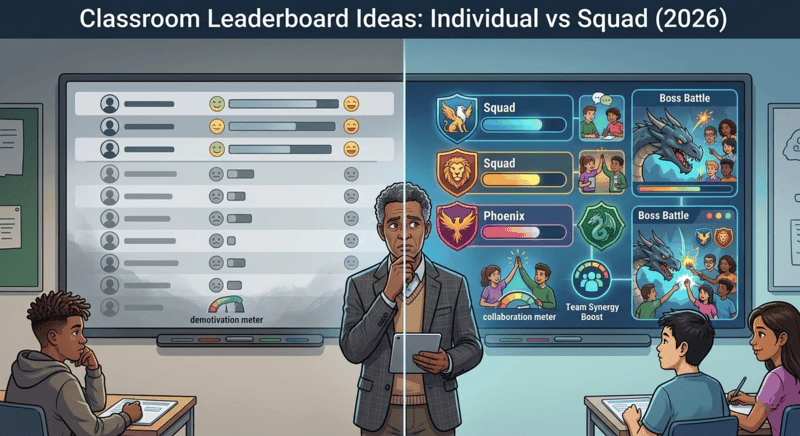
Rank squads, not individuals. An individual leaderboard motivates the few students near the top and tells everyone else they are losing. A squad leaderboard groups students into balanced teams with a shared XP bar, so every student's points help their team win, the gap between first and last stays small, and peer accountability works in your favour.
The appeal of a classroom leaderboard is obvious. Competition motivates. Visibility creates accountability. And watching a score go up on a public display produces a dopamine response that more than a century of game design has confirmed is real and powerful.
The problem is that most classroom leaderboard ideas are designed in a way that makes them motivating for roughly the top twenty percent of the class and actively demotivating for everyone else. An individual leaderboard in a class of thirty students means twenty-five students are not in the top five. Most of them know within two weeks whether they can get there. Once they have decided they cannot, the leaderboard stops being an engagement mechanism and starts being a daily reminder that they are losing.
This guide covers the specific design problems with individual classroom leaderboards, why squad leaderboards solve them, and how to implement a classroom leaderboard system that keeps every student invested - including the ones at the bottom. The implementation tool is Class Cortex, free, no student accounts required.
The Problem With Individual Classroom Leaderboards
Individual leaderboards feel fair because they measure everyone by the same standard. The student who contributes the most earns the most XP. The ranking reflects real differences in participation. What could be more equitable?
The issue is not the fairness of the measurement. It is what happens psychologically when students can see exactly where they sit relative to everyone else in the room, every lesson, all term.
Why Individual Leaderboards Demotivate the Bottom Half
- The gap becomes permanent fast. High-performing students earn XP more frequently because they participate more. This means the gap between top and bottom widens every lesson. By week three, the students at the bottom of an individual leaderboard are so far behind that no realistic level of effort in a single lesson would make a visible difference. The rational response is to stop trying.
- Public ranking exposes social vulnerability. Secondary students are acutely sensitive to peer perception. Being publicly ranked near the bottom of a classroom leaderboard does not create motivation to improve - it creates motivation to disengage before anyone notices you have stopped trying. Disengagement feels safer than visible failure.
- It only measures what it measures. An XP leaderboard based on class participation rewards students who are verbally confident, quick to answer, and socially comfortable in a classroom setting. Students who are strong academically but not participatory, or who are new to the class, or who are going through a difficult period, are penalised structurally. The leaderboard reflects social confidence as much as academic contribution.
- The top performers least need the motivation. The students who will sit at the top of an individual leaderboard are almost always the students who were already engaged. The leaderboard gives them another thing to win. It does nothing for the students who needed an engagement mechanism.
Why Squad Classroom Leaderboards Fix These Problems
A squad leaderboard does not replace individual tracking - it adds a layer above it. In Class Cortex, every student has their own individual XP that is tracked in the Command Deck. But the visible competition on the smartboard is between up to six squads, each with their own XP bar. Individual XP flows into squad totals. The ranking that students care about is the squad ranking, not the individual ranking.
This design shift changes the social mechanics in several important ways.
Every student's contribution is meaningful regardless of individual level. In a class of thirty with six squads of five, a student at the bottom of the individual ranking is still contributing to a squad that can win. Earning 10 XP for answering a question might not move you up the individual standings at all, but it moves your squad closer to first place. That 10 XP matters. The student knows it matters. The squad knows it matters.
The competition stays live for every squad. With balanced squad assignment - distributing high, middle, and lower performers evenly across teams - no single squad should pull so far ahead that the competition collapses. The gap between first and sixth in a squad leaderboard is routinely much smaller than the gap between first and thirtieth in an individual leaderboard. Every squad has a realistic path to winning on any given week.
Social pressure works in your favour. On an individual leaderboard, peer pressure around the bottom rankings is negative - it pushes disengaged students further out. On a squad leaderboard, the same social dynamics become constructive. Squad members remind each other to stay on task because their shared score is at stake. That peer accountability is far more effective than teacher intervention at sustaining effort across a lesson.
Students who are not natural participators find other ways to contribute. A student who will never be first to raise their hand can still earn XP for submitting work on time, for quiet sustained effort (Quiet Streak bonus XP), or for doing well in a Boss Battle where the anonymity of answering on their own device removes the social risk of being visibly wrong in front of the class.
How an individual leaderboard and a squad leaderboard compare on the problems covered above.
| Factor | Individual leaderboard | Squad leaderboard |
|---|---|---|
| Who stays motivated | Top few students | Every squad |
| Gap between first and last | Widens every lesson | Routinely much smaller |
| Peer pressure | Pushes bottom students out | Constructive accountability |
| Quiet or non-participating students | Penalised structurally | Other ways to contribute |
| Value of earning 10 XP | May not change rank | Moves squad closer to first |
How the Class Cortex Squad Leaderboard Works
Class Cortex runs up to six squads - ALPHA, BRAVO, CHARLIE, DELTA, ECHO, and FOXTROT - each with a live XP bar on the main scoreboard display. The scoreboard is designed to be projected on a smartboard and left running throughout the lesson. Students can see the competition at any point.
What Feeds the Squad Leaderboard
- Teacher XP awards: Answering questions, volunteering, presenting, submitting work on time - any XP you award to a student via the Command Deck flows automatically into their squad total on the scoreboard.
- Boss Battle performance: When the class defeats the boss in a live multiplayer Boss Battle, the +100 XP reward goes to the class total, the shared goal every squad is working toward. One strong Boss Battle can shift the leaderboard significantly, which creates a periodic high-stakes event that resets engagement after quieter stretches.
- Quiet Streak bonus: The Sonic Defence noise monitor awards automatic bonus XP for every 30 seconds the class stays below the noise threshold. This XP goes to the whole class, but the squad competition means squads that contribute to the quiet moment are aware that their discipline earns points.
- Noise penalty (Pro): On Pro, when the noise monitor fires - automatically, with no teacher intervention - XP deducts from the class total. Every squad shares the cost, which creates natural self-regulation without the teacher having to say anything. On the free tier, the visual alarm and Quiet Streak reset still creates peer pressure without the automatic deduction.
Individual XP Still Matters - It Just Works Differently
The Command Deck in Class Cortex tracks individual XP and HP per student alongside the squad totals. Individual XP serves a different purpose in this system: it is the long-term progression layer rather than the daily competition layer.
CC-Achieve milestone badges unlock at defined individual XP thresholds - and these thresholds are set at levels where consistent effort over a term is sufficient to reach them, regardless of whether a student is a top performer or an emerging one. A student who contributes regularly at a modest level will hit milestones that a highly capable but inconsistent student might miss. This design means the individual tracking system rewards consistency rather than raw ability, which is the behaviour you actually want to reinforce.
Displaying individual XP totals publicly is optional and should be considered carefully. For classes where the social dynamics make individual comparison uncomfortable, leaving individual XP visible only in the Command Deck - while keeping the squad scoreboard public on the smartboard - gives you the best of both approaches. For the full thinking on how XP systems work in secondary classrooms, see the practical guide to using XP in the classroom.
The Neural Core Economy gives that private individual track a genuine outlet, rather than just a number that climbs. Students spend their own banked XP unlocking avatars in the Achievements tab - a first tier is free for everyone, everything beyond it costs XP, and whatever a student buys is theirs for good even through an XP reset. A student who never cares about the squad leaderboard can still have a real, ongoing reason to keep earning.
Classroom Leaderboard Ideas: Practical Variations
The six-squad model is the default and the most thoroughly tested approach, but there are several variations worth knowing for different classroom contexts.
Weekly Reset vs Cumulative Leaderboard
Cumulative (recommended for most classes): XP accumulates all term without resetting. This creates the long-term investment that makes the system resilient to novelty drop. Students who built their squad's lead over eight weeks are invested in protecting it. Students who are behind have a long runway to make up ground.
Weekly reset (useful mid-term refresh): Resetting squad XP at the start of each week gives every squad a fresh start. This is useful if one squad has pulled significantly ahead and the competition has effectively ended. A weekly reset sacrifices the long-term investment layer but restores a live competition when the cumulative version has stagnated. Using a weekly reset for two or three weeks before returning to cumulative is a practical mid-term intervention when engagement has dipped.
Dual Leaderboard: Squad Competition + Individual Milestone
Running the squad leaderboard as the main visible competition and the individual CC-Achieve badge system as a parallel personal progression track gives students two different things to aim for simultaneously. The squad competition is social and visible. The milestone badges are personal and accumulate quietly. Students who are motivated by individual achievement have a track that rewards them. Students who are motivated by team competition have a track that rewards them. Both feed from the same XP system with no extra administration.
Squad Leaderboard Design Principles That Keep It Running All Term
A squad leaderboard that is set up well in week one requires minimal ongoing maintenance. These are the design decisions that determine whether it stays alive for twelve weeks or collapses at week four.
- Balance squads at setup and review at midterm. Uneven squads are the single biggest leaderboard killer. Assign students yourself rather than letting them self-select, distribute performance levels evenly, and check the balance at the midpoint of term. If one squad has pulled more than thirty percent ahead, adjust squad membership rather than watching the competition die.
- Keep the scoreboard visible during lessons. A leaderboard that students cannot see is not a leaderboard - it is a spreadsheet. The Class Cortex Command Deck scoreboard is designed to sit on the smartboard throughout the lesson. Students reference it constantly when it is visible. When it is hidden, it stops being part of the classroom culture within a week.
- Award XP visibly and immediately. The connection between the action and the scoreboard update needs to be immediate and public. When a student answers a question and sees their squad bar move on the screen, that is the engagement loop closing. Delayed or batch XP awards break the loop.
- Use the noise monitor consequence as a class event, not a teacher correction. On Pro, when the Sonic Defence noise monitor fires and deducts XP from the class total, let it happen without teacher commentary. The peer group will register it. Narrating it breaks the automatic quality of the consequence and returns the authority to you rather than the system.
For the broader engagement framework that the leaderboard sits inside - including how Boss Battles, the noise monitor, and individual XP accumulation all connect - see the student engagement strategies guide for secondary school. And if you are setting up for a new term, the start-of-year gamification setup guide covers the full first-week sequence including squad assignment in detail.
No student accounts. No credit card. No install.
Frequently Asked Questions
Are classroom leaderboards a good idea?
Individual classroom leaderboards have well-documented problems - they motivate the top performers who least need motivating and actively demotivate the students at the bottom who have already decided they cannot compete. Squad leaderboards are a different proposition entirely. When students compete as part of a team rather than as individuals, every student's contribution matters regardless of their individual level, and the competition stays live across the whole class rather than collapsing to a contest between the top three.
How do you set up a classroom leaderboard?
In Class Cortex, the squad leaderboard runs automatically once you assign students to squads in the Command Deck. Up to six squads - ALPHA through FOXTROT - each have their own XP bar displayed on the main scoreboard, which you project on your smartboard. XP awards to individual students flow directly into their squad total. The leaderboard updates in real time and persists across every session without any reset unless you choose to start a new term.
What is the difference between an individual and a squad leaderboard?
An individual leaderboard ranks every student against every other student. In a class of thirty, this means twenty-five students are not in the top five - and most of them know within two weeks that they cannot get there. A squad leaderboard ranks teams of five to six students against each other. Individual contributions still matter and are tracked, but the competition is between six roughly equal groups rather than thirty unequal individuals. This keeps the competition meaningful for students at every performance level.
How do you keep a classroom leaderboard engaging all term?
Three mechanisms sustain leaderboard engagement beyond the initial novelty period. First, persistent accumulation - XP that grows continuously across every lesson gives students a reason to care about today in the context of a longer journey. Second, balance reviews - checking squad assignments at midterm and adjusting for teams that have pulled significantly ahead keeps the competition live. Third, periodic high-stakes events - Boss Battles that feed XP into the class total create memorable peaks that reset investment after quiet periods.
Can I run a classroom leaderboard without student accounts?
Yes. Class Cortex runs a full squad leaderboard with persistent XP, individual tracking, and a live smartboard display with zero student accounts required. The roster and all XP data live in the teacher's browser localStorage - no student ever logs in, creates a profile, or interacts with the system directly. Students see the leaderboard on the smartboard and participate in activities that feed into it, but the data layer is entirely teacher-side.
Further Reading