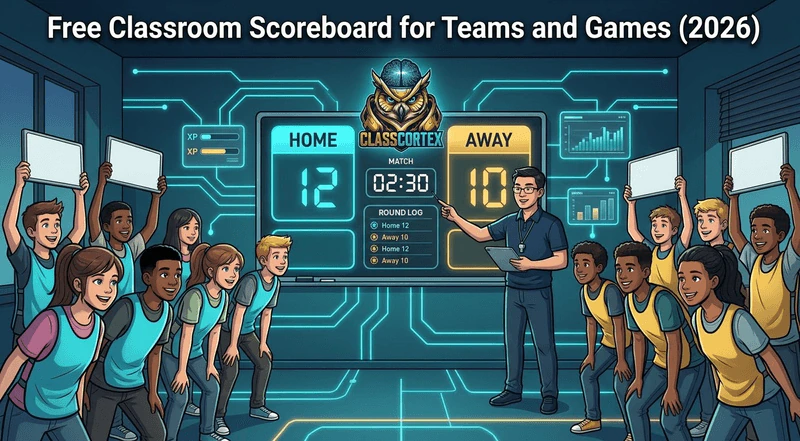
A good classroom scoreboard shows team scores big enough to read from the back row, lets you rename teams, adds or removes points in one tap, and ends the match at a target score or when a timer runs out. Several free options do this in the browser, and the best need no account for you or your students.
Quiz rounds, vocabulary showdowns, debates, PE games, review relays: half of the most energetic lessons in a secondary classroom are some kind of team competition. And in nearly all of them, the score lives in a corner of the whiteboard as a column of tally marks that somebody inevitably disputes.
A digital classroom scoreboard fixes that. It puts the score on the big screen where everyone can see it, makes every point visible the moment it is awarded, and, if it is any good, ends the match cleanly when one team reaches the target. This guide covers what a classroom scoreboard should do, how it differs from a leaderboard, and how the main free options compare in 2026.
What a Classroom Scoreboard Should Do
A classroom scorekeeper has a different job from a sports scoreboard. It runs on a projector or interactive panel at the front of a noisy room, and the teacher operating it is usually doing three other things at once. That gives a short list of things that matter:
- Readable from the back row: large numbers and strong colours, not a small widget in the corner.
- Fast to score: one tap or click per point, and an easy way to take a point back after a disputed answer.
- Team names: students care far more about "Year 9 Blue" than "Team 1".
- A clear finish: a target score or a timer, so the match ends on the rules rather than on the teacher's judgement.
- No student accounts: students only need to see the board, so nobody should have to log in.
Scoreboard, Leaderboard or Team Points?
These three words get used interchangeably, but they solve different problems. A scoreboard scores one match, right now: two or more teams, one activity, a winner at the end. A leaderboard ranks people or squads over weeks, and our guide to the free classroom leaderboard explains why squad-based ones work better than individual rankings. Team points are the term-long system behind a leaderboard, covered in our guide to using team points in the classroom.
This post is about the first one: the scoreboard you put up for a single game. If you want a match result to feed into a term-long system, the trick is to award points to the winning squad afterwards, which the Class Cortex section below explains.
The Free Classroom Scoreboards Worth Using
1. A Whiteboard Tally
It costs nothing and works when the projector does not. The problems are the ones every teacher already knows: students at the back cannot read it, points get rubbed out by accident, and there is no clean way to end a match except announcing that time is up. Fine as a backup, not ideal as the main tool.
2. Classroomscreen Scoreboard
Classroomscreen's Scoreboard widget is free and works without an account. It has three layouts: Home-Away for two teams head to head, Points for multiple teams with custom point values, and Race, where teams move toward a points limit that acts as a finish line. You can rename and recolour teams, reorder them, reset one score or all of them, and turn sounds on or off. It has no match timer or round history of its own, though Classroomscreen has a separate timer widget you can place alongside it. If you already use Classroomscreen, this is the obvious choice, and our roundup of Classroomscreen alternatives covers the wider tool.
3. Leaderboarded
Leaderboarded, from the makers of the KeepTheScore sports scoreboards, builds shareable online leaderboards and trackers. The free plan allows two boards at a time and shows the top 25 participants publicly; it needs a teacher account. Paid plans start at USD $19 for a one-month Plus package (20 boards, 100 participants per board). It suits scores that build up over days or weeks, such as a house competition with a link students can check, more than a fast match at the front of the room.
4. Class Cortex Tactical Scoreboard
The Tactical Scoreboard is one of the tools inside Class Cortex, a free classroom dashboard that runs in the browser with no student accounts. It is built specifically for a match at the front of the room, and every Scoreboard feature is free.
Tactical Scoreboard at a Glance
- Two teams, your names: HOME and AWAY by default, renameable (up to 10 characters), with a button that generates random team names.
- Fast scoring: up and down arrows for each team, plus the scroll wheel or a swipe on a touch panel.
- Target score: set a winning score up to 999 and the match ends with a winner reveal and confetti, or a DRAW if both teams reach it together. Leave it blank for an endless match.
- Match timer: 1, 5, 10, 20 or 30 minute presets or a custom time, with START and pause and a buzzer when time runs out.
- Round log: SAVE ROUND records the score after each round, keeping the last 50.
- Saved per class: scores, names and rounds are remembered for each class, so a match can continue next lesson.
One thing to know: the Scoreboard does not award XP on its own, because a match score and a term-long XP total measure different things. If you run Class Cortex's squad system and want the winners rewarded, award +10 to the winning squad from the Command Deck when the match ends. Our guide to classroom reward tiers shows how squad XP connects to the rest of the system.
Classroom Scoreboard Comparison
| Tool | Account needed | How a match ends | Match timer | Cost |
|---|---|---|---|---|
| Whiteboard tally | None | Teacher calls it | No | Free |
| Classroomscreen | None | Race finish line | Separate widget | Free |
| Leaderboarded | Teacher account | Not match based | No | Free (2 boards), from USD $19 |
| Class Cortex | None | Target score or timer | Built in | Free |
How to Use a Classroom Scoreboard in Lessons
- Quiz rounds: split the room into two teams and alternate questions. Set a target score so the match has a clear end.
- Debates: award points for each well-supported argument and each successful rebuttal, and save a round after each speaker pair.
- Vocabulary or times-table relays: one student per team at a time, a point for each correct answer, with the match timer set to five minutes.
- PE and outdoor games: on a tablet or laptop, the scoreboard travels with you and the buzzer marks the end of each half.
- End of term knockouts: pair squads for knockout rounds and let the winners progress. Our list of end of term classroom activities builds a whole final week around this.
Team competitions get loud, which is why many teachers run the Sonic Defence Noise Monitor alongside the scoreboard. On the free tier it fires a visual alarm and audio cue when the room crosses the threshold, and awards Quiet Streak bonus XP to the class every 30 seconds of quiet; on Pro, Noise Auto-Penalty also deducts class XP automatically, hands-free. Our guide to the free classroom noise monitor explains how to set it up.
Which Classroom Scoreboard Should You Use?
If you want a quick scoreboard in a tool you already use, Classroomscreen's free widget is hard to beat. If you need a public leaderboard that builds over weeks and that students can check from home, Leaderboarded is built for that. If you want a scoreboard designed for a match at the front of the room, with a target score, a timer and a round log, and want it to sit alongside a timer, noise monitor and student picker in the same tab, the Class Cortex Tactical Scoreboard is free and needs no sign-up.
No student accounts. No credit card. No install.
Frequently Asked Questions
Is there a free classroom scoreboard with no sign-up?
Yes. Classroomscreen's Scoreboard widget and the Class Cortex Tactical Scoreboard are both free and work in the browser without an account. Neither needs student accounts either, since students only need to see the board on the projector or interactive panel.
What is the difference between a classroom scoreboard and a leaderboard?
A scoreboard scores a single match right now, with two or more teams and a winner at the end. A leaderboard ranks students or squads over weeks or a whole term. Many teachers use a scoreboard for individual games and then award points to the winning squad on their term-long leaderboard.
Can I set a target score so the match ends automatically?
In Class Cortex you can set a target score up to 999, and the match ends with a winner reveal as soon as one team reaches it, or a draw if both reach it together. Classroomscreen's Race layout works in a similar way, with a points limit that acts as a finish line.
Does the Class Cortex scoreboard award XP to the winning team?
No. The Tactical Scoreboard keeps match scores separate from XP. If you use the Class Cortex squad system and want the winners rewarded, award +10 to the winning squad from the Command Deck after the match.
Can I use a classroom scoreboard on a smart board or interactive panel?
Yes. Browser-based scoreboards run on any interactive panel or projector with a web browser. The Class Cortex scoreboard also supports touch: tap the arrows or swipe to change a score, and use the match timer and buzzer from the same screen.
Further Reading