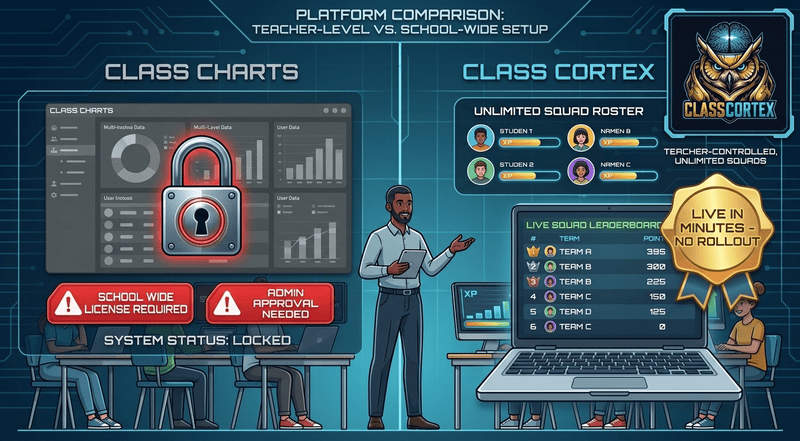
Class Cortex is the strongest Class Charts alternative for a single teacher who wants behaviour tracking and seating plans without a school-wide procurement process. Other genuine alternatives worth knowing about include Satchel One for a whole-school MIS, SIMS Behaviour if your school already runs SIMS, and iDoceo for a single-teacher, one-time-purchase option.
Class Charts, now branded Tes Class Charts after its acquisition, is the dominant whole-school behaviour and seating plan platform in UK and Australian secondary schools. Its influence-based seating tool, two-click behaviour points, parent app, and SIMS sync are genuinely well built, and its integration with sister product Provision Map gives SENCOs a real workflow for tracking SEN plans against pupil profiles. None of that is in question.
What is worth being honest about is who actually gets to use it. Class Charts is sold as a whole-school or Multi-Academy Trust licence with pricing available on request, not a self-serve signup. A single teacher who wants to try it in their own room this week generally cannot - it has to go through school leadership, IT, and a procurement conversation, which can take weeks or months even when everyone agrees it is worth doing.
What "Whole-School Licensing" Actually Means for a Teacher
If your school already has Class Charts, this whole section is moot - use it, it is a strong platform. This post is for the teacher who does not have institutional buy-in yet, or whose school has decided against it, but still wants the core benefits: less admin time recording behaviour, a seating plan that is actually useful, and a system students respond to. For that teacher, the whole-school model is the actual barrier, not the feature set.
Getting Class Charts into a classroom means convincing a head of year or an assistant head that it is worth a budget line, then waiting for IT and data protection sign-off since it syncs with the school's MIS and stores pupil behaviour data centrally. None of that is unreasonable for a school-wide system. It is just a genuinely different process to opening a browser tab and starting. For more on getting a system running without that overhead, see our first day classroom management guide.
Where Class Cortex Fits
Class Cortex covers the same core ground a single teacher actually needs day to day - behaviour tracking and a seating plan - without any of the procurement layer, and adds a gamification system Class Charts does not attempt.
- No admin approval required: A teacher creates a free account and is running it in their own classroom the same lesson. No IT review, no MIS integration, no budget conversation.
- Zero student accounts, zero central data store: All class data lives in the teacher's own browser local storage rather than syncing to a school MIS. For teachers whose schools are cautious about third-party data processors, this removes the review Class Charts' SIMS sync would trigger.
- A gamification layer on top of behaviour points: Persistent XP, 2 to 6 squads, live Boss Battles, and CC-Achieve milestone badges give behaviour tracking a competitive, game-like structure. Class Charts records behaviour cleanly but does not turn it into an ongoing class-wide game. For the reasoning behind why that distinction matters for engagement, see our classroom reward system guide for secondary school.
- An automated noise consequence: The Sonic Defence Noise Monitor fires a visual alarm and Quiet Streak bonus XP on the free tier, with hands-free Noise Auto-Penalty XP deduction on Pro - a behaviour management layer Class Charts has no equivalent for.
- Free to start, transparently priced to scale: The free tier is permanently free. Pro is a published AUD $49 per year, no quote required.
Full Feature Comparison
| Feature | Class Cortex | Class Charts |
|---|---|---|
| Single Teacher Self-Serve Signup | ✓ Free, no approval | ✗ Whole-school license only |
| Published Self-Serve Pricing | ✓ Free / AUD $49 | ✗ Quote-based per school |
| No Student Accounts Required | ✓ All features | Parent app requires separate accounts |
| Behaviour Points Tracking | ✓ XP-based | ✓ 2-click points |
| Digital Seating Plan | ✓ | ✓ Influence-based |
| Persistent XP & Squad Gamification | ✓ 2 to 6 squads | ✗ |
| Live Multiplayer Boss Battles | ✓ P2P, no accounts | ✗ |
| Classroom Noise Monitor | ✓ Alarm free, auto-penalty Pro | ✗ |
| Parent Communication Portal | ✗ | ✓ |
| SEN / Provision Map Integration | ✗ | ✓ |
| School MIS (SIMS) Sync | ✗ | ✓ |
| Time to First Use | Same lesson | Weeks to months (procurement) |
Other Class Charts Alternatives Worth Knowing About
If a whole-school platform is genuinely what you need, a couple of others are worth researching alongside Class Charts. Satchel One, built from the market-leading Show My Homework, is used in roughly one in three UK secondary schools and bundles behaviour, seating, homework, and attendance into a single cloud MIS. SIMS Behaviour is worth a look if your school already runs the SIMS management information system, since it keeps behaviour data inside the platform staff already use. iDoceo is the closest single-teacher parallel to Class Cortex - a one-time purchase iPad app with a gradebook, seating plans, and behaviour notes that a teacher can buy and use without any school procurement at all.
None of the three add persistent XP, squad competition, or a live Boss Battle mechanic to a class, and iDoceo in particular has no gamification layer whatsoever - it is a planner, not a motivation system. That is the specific gap Class Cortex fills: the only option here that is both free to start without admin approval and genuinely gamified.
Should You Push for Class Charts, or Start With Class Cortex?
Push for whole-school Class Charts if: Your school has capacity for a procurement process, you need SEN and Provision Map integration, a parent communication portal, or SIMS sync as part of a school-wide behaviour policy, and you can wait for that rollout.
Start with Class Cortex if: You want to improve behaviour tracking and seating in your own room this week, not next term. You do not need whole-school parent reporting or SEN integration to get value from a system. And you want the gamification layer - XP, squads, Boss Battles, an automated noise consequence - that no whole-school behaviour platform currently offers. For the setup sequence most teachers use, see our guide to using squad teams in the classroom.
No student accounts. No credit card. No install.
Frequently Asked Questions
What is the best alternative to Class Charts for a single teacher?
Class Cortex is the strongest option for a single teacher who wants behaviour tracking and seating plans without waiting for a school-wide rollout. It requires no admin approval, no IT sign off, and no student accounts, and adds a gamification layer of persistent XP, squads, and live Boss Battles that Class Charts does not have. If you specifically need whole-school SEN integration or a parent communication portal, those remain reasons to stick with Class Charts or a similar whole-school platform.
Does Class Charts require a whole-school license?
Yes. Class Charts, now branded Tes Class Charts, is sold as a whole-school or Multi-Academy Trust deployment with pricing available on request rather than published self-serve rates. A single teacher generally cannot sign up and start using it independently - it needs to be procured and rolled out by school leadership or IT, which can take weeks or months. Class Cortex has no equivalent requirement: a teacher can create a free account and be running it in their own room the same day.
Does Class Cortex have the same SEN integration as Class Charts?
No, and this is worth being upfront about. Class Charts integrates with its sister product Provision Map to surface SEN plans, provisions, and passports directly against a pupil's profile, which is a genuinely useful whole-school SEND workflow. Class Cortex does not have an equivalent SEN or Provision Map integration - it is a single-teacher gamification and classroom management tool, not a whole-school SEND system.
Is Class Cortex free like Class Charts?
Class Cortex has a permanently free tier for 1 class slot and 30 students, with Pro at AUD $49 per year for 12 class slots and the full feature set. Class Charts does not publish self-serve pricing - it is quoted per school or Multi-Academy Trust based on pupil numbers, which typically means a budget conversation with school leadership rather than a card payment a single teacher can make.
Can I use Class Cortex without my school's IT department approving it?
Yes. Class Cortex requires zero student accounts for any feature, stores all data in the teacher's own browser local storage rather than on a server, and needs no integration with a school MIS like SIMS. That means there is no student data flowing to a third party for IT or data protection teams to review before a teacher can start using it in their own classroom, which is a meaningfully lower approval bar than a whole-school platform like Class Charts.
What are other alternatives to Class Charts besides Class Cortex?
Satchel One, built from Show My Homework, is used in around 1 in 3 UK secondary schools and bundles behaviour, seating, homework, and attendance into one whole-school MIS. SIMS Behaviour is worth considering if a school already runs the SIMS management information system, since it keeps behaviour data inside the same platform. iDoceo is the closest single-teacher parallel to Class Cortex in terms of no school buy-in required - a one-time purchase iPad app with gradebook, seating plans, and behaviour notes, though it has no XP, squads, or gamification layer at all.
Further Reading