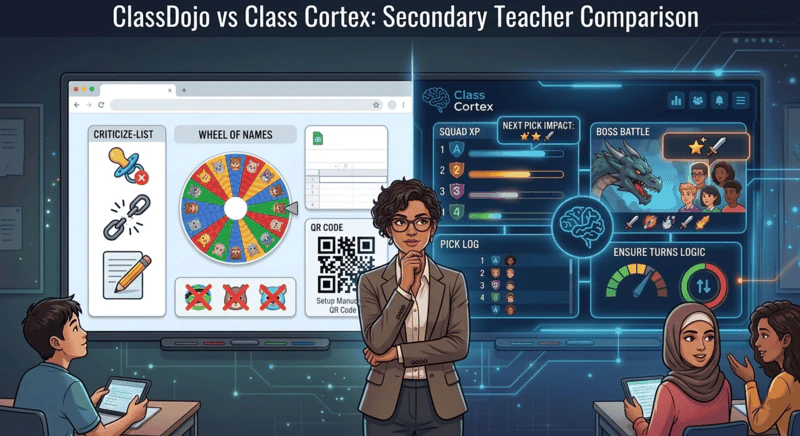
Class Cortex is the top ClassDojo alternative for secondary teachers who need engagement mechanics built for older students. Other options worth knowing about include ClassMana for RPG-style progression and Classroomscreen for a neutral utility display board.
ClassDojo is one of the most widely adopted edtech tools on the planet. Over 50 million teachers, students, and parents use it globally. Its parent communication features are genuinely excellent, its interface is clean and accessible, and for primary school teachers it solves several real problems in one place.
But secondary teachers have a different experience. The same features that make ClassDojo effective for a Year 3 class - cartoon monster avatars, simple point addition for behaviour, parent notifications about classroom moments - land differently with a Year 9 cohort. Not badly, necessarily. Just not for this age group. The tool was not designed with them in mind, and it shows. For the wider picture, read our guide to classroom management for secondary school.
This comparison is for high school and secondary teachers specifically - Years 7 through 12 - who are weighing up whether ClassDojo is worth deploying in their classroom, or whether something built for their context would serve them better. We will be honest about what ClassDojo does well, because it genuinely does some things well. But the picture for high school and secondary classrooms is more complicated than the headline numbers suggest.
Where ClassDojo Is Strong
Starting with ClassDojo's genuine strengths matters because too many comparisons like this one exist purely to sell an alternative. ClassDojo earned its position at the top of the primary edtech market for real reasons.
ClassDojo's Genuine Strengths
- Parent communication: The ClassDojo messaging system is the best in the category for connecting teachers with parents. The ability to send photos, videos, and updates to a private class feed - with parents getting push notifications rather than emails - is genuinely useful and widely adopted at the school level.
- Student portfolios: Students can add work samples, reflections, and creative pieces to a digital portfolio that parents can view. For primary school, this is a powerful home-school connection tool.
- Whole-school adoption: Because ClassDojo is frequently adopted at an administration level rather than by individual teachers, there is often an existing parent base already on the app. If your school has mandated ClassDojo, the communication layer has real network value.
- Simple behaviour tracking: Awarding and removing points is fast, the interface is intuitive, and the class display is clean. For teachers who just want a visible positive reinforcement counter, it works.
- Free core tier: ClassDojo's core functionality is free and has remained free. There is no paywall on the basic features that most primary teachers need.
Where ClassDojo Struggles at Secondary
The problems at secondary level are not bugs - they are design choices that made perfect sense for the intended audience. The issue is that secondary teachers are not that audience.
The aesthetic barrier. ClassDojo's monster avatar system is charming for primary students. For Year 9 students, it is actively counterproductive. Secondary students are highly attuned to anything that feels childish or condescending, and a behaviour management system built around cartoon creatures is an immediate credibility drain. Teachers who have tried ClassDojo at secondary consistently report that the aesthetic alone undermines buy-in within the first week.
Student accounts at scale. ClassDojo requires student accounts for most meaningful features. In a secondary school where a teacher might have six different classes of thirty students each, that is 180 accounts that need to be created, activated, and managed. Each one is a potential IT approval requirement, a COPPA or Privacy Act consideration, and a login failure waiting to happen in lesson one. The account overhead that is manageable for a single primary classroom teacher becomes a significant systems problem at secondary scale.
No engagement mechanics for older students. Point tracking tells students their score went up. That is the full extent of the engagement loop in ClassDojo - there is no XP accumulation over time, no squad competition, no live multiplayer format, no games. For primary students, seeing their monster grow and collecting points is sufficient. For secondary students who have been gaming since primary school and have sophisticated expectations of interactive systems, it is not enough.
Limited utility tools. ClassDojo's free Toolkit covers the basics - a timer, random picker, group maker and noise meter - but there is no seating map, no whiteboard and no dice roller, and none of the Toolkit feeds a persistent XP layer. It is a communication and behaviour tracking tool. Teachers who need a classroom dashboard - something to project on the smartboard that runs their lesson - need to supplement ClassDojo with other tools. That fragmentation has a real cost in cognitive load and screen switching mid-lesson. For seating specifically, see our free digital seating chart comparison.
Mobile performance. ClassDojo's mobile PageSpeed score is 43 with failed Core Web Vitals. For a tool that parents and students primarily access on mobile devices, this is a meaningful technical limitation that affects the reliability of the parent communication features that are ClassDojo's primary strength.
What Class Cortex Does Differently
Class Cortex was built by a secondary teacher, for secondary classrooms. That origin shapes every design decision - the aesthetic, the mechanics, the feature set, and the privacy architecture.
The Command Deck tracks individual XP and HP per student in a persistent scoreboard that lives in the teacher's browser. Up to six squads - ALPHA through FOXTROT - compete across every lesson, all term. XP accumulates continuously; it never resets unless the teacher chooses. CC-Achieve milestone badges unlock at defined thresholds and give students a long-term target to work towards across the year. The Neural Core Economy adds another individual layer on top - students spend their own banked XP unlocking avatars, rather than being handed a cartoon character for free. The visual language is tactical and tech-themed rather than cartoon-based - it reads as sophisticated to secondary students rather than juvenile. For how HP works as a behaviour tool, see our classroom HP system guide.
The Sonic Defence noise monitor is the behaviour management layer that ClassDojo completely lacks at secondary. When classroom noise exceeds the calibrated threshold, it fires - a visual alarm on the smartboard and, on Pro, an automatic XP deduction from the class scoreboard. On the free tier the visual alarm and Quiet Streak XP still create peer pressure without the hands-free deduction. Students self-regulate because the class score is at stake. The noise monitor and the gamification system are connected, which is what makes the automated consequence credible. For a full comparison of how noise monitors work across different tools, see the free classroom noise monitor comparison.
Boss Battles are the live engagement mechanic. Students join at classcortex.com/join via QR code - no accounts, no app, any device. The teacher reveals questions, students answer on their phones, correct answers deal damage to the boss on the main screen, and the class's combined accuracy decides how hard each hit lands. It runs in the same energy space as Kahoot but feeds directly into the persistent XP system that carries across the rest of the term. For the secondary teachers who have found ClassDojo's engagement mechanics too thin, Boss Battle is the feature that tends to land the strongest.
On privacy, Class Cortex goes further than ClassDojo. No student data of any kind is transmitted to Class Cortex servers - all class rosters, XP scores, and session history live entirely in the teacher's browser localStorage. Built with COPPA and GDPR principles in mind. No IT approval required at any school. The existing ClassDojo alternative guide covers the privacy comparison in detail if that is the primary decision driver for your school.
Full Feature Comparison: ClassDojo vs Class Cortex
| Feature | Class Cortex | ClassDojo |
|---|---|---|
| Secondary school fit | ✓ Built for it | ✗ Primary focus |
| Student accounts required | ✓ None ever | Required |
| Persistent XP per student | ✓ All term | ✗ Points only |
| Squad / team competition | ✓ 2 to 6 squads | ✗ |
| Live multiplayer activity | ✓ Boss Battle | ✗ |
| Noise monitor with XP penalty | ✓ Automated (Pro) | ✗ |
| Classroom timer | ✓ Arc + Detonator | ✓ Toolkit |
| Seating map | ✓ Drag-and-drop | ✗ |
| Classroom whiteboard | ✓ Full tactical | ✗ |
| Built-in classroom games | ✓ 8 games | ✗ |
| Parent communication | ✗ | ✓ Best in class |
| Student portfolios | ✗ | ✓ |
| No student data on servers | ✓ localStorage only | ✗ Data collected |
| Mobile PageSpeed score | 74 | 43 - CWV failed |
| Free tier | ✓ Permanent | ✓ Core features |
Other ClassDojo Alternatives Worth Knowing About
Class Cortex is not the only option secondary teachers consider when moving away from ClassDojo, and the right choice depends on what matters most in your context. If you want a system with a deeper RPG-style character progression layer and your school's IT policy permits student account creation, ClassMana is worth a look. If your main requirement is a clean, neutral utility board with a timer, noise meter, and QR codes rather than a gamification system, Classroomscreen covers that without any student login requirement at all.
Neither pairs persistent XP and HP, live multiplayer Boss Battles, squad-based competition, and an automated noise consequence in a single browser tab the way Class Cortex does, with zero student accounts required. But each is worth evaluating on its own merits if your classroom does not need that full system.
Which One Is Right for You?
Choose ClassDojo if: you teach primary school or work in a school with an established whole-school ClassDojo rollout for parent communication. If the parent messaging layer is the primary value driver and your students are in the age range where the monster avatar system has genuine appeal, ClassDojo does its job very well.
Choose Class Cortex if: you teach secondary school or high school (Years 7-12) and need a tool that secondary students will actually engage with. If you want persistent gamification, squad competition, a live engagement format that replaces Kahoot, a noise monitor with real automated consequences, and a full classroom utility dashboard - all without student accounts or IT approval - Class Cortex was built for exactly this. The free tier covers the full XP system, noise monitor, seating map, student picker, timers, whiteboard, and four training games. Pro adds twelve class slots, Noise Auto-Penalty, Pro boss types, PDF export, and Picture-in-Picture widgets at AUD $49 per year.
The honest answer for most secondary teachers is that ClassDojo was never designed for their classroom. It has been adopted there because it was already at the school, not because it fits the context. If your students are disengaged with it, that is not a reflection of your implementation - it is a reflection of the audience mismatch. For more on what works at secondary specifically, the student engagement strategies guide covers the underlying framework in detail.
No student accounts. No credit card. No install.
Frequently Asked Questions
Is ClassDojo good for high school?
ClassDojo was designed for primary school and works best in that context. Its Monster avatar system, parent communication feed, and point-based behaviour tracking are well-suited to younger students. At secondary level, the primary aesthetic is a significant deterrent - Year 9 and 10 students are unlikely to engage seriously with a system built around cartoon characters. ClassDojo also requires student accounts, which creates IT approval friction, and its mobile performance score is 43 with failed Core Web Vitals on mobile.
What is the main difference between ClassDojo and Class Cortex?
ClassDojo is a primary-focused behaviour and parent communication platform. Class Cortex is a secondary-focused gamified classroom management system. ClassDojo's strengths are parent messaging, portfolio sharing, and simple point tracking for younger students. Class Cortex's strengths are persistent XP and HP per student, six-squad competition, live multiplayer Boss Battles via QR code, an automated noise monitor with XP consequences, and a full suite of utility tools - all with no student accounts required.
Does ClassDojo require student accounts?
Yes. ClassDojo requires student accounts for full functionality. Students need to create accounts to access portfolios, receive messages, and participate in class activities beyond basic point tracking. This creates IT approval requirements, COPPA and GDPR compliance considerations, and the inevitable first-lesson login failures that derail engagement before it starts. Class Cortex requires zero student accounts for any feature including live multiplayer Boss Battles.
Can I use ClassDojo and Class Cortex together?
Yes, though most secondary teachers find they replace rather than supplement. If your school already uses ClassDojo for parent communication at the whole-school level, you can continue using it for that purpose while running Class Cortex as your in-class engagement and management system. The two tools operate independently - ClassDojo on the parent communication layer, Class Cortex on the student engagement and gamification layer.
What does Class Cortex have that ClassDojo does not?
Class Cortex has: live multiplayer Boss Battles (students join by QR code, no accounts), a Sonic Defence noise monitor (visual alarm and Quiet Streak XP free; automatic XP deduction on Pro), six-squad competition with persistent XP across every lesson all term, eight built-in classroom mini-games, a drag-and-drop seating map with PDF export, a Tactical Whiteboard, two countdown timer formats, a Quantum Core dice roller with D20 and custom dice, and a random student picker integrated with the XP system. None of these exist in ClassDojo.
What are other alternatives to ClassDojo besides Class Cortex?
Besides Class Cortex, other ClassDojo alternatives for secondary students include ClassMana for RPG-style character progression where student accounts are permitted, and Classroomscreen for a neutral utility display board with no gamification layer. Class Cortex remains the only option that combines persistent XP and HP, live Boss Battles, squad competition, and an automated noise consequence with zero student accounts required.
Further Reading