Every teacher has said some version of the same sentence a dozen times in one lesson: "can I have quiet please," followed five minutes later by the same request, slightly louder. By the third or fourth repetition, most of the class has stopped actually listening for it. They are listening for your tone, waiting for the specific pitch of voice that means you are actually serious this time. That is the real problem. Repetition without a consistent consequence trains a class to ignore the first few warnings entirely.
The fix is not a louder voice or a stricter tone. It is removing your voice from the equation as the thing that has to carry the consequence every single time. This guide walks through how to do that using an automated signal in place of repeated verbal requests, with the Sonic Defence Noise Monitor in Class Cortex as the working example throughout.
Why Repeating Yourself Stops Working
Behavioural conditioning explains most of this. If a request is repeated several times before any consequence follows, students learn that the first few instances of the request carry no real weight. This is not defiance in the way it often gets framed - it is a learned, accurate read of the actual pattern in the room. The fix has to change the pattern itself, not just increase the volume or firmness of the same request. For the broader picture of behaviour management approaches that do not rely on escalating tone, see our guide to classroom behaviour management without shouting.
Step 1: Set a Baseline Before You Need It
An automated noise consequence only works if the threshold it fires on actually reflects your room, not a generic default. The Sonic Defence Noise Monitor uses a one-button, five-second calibration step that sets the baseline to your specific classroom's ambient noise at the moment you calibrate. Run this calibration at the start of the lesson rather than relying on one calibration set weeks earlier - a practical lesson and a silent reading lesson have genuinely different baseline noise levels, and a threshold calibrated for one will misfire during the other.
Step 2: Let a Signal Carry the Warning, Not Your Voice
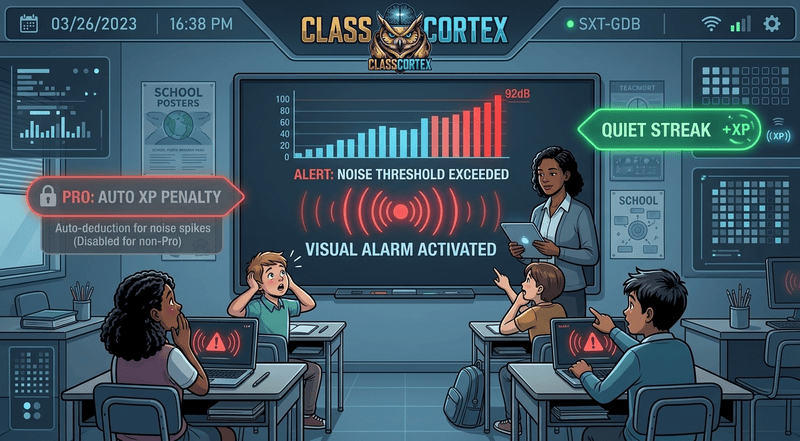
Once calibrated, the noise monitor fires a visual alarm and an audio cue the instant the room crosses the threshold, on the free tier. This is the actual mechanism that fixes the repetition problem: the alert is consistent every single time, regardless of how tired, patient, or firm you sound that period. Students stop listening for your tone and start responding to the signal itself, because the signal never varies and never gets progressively louder or more annoyed. If you are weighing a basic display against an alarm, our classroom sound meter guide explains the difference.
Step 3: Reward the Quiet, Not Just Penalise the Noise
A system that only ever punishes noise gives students nothing to actively work toward, only something to avoid. On the free tier, the Quiet Streak mechanic awards bonus XP to the whole class every 30 seconds the room stays under the noise threshold. This reframes quiet as something the class is actively earning rather than a state they are merely failing to break. For secondary students in particular, framing this as a squad or class-wide XP target rather than a purely disciplinary tool tends to land better - it sits inside a competitive structure students already engage with rather than reading as a primary school behaviour chart.
Step 4: Automate the Consequence Entirely
The free tier's alarm and Quiet Streak bonus solve the repetition problem, but they still require the teacher to notice the alarm and decide whether to act. On Pro, Noise Auto-Penalty removes even that step: crossing the threshold automatically deducts XP from the class scoreboard, completely hands-free, with zero teacher intervention required to enforce it. This is the point where the consequence is no longer something the teacher administers at all - it enforces itself in real time while the lesson continues. For the fuller free versus Pro breakdown, see our free vs paid classroom noise monitor comparison.
Common Mistakes That Undo the System
- Recalibrating too rarely: A threshold set once at the start of term drifts out of sync with how a room actually sounds during different activity types, causing false alarms or missed ones.
- Overriding the system verbally anyway: If a teacher still shouts "quiet" over the alarm, students learn the alarm is decorative and the voice is still what matters. Let the signal do the work it is designed to do.
- Punishment only, no reward mechanic: A system with no Quiet Streak or equivalent positive reinforcement reverts to feeling purely disciplinary, which secondary students in particular tend to disengage from faster.
- Inconsistent enforcement across lessons: Using the automated system some lessons and reverting to verbal warnings on others resets the learned pattern back to where it started.
Keeping It Working Past the First Fortnight
Like most classroom systems, the novelty of a new noise monitor fades within a couple of weeks, and what keeps it effective past that point is consistency rather than reinvention. Recalibrate every lesson, let the alarm or the automated penalty do its job without a verbal override, and keep the Quiet Streak or equivalent reward running alongside it so quiet remains something the class is earning, not just avoiding a loss. For the full picture of how an automated noise consequence fits inside a broader XP and squad system, see our classroom XP system guide.
No student accounts. No credit card. No install.
Frequently Asked Questions
Why do students keep talking over me even after I ask for quiet?
Repeated verbal requests lose their weight because students learn there is no real consequence attached until roughly the third or fourth time you ask. This trains the class to ignore the first two warnings entirely and only respond once your tone signals you mean it. Replacing the verbal cue with an automated signal, such as a visual alarm that fires the moment noise crosses a threshold, removes the guesswork about which warning actually counts.
What is the best way to stop students talking without shouting?
Replace your voice with a consistent, automated signal. A calibrated noise monitor that fires a visual alarm and audio cue the instant the room crosses a set threshold gives students an unambiguous, non-verbal cue that does not depend on your energy levels that lesson. Pairing it with a reward for sustained quiet, rather than only a consequence for noise, tends to work faster than a consequence-only approach.
Does a classroom noise monitor actually work for secondary students?
Yes, though the framing matters more with secondary students than with younger ones. A purely punitive noise monitor can read as childish to Year 9 and 10 students. Framing it as a squad or class-wide XP mechanic, where sustained quiet earns bonus points rather than just avoiding a penalty, tends to land better with older students because it fits inside a competitive game structure they already buy into.
Can a noise monitor automatically deduct points without the teacher doing anything?
On Class Cortex's free tier, the Sonic Defence Noise Monitor fires a visual alarm and audio cue when noise crosses the calibrated threshold, and awards Quiet Streak bonus XP every 30 seconds the room stays quiet. On Pro, Noise Auto-Penalty goes a step further and automatically deducts XP from the class scoreboard the moment the threshold is crossed, completely hands-free, with no teacher action required.
How do I calibrate a noise monitor for my specific classroom?
The Sonic Defence Noise Monitor uses a one-button, five-second calibration step that sets the baseline threshold to your specific room's ambient noise level at the time you calibrate it. Recalibrating at the start of each lesson, rather than relying on a single calibration set weeks earlier, accounts for genuine differences between a practical lesson and a silent reading lesson.
Further Reading