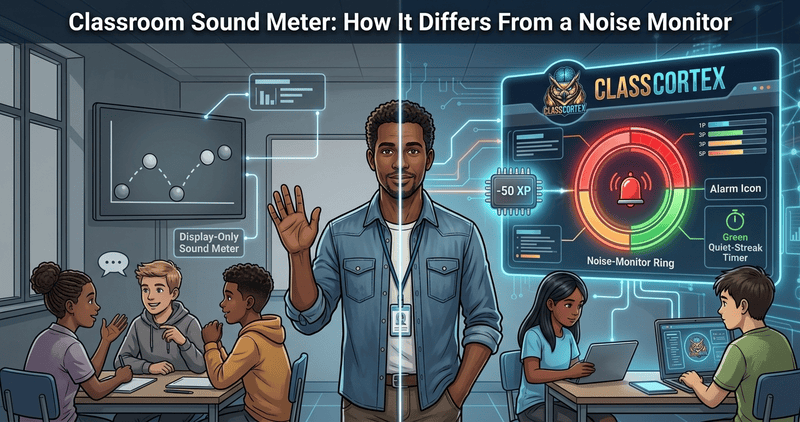
Search for a classroom sound meter and you will find a dozen free tools that look almost identical: a bar, a needle or a few bouncing balls that react to the room. They all answer the same question, "how loud is it?" The question that matters more is what happens next, and that is where a sound meter and a noise monitor part ways.
This is a buyer's guide to the difference. It compares the most popular free options, explains what a browser-based meter can and cannot measure, and helps you decide whether a display is enough or whether you want something that responds. Every tool below was checked against its own site in September 2026, and the details may change.
What Is a Classroom Sound Meter?
A classroom sound meter uses the microphone on your computer, tablet or interactive board to measure how loud the room is and turns that into something students can see: a rising bar, a swinging needle, bubbles that grow, an emoji that gets upset. The idea is that students who can see their own volume will self-correct without a teacher raising their voice.
That is genuinely useful, and for many classes it is all you need. But a sound meter is passive. It shows the level and stops. The teacher still has to notice it, decide what to do, and follow through. That is the gap a noise monitor is built to close.
Sound Meter vs Noise Monitor: Four Rungs on a Ladder
The clearest way to compare tools is to imagine four rungs, each adding one thing to the one below it.
- Display only: shows the level and nothing else. The teacher supplies every response.
- Display plus alert: also makes a sound or flashes when the level crosses a limit, so the room gets a cue without the teacher speaking.
- Alert plus reward: also gives something back for sustained quiet, such as stars or points, so students have a reason to want the quiet, not just to avoid the alarm.
- Reward plus consequence: also applies a real, automatic cost to the class when the limit is crossed, tied to a score students already care about.
Most free tools stop at the second or third rung, and that is worth saying plainly. Bouncy Balls has an optional beep or shush alert, Classroomscreen's sound level widget can ring a bell, and Too Noisy adds star rewards. Very few free tools apply an automatic consequence, which is the fourth rung.
Are Online Sound Meters Accurate?
Not in the way a decibel meter is. Browser microphones are uncalibrated, so an online meter shows a relative digital level, not a certified sound pressure reading, and the numbers differ from one device to the next. Tools that display decibel figures are estimating. As one decibel meter's own accuracy notes put it, an uncalibrated microphone gives a relative level rather than a verified dBA value, and such tools are suitable for relative comparisons on the same device rather than compliance decisions.
For a classroom that is fine, because you are not measuring workplace exposure. You want to know whether this room is louder than it usually is. That is why calibration matters more than a decibel figure. Class Cortex does not pretend to show dB: it reads the room as a percentage, and its one-button CALIBRATE step listens to the room for five seconds to set your baseline. There is also a SENSOR GAIN slider for fine adjustment, and readouts for the noise floor, the peak signal and your record quiet streak.
Classroom Sound Meter Comparison Table
Here is how the most common free options compare across the four rungs.
| Tool | What it shows | Alert when too loud | Rewards quiet | Automatic consequence | Cost |
|---|---|---|---|---|---|
| Bouncy Balls | Balls, bubbles or emoji; sensitivity slider | Optional beep or shush sound | None documented | None | Free, no registration |
| Classroomscreen sound level | Bar graph with max noise slider and smoothing | Optional bell after 10 seconds over the limit | None built in | None | Free to try, no sign-up |
| Too Noisy | Animated backgrounds and needle; sensitivity slider | Adjustable alarm, custom voice | Star rewards | None documented | Free Lite; web app is a subscription after a 30-day trial |
| Class Cortex (free) | Percentage ring with noise floor, peak and record readouts | Visual alarm and audio cue | Quiet Streak XP every 30 seconds | No | Free, no student accounts |
| Class Cortex (Pro) | Everything in free, plus a pop-out window | Visual alarm and audio cue | Quiet Streak XP every 30 seconds | Yes: automatic class XP deduction | AUD $49 per year |
Details taken from each tool's own site and checked September 2026. Physical meters, such as wall-mounted traffic-light devices, are a separate paid category and are not included.
When a Display-Only Sound Meter Is Enough
Do not upgrade for the sake of it. A simple meter is a good fit when your class already responds to visual cues, when you only need a signal during a short activity, or when you have solid routines and just want a gentle nudge on screen. Younger classes in particular often love watching bouncing balls rise and fall, and a free meter with an optional alert does the job. If that describes your room, a free tool is the right answer.
When You Need a Noise Monitor With Consequences
The situation changes when students learn to ignore the display. A bar that turns red with no follow-up quickly becomes wallpaper, especially with older students, and the teacher ends up being the consequence anyway. That is the moment to look at a monitor that connects noise to something students actually track.
How Class Cortex handles it
On the free tier, the Sonic Defence noise monitor fires a visual alarm and audio cue when the level spikes into the red zone, and the Quiet Streak awards bonus XP to the class scoreboard for every 30 seconds the room stays quiet, so silence earns something. On Pro, the Auto-Penalty toggle adds Noise Auto-Penalty: automatic XP deduction when the room gets too loud, hands free, with no need for the teacher to stop and act. Pro also lets you pop the monitor out as a floating window. Nothing is sent to a server, and there are no student accounts.
For setup, calibration and everyday use, see our free classroom noise monitor guide, which covers that in full so this guide does not repeat it, or the Noise Monitor tutorial. If you are weighing up whether the automatic penalty is worth paying for, our free vs paid noise monitor comparison covers that decision. And if noise is the bigger problem than the tool, read how to stop students talking over you without shouting.
How to Choose a Classroom Sound Meter
- Start with the problem: if students respond to a visual cue, a free display is enough. If they ignore it, you need a reward or a consequence.
- Check sign-up and cost: Bouncy Balls, Classroomscreen and Class Cortex are free without student accounts, while Too Noisy's web app is a subscription after its trial.
- Calibrate to your room: whichever tool you pick, set the threshold from your room's normal level rather than trusting a fixed number.
- Look at what happens next: a meter that feeds a score students already care about will be taken more seriously than one that stands alone. See how it fits with Classroomscreen alternatives if you already use a widget board.
No student accounts. No credit card. No install.
Frequently Asked Questions
What is a classroom sound meter?
A classroom sound meter is a tool that listens through a device microphone and shows how loud the room is, usually as a bar, needle, animated balls or colour. It gives students a visual cue to lower their voices, but on its own it does not decide anything or apply a consequence.
What is the difference between a sound meter and a noise monitor?
A sound meter displays the volume, while a noise monitor also responds when the volume crosses a limit. A noise monitor can sound an alarm, reward sustained quiet and, in some tools, apply a consequence automatically. In Class Cortex the free tier fires a visual alarm and audio cue and awards Quiet Streak bonus XP, and Pro adds Noise Auto-Penalty, which deducts XP automatically.
Are online classroom sound meters accurate?
Not as calibrated decibel measurements. Browser microphones are uncalibrated, so an online meter shows a relative level rather than a certified dB reading, and results differ between devices. That is fine for a classroom, because what matters is comparing the room to its own baseline, which is why calibrating to your room's normal noise level is more useful than a decibel figure.
Is there a free classroom sound meter with no sign-up?
Yes. Bouncy Balls is free with no registration and has an optional beep or shush alert, Classroomscreen's sound level widget is free to try without signing up and can ring a bell when noise stays over the limit, and Class Cortex's noise monitor is free with no student accounts and fires a visual alarm and audio cue. Too Noisy has a free Lite version, but its web app is a paid subscription with a 30-day trial.
Does the Class Cortex noise monitor deduct XP automatically?
Only on Pro. On the free tier the noise monitor fires a visual alarm and an audio cue when noise crosses the threshold and awards Quiet Streak bonus XP for every 30 seconds of quiet. Noise Auto-Penalty, which automatically deducts XP from the class scoreboard when the room gets too loud, is a Pro feature that you switch on with the Auto-Penalty toggle.
Further Reading