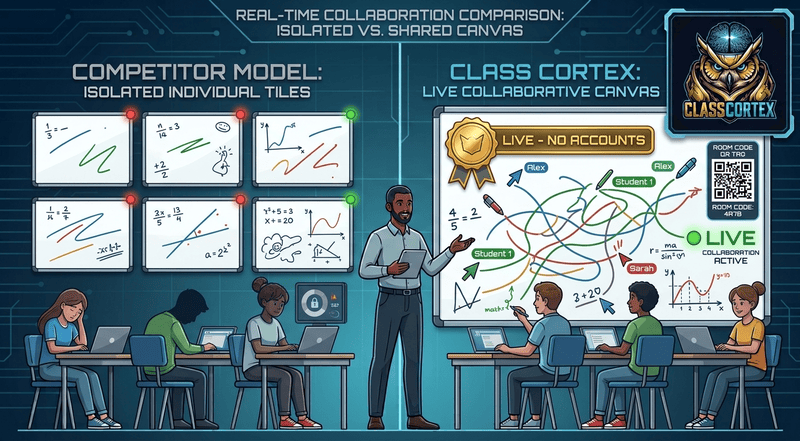
Search for a collaborative whiteboard and the results are dominated by the same pitch: no login needed, share a link, start drawing. Tools like WBO, BitPaper, and NotebookCast have built entire products around removing the signup friction, and for the general use case - two people sketching an idea together, a tutor and a single student, a quick brainstorm - that pitch delivers exactly what it promises. What none of them were built for is a teacher standing in front of thirty students, needing the whole class on one board at once while still being able to keep control of it.
That gap is worth separating from the broader whiteboard comparison already covered in our classroom whiteboard tools guide. This piece is specifically about live, multi-student collaboration - the moment a whole class is drawing on the same canvas at the same time - and what that actually requires that a generic collaborative whiteboard does not provide.
What "No Login Needed" Actually Covers
WBO is free, open source, and genuinely has no login at all - anyone with the board link can draw, which is exactly the point for its intended use as an open collaborative canvas. NotebookCast works similarly but caps sessions at around ten simultaneous users, which covers a small group but not a full class roster. BitPaper leads with video and audio calling built in, but its free tier is limited to a single reusable "paper," and its whole design centres on one tutor working with one or a few students rather than a full classroom of thirty drawing at once.
None of the three were built with a teacher's actual classroom problem in mind: thirty students, most of whom are engaged, a handful who are not, and a genuine need to stop one student from erasing another student's work or drawing over the board mid-lesson. A no-login pitch solves the friction of getting into a shared board. It does not solve what happens once the whole class is actually in it together.
What a Classroom Needs That a Generic Whiteboard Doesn't Have
- A roster-scoped session, not an open link: Session capacity is capped at 20 students or the class roster size, whichever is smaller, rather than an open board anyone with the link can join regardless of headcount.
- Students can only edit their own contribution: Anyone can add to the shared board, but nobody can move or delete a classmate's work, so a live board with thirty students does not collapse into chaos within the first minute.
- A freeze button: The teacher can pause every student's input in one click to pull attention back to the front of the room without ending the session entirely.
- The ability to remove a disruptive student: If one student is misusing the board, the teacher can remove them from the session, with the option to also clear whatever they had drawn.
- No student accounts, same as the generic tools: Students join at classcortex.com/whiteboard using a room code and a display name, with no account, no email, and no app download - matching the no-login promise the generic tools make, without giving up classroom control to get it.
Free Tier vs Live Collaboration: What's Actually Included
The Tactical Whiteboard itself, including two ready-made templates, Think Pair Share and a Venn Diagram, is available on every plan as a teacher display tool - one board, drawn on by the teacher, that the whole class watches on the screen. This is genuinely free and requires no student accounts on any plan. Live Whiteboard Collaboration, where every student in the room draws on that same board at the same time, is a Pro-only feature. It is worth being precise about this distinction, since it is easy to conflate "the whole class looking at one board" with "the whole class drawing on one board" - the free tier gives you the first, Pro adds the second.
Feature Comparison
| Feature | Class Cortex | WBO | NotebookCast | BitPaper |
|---|---|---|---|---|
| No Login Required | ✓ | ✓ | ✓ | ✓ (basic) |
| Built for a Full Class Roster | ✓ Up to 20 or roster size | ✗ Open, no cap | ~10 users | ✗ 1-to-1 focused |
| Students Can Only Edit Own Work | ✓ | ✗ | ✗ | ✗ |
| Teacher Can Freeze the Board | ✓ | ✗ | ✗ | ✗ |
| Remove a Disruptive Student | ✓ | ✗ | ✗ | ✗ |
| Ready-Made Whiteboard Templates | ✓ (2 free, 4 Pro) | ✗ | ✗ | ✗ |
| Persistent XP & Squad System | ✓ | ✗ | ✗ | ✗ |
| Free Tier Available | ✓ Display board | ✓ | ✓ | 1 paper only |
Where Whiteboard.fi Fits Into This
Whiteboard.fi is worth a separate mention because it solves a genuinely different problem than either the generic no-login tools or Class Cortex. It gives each student their own individual board, viewable in real time by the teacher on a single overview screen - it was never a shared canvas at all, on any plan. That makes it strong for checking individual understanding across a whole class at once. It is simply answering a different question than "can the whole class draw on one board together," which is what this article is actually about.
Which Tool Fits Your Situation
A generic no-login tool like WBO is the right call for a quick one-off sketch with a small group, where nobody needs moderation and the session ends in ten minutes. For a full class, a whole-term teaching tool, or a session where a teacher genuinely needs to stay in control of who can edit what, that lack of roster scoping and moderation becomes a real problem rather than a minor gap. Class Cortex's Live Whiteboard Collaboration was built specifically for that classroom scenario, with the free display-board tier available for teachers who are not ready to commit to live student collaboration yet. For the setup sequence most teachers use to introduce it, see our first day classroom management guide.
No student accounts. No credit card. No install.
Frequently Asked Questions
What is the best free live collaborative whiteboard for a classroom?
It depends on class size and whether moderation matters. Generic tools like WBO and NotebookCast work well for small groups with no need for a teacher to control who can edit what. For a full class of up to 30 students with the ability to freeze the board, remove a disruptive student, and restrict students to editing only their own contributions, Class Cortex's Live Whiteboard Collaboration on Pro is built specifically for that classroom use case.
Do students need an account to join a live collaborative whiteboard?
No, not with Class Cortex. Students join a live whiteboard session at classcortex.com/whiteboard using a room code and a display name, with no account, no email, and no app download required, the same account-free approach used for Boss Battle. This matches the no-login pitch of generic tools like WBO and NotebookCast, but adds classroom-specific roster and moderation features those tools do not have.
Is live whiteboard collaboration free in Class Cortex?
The Tactical Whiteboard itself, including two ready-made templates, is available on the free tier as a teacher display tool with no student accounts required. Live Whiteboard Collaboration, where the whole class draws on the same board together in real time, is a Pro-only feature. There is no free tier version of live multi-student collaboration.
How many students can join a live whiteboard session at once?
Session capacity is 20 students or the class roster size, whichever is smaller. This is deliberately scoped to a real class size rather than the open public sessions generic tools like WBO allow, where anyone with the link can join regardless of headcount.
How is Class Cortex different from Whiteboard.fi for live collaboration?
Whiteboard.fi gives each student their own individual board that the teacher views on an overview screen - it was never built as a single shared canvas, on any plan. Class Cortex works the opposite way: the free tier is one shared board the whole class watches as a teacher display tool, and Pro adds true live collaboration where every student draws on that same one canvas together in real time, each restricted to editing only their own contributions.
Further Reading