For several years, Google Jamboard was the default answer when a teacher asked for a free interactive whiteboard. It was free, it was familiar, it lived inside the Google ecosystem that most schools already used, and it worked well enough for projecting annotations onto a smartboard or running a collaborative sticky-note session with students.
Then Google discontinued it in December 2024. Teachers who had built Jamboard into their workflows suddenly needed a replacement - and discovered that the alternatives available do not all serve the same purpose. Whiteboard.fi is built for students. Classroomscreen includes a basic drawing widget. Miro and FigJam are enterprise tools priced accordingly. And a new category of classroom management tools has emerged that includes a full-featured whiteboard as one component of a broader system.
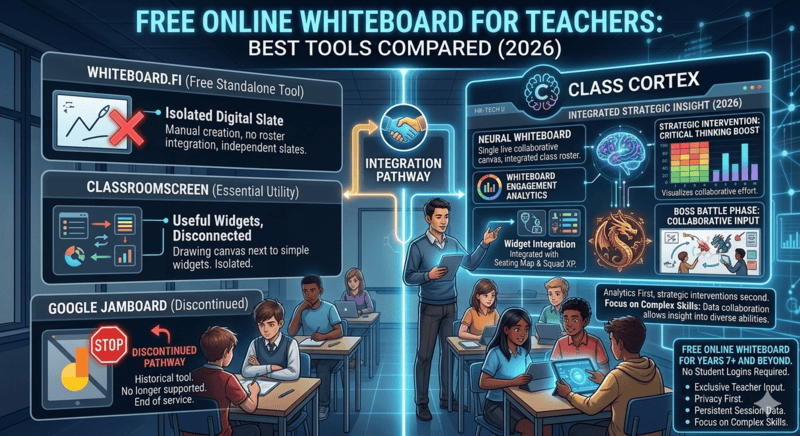
This guide covers the four most relevant free online whiteboard tools for teachers in 2026 - what each one actually does, which use cases each serves, and which one is worth using as your primary smartboard display. If you are also comparing Classroomscreen as a full widget board, the Classroomscreen vs Class Cortex breakdown covers that comparison in detail.
The Key Question: Teacher Display or Student Canvas?
Before comparing specific tools, it is worth identifying the distinction that most whiteboard comparisons miss. There are two fundamentally different use cases for a classroom whiteboard tool, and most tools are built for only one of them.
A teacher display whiteboard is projected onto a smartboard or screen. The teacher draws, annotates, and presents to the class. Students watch. Think of it as a digital replacement for the physical whiteboard at the front of the room - with the advantages of undo, zoom, export, and tools that markers cannot provide.
A student canvas whiteboard gives each student their own drawing space that the teacher can monitor simultaneously. Students submit work, the teacher reviews responses in a grid view. Collaborative, formative, student-facing.
These are different tools solving different problems. Knowing which one you need is the first step to choosing the right option.
One update worth flagging up front, because it changes the answer this guide gave in earlier versions: Class Cortex now does both. It remains a teacher display whiteboard by default, and on Pro it also runs a live shared board the whole class joins from their own devices. The distinction that still matters is shared versus individual: Whiteboard.fi gives every student their own separate canvas, while Class Cortex puts the entire class on one board together.
The Four Tools Worth Considering in 2026
1. Google Jamboard - Discontinued December 2024
It is worth acknowledging Jamboard directly because a significant number of teachers are still searching for it in 2026, unaware that the service has been shut down. Google closed Jamboard permanently at the end of 2024 and existing boards are no longer accessible. If you are arriving here from a Jamboard search, you need a replacement - keep reading.
Google has pointed users toward Miro, FigJam, and Lucidspark as alternatives, but all three are primarily enterprise or design tools with free tiers that feel constrained for daily classroom use. They are not built with teacher workflows in mind.
2. Whiteboard.fi (now owned by Kahoot)
Whiteboard.fi is the most capable student-facing whiteboard tool available to teachers for free. Students join a session via a code or QR link, each get their own canvas, and the teacher sees all boards simultaneously in a grid. It is well-designed for formative assessment, quick sketching tasks, and collaborative activities where you want visibility into every student's thinking in real time.
The limitation is that it is entirely a student tool. It is not designed to be projected as a teacher display - there is no laser pointer, no annotation layer for presenting to the class, no zoom and pan for moving through content on a large screen. It is the right tool for the student canvas use case and the wrong tool for the teacher display use case. It also requires students to have a device and access the join link, which adds friction in classrooms without 1:1 devices. Whiteboard.fi was acquired by Kahoot in 2022, so its long-term direction is tied to that platform's roadmap.
3. Classroomscreen
Classroomscreen includes a drawing widget as part of its broader classroom display board. For quick annotations, underlining text, or sketching a simple diagram during a lesson, it works adequately. The tools are minimal - pen, eraser, colour selection - and the canvas is one component among many rather than a dedicated drawing environment.
If you primarily need a timer, noise indicator, and random name picker with occasional light annotation on top, Classroomscreen's whiteboard is functional. If you regularly draw diagrams, annotate student work on screen, use shapes and text, or want to export your boards, its whiteboard will feel limiting within a week. Its mobile PageSpeed score of 40 is also worth noting if you ever project from a tablet rather than a desktop.
4. Class Cortex - Tactical Whiteboard
Class Cortex's Tactical Whiteboard is purpose-built as a teacher display tool. It runs natively inside the main classroom management dashboard at classcortex.com/app and is designed specifically for projecting onto a smartboard during a live lesson. The full feature set available free includes:
- Pen and eraser with adjustable weight and colour palette
- Shapes - rectangles, circles, lines, and arrows for structured diagrams
- Stickers for quick visual emphasis and engagement cues
- Text tool for typed annotations directly on canvas
- Fill tool for solid regions and backgrounds
- Grid toggle for structured layouts and graph-style work
- Laser pointer for directing student attention without marking the canvas
- Zoom and pan for navigating large diagrams or zooming into detail
- Unlimited undo and redo - reliable, no step limit
- Dark and light mode for different room lighting conditions
- PNG export for saving boards to share or print
- Live Mission HUD overlay - the class XP scoreboard and squad data visible on top of the canvas while you draw
- Ready-made templates - Think Pair Share and a Venn Diagram, free on every plan, dropped onto the canvas as one movable, resizable object
Pro users additionally unlock the Elite Shape and Sticker Library, four more templates (Mindmap, KWL Chart, Kanban Board, and Reflection Table), and live class collaboration, covered in the next section.
The Mission HUD: What No Other Whiteboard Has
The live Mission HUD overlay is the feature that separates the Tactical Whiteboard from every other tool in this comparison. While you annotate, sketch diagrams, or work through a problem on screen, the class XP totals, squad scores, and gamification data remain visible on top of the canvas.
Students can see the scoreboard and the lesson content at the same time. The gamification layer never disappears behind the teaching tool. That combination does not exist in Whiteboard.fi, Classroomscreen, or any standalone whiteboard application.
Live Collaboration: One Board, the Whole Class
The teacher display versus student canvas split described earlier has a third option that did not exist when most whiteboard comparisons were written: a single board the entire class draws on at the same time. On Pro, Class Cortex turns any board, blank or templated, into a shared canvas. Students go to classcortex.com/whiteboard, enter a room code, and pick a display name. No account, no email, no app download, the same account-free approach used for Boss Battle.
This is a genuinely different activity from Whiteboard.fi's model, not a competing version of it. Thirty individual boards answer the question "can each student do this on their own?" One shared board answers "what can this class build together?" A KWL chart that fills in from twenty directions at once is a different lesson from twenty separate KWL charts the teacher reviews afterwards.
- Students edit only their own work: Anyone can add to the board, nobody can move or delete a classmate's contribution.
- Freeze the board: Pause all student input instantly to bring attention back to the front without ending the session.
- Moderation built in: Tap any object to see who drew it, and remove a disruptive student with the option to clear their contributions.
- Nothing stored about students: Display names only, and the connection ends when the tab closes.
A shared board is also the loudest activity most classrooms run, which is where the Sonic Defence Noise Monitor sitting in the same tab earns its place. On the free tier it fires a visual alarm and awards Quiet Streak bonus XP for every thirty seconds the room stays below threshold. On Pro, Noise Auto-Penalty deducts XP automatically the moment the room crosses it, with no teacher action required, so a collaborative brainstorm does not need policing by voice.
Feature Comparison: Free Online Whiteboards for Teachers
| Feature | Class Cortex | Whiteboard.fi | Classroomscreen | Google Jamboard |
|---|---|---|---|---|
| Teacher display / smartboard mode | ✓ | Limited | ✓ Basic | Discontinued |
| Individual student canvases | ✗ | ✓ Core feature | ✗ | Discontinued |
| Live shared board (whole class, one canvas) | ✓ (Pro) | ✗ | ✗ | Discontinued |
| Ready-made templates | ✓ (2 free, 4 Pro) | ✗ | ✗ | Had frames |
| Pen, eraser, colour palette | ✓ | ✓ | ✓ Basic | Discontinued |
| Shapes and text tools | ✓ | ✓ | ✗ | Discontinued |
| Laser pointer | ✓ | ✗ | ✗ | Discontinued |
| Zoom and pan | ✓ | ✗ | ✗ | Discontinued |
| Unlimited undo / redo | ✓ | ✓ | ✗ | Discontinued |
| PNG export | ✓ | ✓ | ✗ | Discontinued |
| Live XP / gamification HUD overlay | ✓ | ✗ | ✗ | Discontinued |
| No student accounts required | ✓ | ✓ Join by code | ✓ | Discontinued |
| No software install | ✓ | ✓ | ✓ | Discontinued |
| Cost | Free / AUD $49/yr | Free / ~AUD $65/yr | Free / ~AUD $40/yr | Discontinued |
How Teachers Use the Tactical Whiteboard in Class Cortex
Because the Tactical Whiteboard is a teacher display tool rather than a student canvas, its value comes from how it integrates into a lesson rather than as a standalone product. Here are the scenarios where it earns its place in the dashboard.
Live Annotation and Modelling
The most common use is the same as a physical whiteboard - working through a problem on screen, annotating a diagram, or sketching a concept while talking students through it. The difference is zoom and pan for navigating detail, the laser pointer for directing attention without marking, and undo for correcting mistakes without leaving a visible trace.
Diagram-Driven Lessons
The shapes and text tools are what separate the Tactical Whiteboard from Classroomscreen's drawing widget. For Digital Technology, STEM, science, or any subject involving structured diagrams, the ability to place shapes, connect them with arrows, and add typed labels produces cleaner output than freehand drawing and is faster to set up than preparing a slide in advance.
Displaying Boards Alongside the Gamification System
The Mission HUD overlay means you can draw a diagram while the class XP bar and squad scores remain visible to students. If the class is mid-Boss Battle or mid-training session, switching to the whiteboard for a teaching moment does not remove the gamification context students are engaged in. For a full picture of how the XP and squad system works during lessons, see the XP in the Classroom guide.
End-of-Lesson Summary Boards
A quick summary sketch at the end of a lesson - key terms, diagram, formula, or concept map - exported as PNG and shared to a class channel takes under two minutes and gives students a visual reference they can save. No slide prep required.
Which Tool Is Right for You?
Choose Whiteboard.fi if your primary need is student-facing collaborative work - individual canvases you can monitor simultaneously for formative tasks. You will need 1:1 student devices and a code or QR join process.
Choose Classroomscreen if you need light annotation capability alongside a simple widget display board and draw infrequently enough that minimal tools are sufficient.
Choose Class Cortex if you need a proper teacher display whiteboard - one with shapes, laser pointer, zoom and pan, PNG export, ready-made templates, and unlimited undo - that can also become a live shared board the whole class draws on together, and that lives inside a full classroom management system with XP, squad scoring, noise monitoring, and Boss Battles in the same tab. The whiteboard is not an add-on; it is one of ten purpose-built classroom tools all running together. For teachers replacing Jamboard who also want to upgrade their broader classroom management, it covers both needs at once. For more on the full gamification system, see How to Gamify Your Classroom Without Losing Control.
No install. No student accounts. Tactical Whiteboard included free.
Frequently Asked Questions
What is the best free online whiteboard for teachers?
The best free online whiteboard for teachers depends on your use case. Whiteboard.fi is strong for student-facing collaborative work. Classroomscreen includes a basic whiteboard as part of a widget board. Class Cortex offers the most fully-featured teacher display whiteboard - pen, shapes, stickers, text, laser pointer, zoom and pan, unlimited undo and redo, PNG export, ready-made templates, and a live Mission HUD overlay - all free, inside the same tab as the XP system and noise monitor, with live whole-class collaboration on Pro.
Is Google Jamboard still available in 2026?
No. Google discontinued Jamboard in December 2024. The service is no longer accessible and existing boards cannot be retrieved. Teachers who relied on Jamboard need a replacement - Class Cortex's Tactical Whiteboard covers the teacher display use case, while Whiteboard.fi covers the student collaborative canvas use case.
What is the difference between Whiteboard.fi and Class Cortex's whiteboard?
Whiteboard.fi gives each student their own separate canvas the teacher monitors in a grid. Class Cortex's Tactical Whiteboard is a teacher display tool for projecting onto a smartboard - laser pointer, shapes, zoom and pan, PNG export, templates, and a live Mission HUD overlay - and on Pro it also runs one shared board the whole class draws on together. The real difference is individual canvases versus a single shared canvas.
Does Class Cortex's whiteboard require any installation or student accounts?
No. The Tactical Whiteboard runs entirely in the browser at classcortex.com/app with no installation, no teacher account required, and zero student accounts. On the free tier it is a teacher display tool projected onto the classroom screen. On Pro, students can join a live shared board at classcortex.com/whiteboard with a room code and a display name, still with no account or app download.
What is the Mission HUD overlay in Class Cortex's whiteboard?
The Mission HUD overlay is a live heads-up display that sits on top of the Tactical Whiteboard canvas, showing class XP totals, squad scores, and gamification data while you draw and annotate. Students can see the scoreboard and the lesson content simultaneously - the gamification layer stays visible even when you are mid-lesson on the canvas.
Further Reading
- Class Cortex vs Classroomscreen: Which One Actually Gamifies Your Classroom?
- How to Gamify Your Classroom Without Losing Control
- How to Use XP in the Classroom: A Practical Teacher's Guide
- Free Classroom Timer Online: Best Countdown Timers for Teachers
- The Best Gamified Classroom Management Tool With No Student Logins