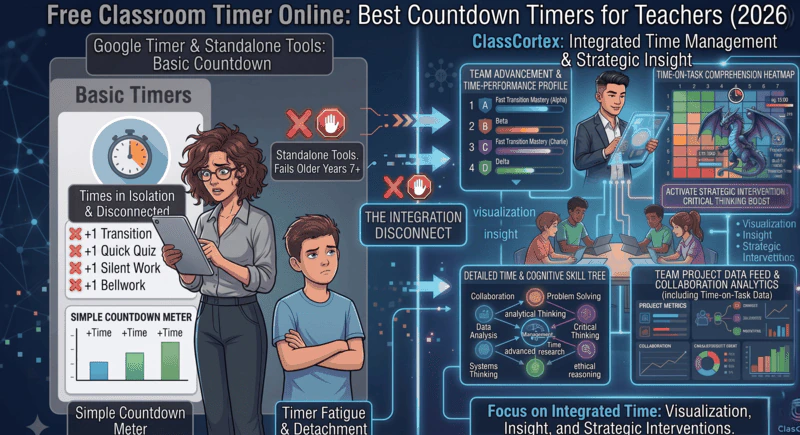
The best free classroom timer depends on what else you need it to do. Online-Stopwatch and Classroomscreen are solid standalone countdowns with no setup. Class Cortex suits secondary classes, with free Arc and Detonator countdowns plus a lap stopwatch in the same browser tab as a noise monitor, XP scoreboard and squads.
The classroom timer is one of the most universally used tools in teaching. Whether you are running a timed writing task, a do-now starter, a partner discussion, or a transition to pack up, a visible countdown on your projector screen creates urgency, reduces drag, and keeps students on task without you having to say a word about time management.
The problem is that most free classroom timers online are exactly that - just timers. They count down, they beep, and then they sit there doing nothing while you go back to managing behaviour manually, tracking XP on a whiteboard, and switching between four different browser tabs to do the things that should all be happening in one place.
This guide covers the four most commonly used free classroom timers available in 2026 - what each does well, where each falls short, and which one is worth using as your full-time classroom display. If you are already looking at broader classroom management tools, the Classroomscreen vs Class Cortex comparison covers the widget board angle in full detail.
What Makes a Good Classroom Timer?
Before comparing tools, it is worth being clear about what a classroom timer actually needs to do. A timer for a kitchen countdown or a personal study session has different requirements from one running on a smartboard in front of 28 Year 9 students every lesson of every day.
- Visible at distance. Numbers or visual indicators large enough to read from the back of the room without squinting.
- Quick to set. If it takes more than ten seconds to start a countdown, you will stop using it within a fortnight.
- No ads or pop-ups. A full-screen ad appearing mid-lesson in front of a class is not a recoverable situation.
- Audio cue on completion. The end-of-timer alert needs to be audible without being jarring, and should not require you to be watching the screen.
- Browser-based. No installs. No admin permissions. Works on whatever computer is connected to your smartboard.
Every tool in this comparison meets those basics. The question is what else each tool does beyond them.
The Four Best Free Classroom Timers in 2026
1. Classroomscreen
Classroomscreen pioneered the digital widget board for teachers and its timer remains one of the most polished standalone countdown tools available. The interface is clean, setup is near-instant, and the timer widget sits alongside other classroom utilities like a noise level indicator, random name picker, and background selector. The free tier is genuinely functional.
The limitation is that Classroomscreen is a display tool, not a management system. The timer counts down and stops. There is no XP system, no squad scoreboard, no behaviour consequence linked to what is happening on screen. What you see is what you get - and for many primary school teachers, that is perfectly fine. For secondary classrooms that need more, it is the starting point rather than the destination.
2. Online-Stopwatch (online-stopwatch.com)
Online-Stopwatch is the closest thing to a pure-function classroom timer on the web. It loads immediately, has multiple timer formats including bomb countdown and visual sand timer variants, and requires absolutely no account or configuration. For teachers who want a no-frills tool they can open in a second tab and forget about, it works reliably.
The trade-off is that it is completely isolated from everything else. It has no roster awareness, no gamification hooks, and no way to connect the countdown to anything your students care about beyond the clock running out. It is a utility, not a system.
3. Google Timer
Typing "10 minute timer" directly into Google Search produces a usable countdown that runs in the search results page. For occasional, informal use it is frictionless - no tab required beyond what you already have open. The display is small and not particularly visible from a distance, and it disappears the moment you navigate away. Not a serious candidate for daily classroom display, but worth knowing about for quick personal use.
4. Class Cortex - Arc, Detonator, and Stopwatch Modes
Class Cortex includes two purpose-built countdown modes plus a stopwatch, all running natively inside the full classroom management dashboard. This is where the comparison becomes meaningfully different.
Arc is a circular visual countdown that depletes like a clock face. It is calm and readable, ideal for independent work sessions, reading time, or transitions. Students can glance at it from across the room without disrupting their focus.
Detonator is a high-tension full-screen countdown format designed to create urgency. It dominates the display and is built for moments where pressure is the point - final-minute tasks, challenge sprints, end-of-activity countdowns where the energy in the room is supposed to ramp up.
Stopwatch flips the same tool from counting down to counting up, with a LAP button that logs a split into a running session history log each time it is pressed, without stopping the clock. It is built for timing rotations, group challenges, or anything where you need to record a sequence of times back-to-back rather than a single countdown - the log stays on screen so students can compare splits as they go, and clears with one tap (PURGE LOG) when you are ready for the next activity.
None of these three modes is revolutionary as a timer in isolation. What makes them different is that they run inside the same tab as the Sonic Defence noise monitor, the Command Deck XP scoreboard, the squad system, and every other classroom management tool in Class Cortex. On Pro, when a Detonator countdown is running and the noise monitor fires, XP is automatically deducted from the class scoreboard. The timer and the behaviour consequence are part of the same system. That integration does not exist in any standalone timer tool.
The Integration Advantage
A standalone timer tells students how much time is left. A timer inside Class Cortex tells students how much time is left - and the noise monitor running alongside it tells them that being loud during that countdown will cost the class XP on the scoreboard everyone is watching.
That is the difference between a display tool and a system. The timer is more effective when students know there are consequences attached to how they behave while it runs.
Feature Comparison: Free Classroom Timers
| Feature | Class Cortex | Classroomscreen | Online-Stopwatch | Google Timer |
|---|---|---|---|---|
| Browser-based, no install | ✓ | ✓ | ✓ | ✓ |
| Visual countdown format | ✓ Arc + Detonator | ✓ | ✓ Multiple styles | Basic only |
| Audio alert on completion | ✓ | ✓ | ✓ | ✓ |
| Ad-free experience | ✓ | ✓ | Ads present | ✓ |
| No student account required | ✓ | ✓ | ✓ | ✓ |
| Stopwatch with lap/split tracking | ✓ | ✓ | ✓ | ✗ |
| Linked to noise monitor | ✓ | ✗ | ✗ | ✗ |
| XP and squad scoreboard | ✓ | ✗ | ✗ | ✗ |
| Boss Battles and mini-games | ✓ | ✗ | ✗ | ✗ |
| Seating map and student picker | ✓ | Partial | ✗ | ✗ |
| Cost | Free / AUD $49/yr | Free / ~AUD $40/yr | Free | Free |
How to Use the Class Cortex Timer in Your Lessons
Class Cortex runs at classcortex.com/app - no installation, no account for the teacher, no configuration. The timer modes sit inside the main dashboard alongside every other classroom management tool. Here is how most teachers integrate them into a standard lesson flow.
Starter and Do-Now Activities
Launch the Arc timer as students enter the room. A circular countdown depleting on the board signals immediately that work time is active. No instruction needed. On Pro, the noise monitor running alongside it means any social chatter that spikes over the threshold automatically costs the class XP - the timer and the behaviour system reinforce each other without you saying a word. On the free tier, the visual alarm and Quiet Streak still reinforce the expectation.
Independent and Group Work
Arc mode is ideal for sustained work periods. The calm visual depletion is not distracting - it gives students a reference without creating anxiety. Pair it with the Sonic Defence noise monitor for automatic volume management during work time.
Timed Challenges and Boss Battles
Detonator mode is built for pressure. Use it during a Boss Battle countdown, a challenge sprint, or an end-of-task urgency push. The full-screen format commands attention and creates the kind of focused energy that is hard to manufacture with a verbal "you have two minutes left." For a full guide on running these sessions, see How to Run a Boss Battle in Your Classroom.
Transitions and Pack-Up
A Detonator countdown running during pack-up communicates the expectation without an announcement. Students who are already invested in the XP system know that noise above the threshold during transition costs points. The timer creates the boundary; the system enforces it.
Rotations and Group Challenges
Switch to Stopwatch mode for anything with multiple back-to-back segments - lab rotations, relay-style challenges, or timing how long each group takes at a station. Hit LAP each time a group finishes or a rotation ends, and the split logs to the session history without resetting the clock, so you have a full record of every group's time by the end of the activity. PURGE LOG clears it in one tap before the next class.
Which Timer Is Right for You?
Choose Online-Stopwatch if you want an absolutely minimal, zero-friction timer for occasional use and nothing else. It opens instantly and does the job.
Choose Classroomscreen if you primarily teach lower primary and want a clean widget board display with a timer alongside simple visual tools. No gamification, no consequences - just a calm display.
Choose Class Cortex if you teach upper primary or secondary and want a timer that is part of a broader system - one where the countdown, the noise monitor, the XP scoreboard, and the squad competition are all running in the same tab and reinforcing each other. The timer is more effective because of what is running alongside it.
No install. No student accounts. Arc and Detonator timers included free.
Frequently Asked Questions
What is the best free classroom timer online?
The best free classroom timer depends on what else you need it to do. For a standalone countdown with no setup, Classroomscreen or Online-Stopwatch work well. If you want a timer that connects to an XP system, noise monitor, and squad scoreboard in the same tab, Class Cortex is the stronger option - free, no install required, with two dedicated timer modes built for the classroom.
Does Class Cortex have a visual timer for classrooms?
Yes. Class Cortex includes two purpose-built timer modes: Arc, a circular visual countdown that depletes like a clock face, and Detonator, a high-tension full-screen format designed to create urgency during timed tasks. Both run inside the same tab as the noise monitor, XP scoreboard, and squad management system.
Can I use a classroom timer without installing anything?
Yes. All the timers covered in this article - Classroomscreen, Online-Stopwatch, and Class Cortex - run entirely in a browser with no installation, no account required for the teacher, and no configuration needed. Class Cortex runs at classcortex.com/app and is ready to use the moment the page loads.
What is the difference between Arc and Detonator timer modes in Class Cortex?
Arc is a circular visual timer that shows time remaining as a depleting ring - ideal for independent work or transitions where students need a calm visual reference. Detonator is a high-tension countdown format designed for urgency, dominating the screen during challenge tasks or end-of-activity sprints. Both modes are free and run inside the full Class Cortex classroom management system.
Does a classroom timer affect student behaviour?
Research consistently shows that visible time constraints improve on-task behaviour and reduce transition drag. A timer alone creates urgency. Class Cortex's timer modes go further by running alongside the Sonic Defence noise monitor, which on Pro automatically deducts XP from the class scoreboard when noise spikes during a timed task - creating both time pressure and a behavioural consequence in the same integrated system. On the free tier, the visual alarm and Quiet Streak XP still reinforce focus without the automatic deduction.
Does Class Cortex have a stopwatch with lap times?
Yes. Alongside the Arc and Detonator countdown modes, Class Cortex's timer tool includes a Stopwatch mode that counts up instead of down. Pressing LAP logs a split into a session history log without stopping the clock, useful for timing multiple groups, rotations, or challenges back-to-back. The log clears with one tap (PURGE LOG) between classes. It is free, with no Pro requirement.
Further Reading