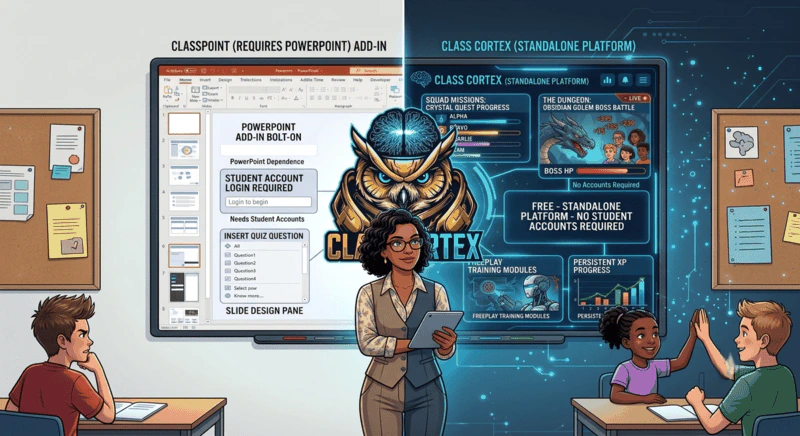
Class Cortex is the top ClassPoint alternative for teachers who want engagement without PowerPoint. Other options worth knowing include Nearpod for interactive lessons, Pear Deck for interactive questions inside Google Slides, and Mentimeter for live polls and word clouds.
ClassPoint has grown fast as a PowerPoint add-in, and it is easy to see why. Turning static slides into something interactive, with built-in quiz tools and annotation features, solves a real problem for teachers who live inside PowerPoint. But that dependency is also exactly why a growing number of teachers are searching for a ClassPoint alternative.
If your lessons are not built in PowerPoint, if your school has standardised on Google Slides, or if you simply want an engagement and management layer that does not depend on which slide software you opened that day, ClassPoint's core requirement becomes a hard blocker rather than a minor inconvenience. This guide covers what ClassPoint does well, where it runs into limits, and how Class Cortex handles the same classroom needs without the PowerPoint dependency.
What Is ClassPoint?
ClassPoint is an add-in for Microsoft PowerPoint that layers interactive tools directly onto your slides: annotation, quiz questions, and student response features that appear while you present. It is built specifically to extend PowerPoint, which means every one of its interactive features only activates inside a PowerPoint presentation.
Students join at classpoint.app with a class code and their name, with no accounts needed, which keeps entry quick. ClassPoint also has its own light gamification - stars, levels and a leaderboard for saved classes, plus groups, a timer and a name picker - but all of it lives inside PowerPoint. There is no squad XP economy, no behaviour consequences, no noise monitor and no seating map, and none of it runs when PowerPoint is closed.
What Is Class Cortex?
Class Cortex is a gamified classroom management tool built by a secondary school Digital Technology and STEM teacher with over fourteen years of K-12 experience. It runs entirely standalone in a browser tab, independent of whatever slide deck, worksheet, or textbook page you are using that lesson, and combines a persistent XP and squad system with ten classroom utility tools.
Because Class Cortex does not attach to any presentation software, it works identically whether your lesson is built in PowerPoint, Google Slides, printed worksheets, or nothing at all. For the mechanics behind the XP layer specifically, see our guide on how the classroom XP system works.
Where ClassPoint Wins
ClassPoint solves a specific problem well, and it is worth naming that clearly.
- Deep PowerPoint integration: Annotation tools, quiz slides, and response collection appear directly inside the presentation you are already building, with no separate app to manage.
- Familiar workflow for PowerPoint-first teachers: If your entire lesson library already lives in PowerPoint, ClassPoint adds interactivity without changing how you build content.
- Slide-level annotation: Drawing, highlighting, and marking up slides in real time is a strength ClassPoint executes well within its PowerPoint context.
- Easy student entry: Students join at classpoint.app with a class code and their name. No student accounts are needed, even for private classes.
Where Class Cortex Wins
The four structural advantages of Class Cortex:
- No PowerPoint dependency: Class Cortex runs in its own browser tab regardless of what software, if any, your lesson content lives in. Teachers using Google Slides, Keynote, printed handouts, or improvised whiteboard lessons get the exact same experience.
- No student accounts, ever: The class roster lives in the teacher's browser localStorage. Students only join anything at classcortex.com/join via QR code for live Boss Battle sessions, with no login and no profile created anywhere.
- A full XP economy instead of slide-based stars: ClassPoint awards stars and levels inside PowerPoint. Class Cortex tracks XP and HP per student across the whole term through the Command Deck, with up to six squads competing toward weekly goals, and it keeps running whether or not a slideshow is open.
- Ten tools instead of a slide add-in: Alongside the XP system, Class Cortex bundles Arc and Detonator timers, the Sonic Defence Noise Monitor (visual alarm and Quiet Streak bonus XP free, automatic XP deduction on Pro), a no-repeat Student Picker, a Quantum Core dice roller, a Tactical Scoreboard, the Ordnance Seating Map, and a full Tactical Whiteboard. None of these require a presentation to be open at all.
For teachers weighing whether they need PowerPoint interactivity at all versus a broader management layer, the case for gamified classroom management with no student logins is worth reading alongside this one. The account-free approach tends to matter most in secondary schools, where IT overhead and student patience for new logins are both at their lowest.
Who Should Use Class Cortex as a ClassPoint Alternative
Class Cortex is the right choice if your lessons are not built exclusively in PowerPoint, you want gamification and classroom utility tools that work no matter what is on the screen, you do not want PowerPoint open for every activity, or you want engagement data that persists across the whole term rather than resetting at the end of each slideshow. If you are also comparing quiz-style platforms more broadly, our Quizizz alternative guide covers a related but distinct part of this decision.
Head-to-Head Comparison
| Feature | Class Cortex | ClassPoint |
|---|---|---|
| Requires PowerPoint | No | Yes |
| Student accounts required | None | None (code + name) |
| Persistent XP & squad system | ✓ | Stars & levels (in PowerPoint) |
| In-slide annotation tools | ✗ | ✓ |
| Noise monitor | ✓ (XP-connected) | ✗ |
| Drag-and-drop seating map | ✓ | ✗ |
| Full classroom whiteboard | ✓ | ✗ |
| Live activities on student devices | ✓ Boss Battles | ✓ Quiz responses |
| Works with any slide software or none | ✓ | ✗ (PowerPoint only) |
| Built-in classroom mini-games | ✓ (8 games) | ✗ |
| Free tier available | ✓ | ✓ |
Other ClassPoint Alternatives Worth Knowing About
If you want to keep an interactive-slides workflow, there are established options. Nearpod builds full interactive lessons with polls, quizzes and drawing activities. Pear Deck adds interactive questions to Google Slides and PowerPoint presentations. Mentimeter focuses on live polls, word clouds and quick audience questions.
All three live inside a presentation. Class Cortex works the other way round: a standalone dashboard with persistent XP, squads, Boss Battles, a noise monitor and classroom tools, so engagement keeps running whether or not a slide deck is open, and with no student accounts.
The Verdict
ClassPoint is a strong tool for one specific situation: a teacher who has already built their lesson entirely in PowerPoint and wants to add annotation and quiz interactivity without leaving that environment. Inside that narrow lane, it does a genuinely good job.
Outside that lane, the PowerPoint dependency becomes the whole problem. Class Cortex was built to work regardless of what is on the screen, with persistent XP and squads that outlast any single slideshow, ten classroom tools that need no presentation software at all, and zero student accounts. For teachers who do not want their classroom management tied to one piece of presentation software, Class Cortex is the better fit.
The real question is not which tool has more features in the abstract, it is whether your classroom management should depend on which app your slides happen to be built in. If it should not, start with Class Cortex.
No student accounts. No credit card. No install.
Frequently Asked Questions
What is the best free ClassPoint alternative?
Class Cortex is the strongest free ClassPoint alternative for teachers who do not want to build every lesson inside PowerPoint. It runs standalone in any browser, combines a persistent XP and squad system with ten classroom utility tools, and needs no student accounts to operate.
Does ClassPoint require PowerPoint?
Yes. ClassPoint is an add-in that runs inside Microsoft PowerPoint and only works when your lesson is built as a PowerPoint deck. Teachers who plan lessons outside PowerPoint, or whose school uses Google Slides or Keynote, cannot use ClassPoint's interactive features at all.
Do Class Cortex or ClassPoint require student accounts?
Neither does. ClassPoint students join at classpoint.app with a class code and their name. Class Cortex requires no student accounts for any feature: the class roster lives in the teacher's browser localStorage, and students only join anything at classcortex.com/join for live Boss Battle sessions by scanning a QR code, with no login or profile created anywhere.
Can Class Cortex do interactive quizzes like ClassPoint?
Class Cortex is not a slide annotation or in-presentation quiz tool the way ClassPoint is. Instead it runs a separate layer of interactive activities, including eight Training Sim mini-games and live Boss Battle multiplayer, that work independently of whatever slides or lack of slides you are using.
Is Class Cortex free like ClassPoint?
Yes. Class Cortex has a free tier with one class slot, 30 students, four training mini-games, two Boss Battle types, and a manual noise monitor with visual alarm and Quiet Streak bonus XP. A Pro tier is available for AUD $49 per year with additional class slots, themes, and automatic noise penalty features.
What are other alternatives to ClassPoint besides Class Cortex?
Besides Class Cortex, other ClassPoint alternatives include Nearpod for full interactive lessons, Pear Deck for interactive questions inside Google Slides and PowerPoint, and Mentimeter for live polls and word clouds. Class Cortex is the only one that runs as a standalone dashboard with persistent XP and classroom management, without needing PowerPoint.
Further Reading